- JMP will suspend normal business operations for our Winter Holiday beginning on Wednesday, Dec. 24, 2025, at 5:00 p.m. ET (2:00 p.m. ET for JMP Accounts Receivable).
Regular business hours will resume at 9:00 a.m. EST on Friday, Jan. 2, 2026. - We’re retiring the File Exchange at the end of this year. The JMP Marketplace is now your destination for add-ins and extensions.
- Subscribe to RSS Feed
- Mark Topic as New
- Mark Topic as Read
- Float this Topic for Current User
- Bookmark
- Subscribe
- Mute
- Printer Friendly Page
Discussions
Solve problems, and share tips and tricks with other JMP users.- JMP User Community
- :
- Discussions
- :
- How to use Get limits function in JMP Script

- Mark as New
- Bookmark
- Subscribe
- Mute
- Subscribe to RSS Feed
- Get Direct Link
- Report Inappropriate Content
How to use Get limits function in JMP Script
Hi
I'm plotting Levey Jenning control chart with different phases and want to set different spec for different phase.
When I do it manually, I use get limit function and things work ok.
However, when I try to script it. it doesn't get control limit from the file.
Control Chart(
	Sample Label( :DateValue ),
	Phase( :Class ),
	KSigma( 3 ),
	Chart Col(
		:Name( "Mean(Residual MAX_SOA_MIN_PWR_X_DBM)" ),
		Levey Jennings,
	),
	get limits("/C:/Transmission Prod SPC/new/control limit.jmp")

);
Accepted Solutions


- Mark as New
- Bookmark
- Subscribe
- Mute
- Subscribe to RSS Feed
- Get Direct Link
- Report Inappropriate Content
Re: How to use Get limits function in JMP Script
You did not state what version you are using so you and I may be using different versions. I am using version 15.2.
You will need to use Control Chart Builder to accomplish this if you have different limits for each phase. This is not possible through scripting with the legacy Levey Jennings Chart.

- Mark as New
- Bookmark
- Subscribe
- Mute
- Subscribe to RSS Feed
- Get Direct Link
- Report Inappropriate Content
Re: How to use Get limits function in JMP Script
Have you tried to do this in Control Chart Builder? The legacy control chart platforms might be a little squirrly
- Mark as New
- Bookmark
- Subscribe
- Mute
- Subscribe to RSS Feed
- Get Direct Link
- Report Inappropriate Content
Re: How to use Get limits function in JMP Script
Do you get an error? I was able to get this to work with the attached limits table and the following code:
dt=Open("$SAMPLE_DATA/Quality Control/Coating.jmp");
Column(dt, "Sample")<<set modeling type(nominal);
ob=dt<<Control Chart(
Sample Label( :Pin ),
Phase( :Sample ),
KSigma( 3 ),
Chart Col(
:Weight,
Levey Jennings,
),
Get Limits("CoatingLimits2.jmp")
);
- Mark as New
- Bookmark
- Subscribe
- Mute
- Subscribe to RSS Feed
- Get Direct Link
- Report Inappropriate Content
Re: How to use Get limits function in JMP Script
Hi
in your example, you have 8 phase (Sample 1 - 8), however, in your limit file, you have only 2 limits (without specify the phase).
So, I think control limit you got from the plot is the auto-calculated by JMP, not user specific.
Thanks
Yanee
- Mark as New
- Bookmark
- Subscribe
- Mute
- Subscribe to RSS Feed
- Get Direct Link
- Report Inappropriate Content
Re: How to use Get limits function in JMP Script
Did you try it? If I do not use the limits file, I get this.
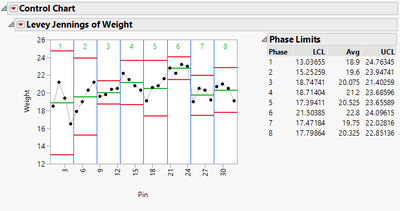
If I do use the limits file, I get this.
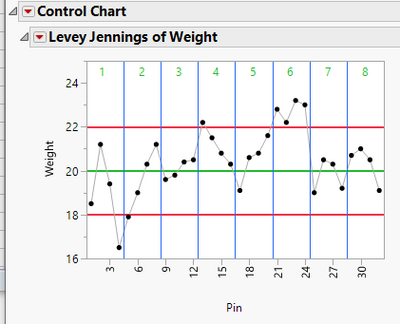
My limits file is specifying JMP to use the same limits for all phases, but the limits given in the file ARE used.
- Mark as New
- Bookmark
- Subscribe
- Mute
- Subscribe to RSS Feed
- Get Direct Link
- Report Inappropriate Content
Re: How to use Get limits function in JMP Script
Hi
I did try it. What I want to do is to have different limit by phase.
I didn't get error when I run my script but it didn't get the correct limit. It will show limit auto-calculated by JMP.
Here is my script.
path = pick file("select control limit file");

Control Chart(
	Sample Label( :DateValue ),
	Phase( :Class ),
	Chart Col(
		:Name( "Mean(Residual MAX_SOA_MIN_PWR_X_DBM)" ),
		Levey Jennings

	),

	get limits(open(path)),
);
it works fine when I do it manually and click "get limits" button.
Thanks
Yanee
- Mark as New
- Bookmark
- Subscribe
- Mute
- Subscribe to RSS Feed
- Get Direct Link
- Report Inappropriate Content
Re: How to use Get limits function in JMP Script
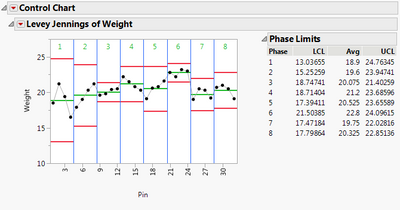
by the way, I ran your script and didn't get the same plot.
this is what I got
- Mark as New
- Bookmark
- Subscribe
- Mute
- Subscribe to RSS Feed
- Get Direct Link
- Report Inappropriate Content
Re: How to use Get limits function in JMP Script
You did not state what version you are using so you and I may be using different versions. I am using version 15.2.
You will need to use Control Chart Builder to accomplish this if you have different limits for each phase. This is not possible through scripting with the legacy Levey Jennings Chart.
- Mark as New
- Bookmark
- Subscribe
- Mute
- Subscribe to RSS Feed
- Get Direct Link
- Report Inappropriate Content
Re: How to use Get limits function in JMP Script
I use JMP Pro 15.1.
So, this is not possible to script ? But it could work when I do get limits manually ?
Thanks
Yanee
Recommended Articles
- © 2025 JMP Statistical Discovery LLC. All Rights Reserved.
- Terms of Use
- Privacy Statement
- Contact Us