- Don’t miss your chance to experience Discovery Summit Europe at our best available rate! Early bird registration through 31 Oct.
- Graph Builder Toolbar streamlines interactive graphing. Creates shortcuts on Report and GraphBuilder Helpers toolbars. Download and install the extension.
- Subscribe to RSS Feed
- Mark Topic as New
- Mark Topic as Read
- Float this Topic for Current User
- Bookmark
- Subscribe
- Mute
- Printer Friendly Page
Discussions
Solve problems, and share tips and tricks with other JMP users.- User Community
- :
- Discussions
- :
- Re: How to space between variables in histogram columns?

- Mark as New
- Bookmark
- Subscribe
- Mute
- Subscribe to RSS Feed
- Get Direct Link
- Report Inappropriate Content
How to space between variables in histogram columns?
I built a histogram with three variables, I want them not to overlap each other on the X-axis but to be close one to other.
This is how it looks to me:

Thanks for the help.
Accepted Solutions


- Mark as New
- Bookmark
- Subscribe
- Mute
- Subscribe to RSS Feed
- Get Direct Link
- Report Inappropriate Content
Re: How to space between variables in histogram columns?
I'm not sure if you can make side-by-side using distribution, but you can create binning column and then use bar chart (or try other grouping options such as Wrap, Group X or Group Y).
Create binning column. Using Cols menu is one option to do it

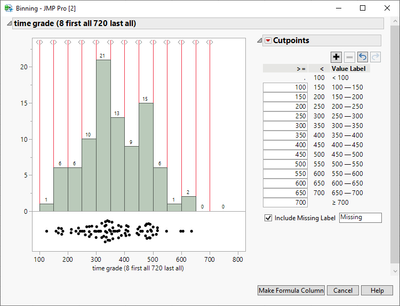
Then use this new column as your X-axis and create Bar Chart

- Mark as New
- Bookmark
- Subscribe
- Mute
- Subscribe to RSS Feed
- Get Direct Link
- Report Inappropriate Content
Re: How to space between variables in histogram columns?
I'm not sure if you can make side-by-side using distribution, but you can create binning column and then use bar chart (or try other grouping options such as Wrap, Group X or Group Y).
Create binning column. Using Cols menu is one option to do it
Then use this new column as your X-axis and create Bar Chart
- Mark as New
- Bookmark
- Subscribe
- Mute
- Subscribe to RSS Feed
- Get Direct Link
- Report Inappropriate Content
Re: How to space between variables in histogram columns?
Thank you very much, looks great.
Recommended Articles
- © 2026 JMP Statistical Discovery LLC. All Rights Reserved.
- Terms of Use
- Privacy Statement
- Contact Us