Turn on suggestions
Auto-suggest helps you quickly narrow down your search results by suggesting possible matches as you type.
- Don’t miss your chance to experience Discovery Summit Europe at our best available rate! Early bird registration through 31 Oct.
- Graph Builder Toolbar streamlines interactive graphing. Creates shortcuts on Report and GraphBuilder Helpers toolbars. Download and install the extension.
Options
- Subscribe to RSS Feed
- Mark Topic as New
- Mark Topic as Read
- Float this Topic for Current User
- Bookmark
- Subscribe
- Mute
- Printer Friendly Page
Discussions
Solve problems, and share tips and tricks with other JMP users.- User Community
- :
- Discussions
- :
- How to show value for certain points in Graph Builder

Level I
- Mark as New
- Bookmark
- Subscribe
- Mute
- Subscribe to RSS Feed
- Get Direct Link
- Report Inappropriate Content
How to show value for certain points in Graph Builder
Created:
Feb 26, 2021 06:13 PM
| Last Modified: Jun 11, 2023 4:11 AM
(9223 views)
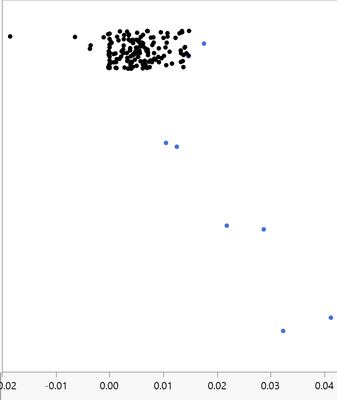
Hi, I am using Graph Builder to plot values for two populations (Blue vs Blue), is there a way to only show the value of all the blue points but not blacks. Thanks.
2 REPLIES 2


Super User (Alumni)
- Mark as New
- Bookmark
- Subscribe
- Mute
- Subscribe to RSS Feed
- Get Direct Link
- Report Inappropriate Content
Re: How to show value for certain points in Graph Builder
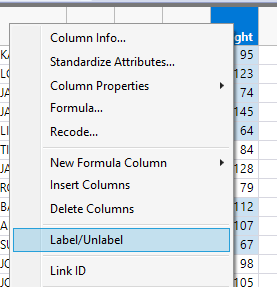
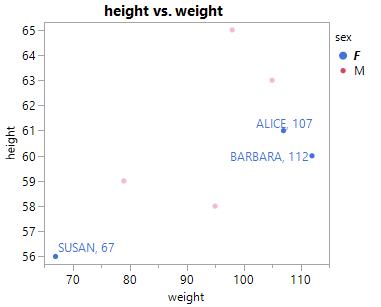
In your data table, select the column you want to show the label for and select 'Label/Unlabel'. You could create a custom column here to bring multiple values together in a formatted string, like 'Point 7 (123.4 lb)'.
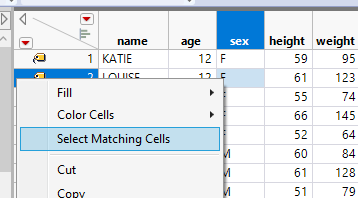
Next select the rows you want to label and right click on a row header and select 'Label/Unlabel'.
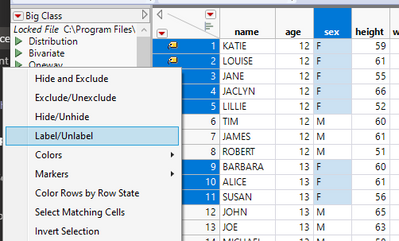
Now redraw your graph and you should see only the blue points labeled:

Level VII
- Mark as New
- Bookmark
- Subscribe
- Mute
- Subscribe to RSS Feed
- Get Direct Link
- Report Inappropriate Content
Re: How to show value for certain points in Graph Builder
Just in addition to what @ih said:
Here I just:
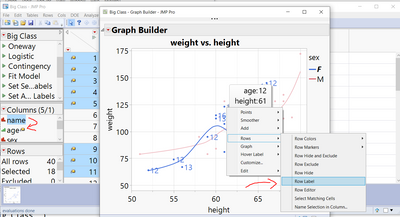
- opened Big Class
- unset label for name column and set label for age column (to show a certain value)
- execute that script for GraphBuilder in the example
- left click on Legend "F" Female to select group, you see the dots highlighted
- right click on one of the blue dots to set label state of the blue dots (= blue rows in data table)
see also screenshot. There are many ways in JMP, most are also intuitive.
Georg
Recommended Articles
- © 2026 JMP Statistical Discovery LLC. All Rights Reserved.
- Terms of Use
- Privacy Statement
- Contact Us