cancel
Showing results for 
Show  only  | Search instead for 
Did you mean: 
] />

Discussions

Solve problems, and share tips and tricks with other JMP users.
Choose Language Hide Translation Bar
CompleteLeopard
Level III

How to set spec limits color

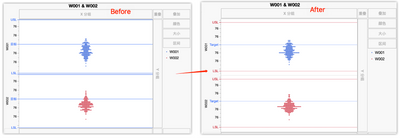
Hi, JMPer I have used JSL to load spec limits into column Properties. But when generate graph or distribution charts, the spec limits' color is bule.

My question is: 

1.How to change the colors to red and line to dot?

2.I used chinese vision, how to change it to english?

CompleteLeopard_0-1681600342912.png


10 REPLIES 10
Victor_G
Super User

Re: How to set spec limits color

Hi @Gabogom,

To create a range of color in any graph, right-click on the Y axis, choose "Axis Settings", check the box "Allow ranges" and specify the min and max values with the color associated to the range:


Victor_G_0-1776753631148.png

Once you click on OK, the range color can be seen in the Prediction Profiler (or any other graph you want to customize):

Victor_G_1-1776753686224.png

Hope this answer will help you,

Victor GUILLER

"It is not unusual for a well-designed experiment to analyze itself" (Box, Hunter and Hunter)

Recommended Articles