- Don’t miss your chance to experience Discovery Summit Europe at our best available rate! Early bird registration through 31 Oct.
- Graph Builder Toolbar streamlines interactive graphing. Creates shortcuts on Report and GraphBuilder Helpers toolbars. Download and install the extension.
- Subscribe to RSS Feed
- Mark Topic as New
- Mark Topic as Read
- Float this Topic for Current User
- Bookmark
- Subscribe
- Mute
- Printer Friendly Page
Discussions
Solve problems, and share tips and tricks with other JMP users.- User Community
- :
- Discussions
- :
- How to select (but not open) file in a directory?

- Mark as New
- Bookmark
- Subscribe
- Mute
- Subscribe to RSS Feed
- Get Direct Link
- Report Inappropriate Content
How to select (but not open) file in a directory?
Hi All,
I'm trying to select a specific file in a directory:

This is probably a huge code, but I don't even know how to start. Does anybody know the command how to SELECT (but not open) a specific file? If someone can provide more code - it would be greatly appreciated.
Thank you!
Alex.
Accepted Solutions

- Mark as New
- Bookmark
- Subscribe
- Mute
- Subscribe to RSS Feed
- Get Direct Link
- Report Inappropriate Content
Re: How to select (but not open) file in a directory?
Hello @Alex19,
Could you explain what you mean by select? Using Pick File(), as @Jed_Campbell suggests, but save the resulting path to a variable, you can call upon it on other areas of your script. Below is an example.
mypath = Pick File( "Select a file", "$Desktop" );

show( mypath );
Edit:
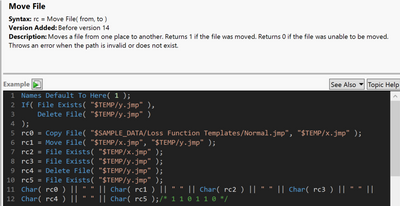
Have you investigated Move File()? Together with Pick File(), you will be able to accomplish what you've outlined.


- Mark as New
- Bookmark
- Subscribe
- Mute
- Subscribe to RSS Feed
- Get Direct Link
- Report Inappropriate Content
Re: How to select (but not open) file in a directory?
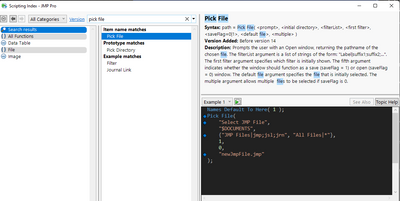
I think Pick File () is what you're looking for.
- Mark as New
- Bookmark
- Subscribe
- Mute
- Subscribe to RSS Feed
- Get Direct Link
- Report Inappropriate Content
Re: How to select (but not open) file in a directory?
Thanks Jed. I have looked at this one, but it does not select the file on the drive. It suggests to open it:
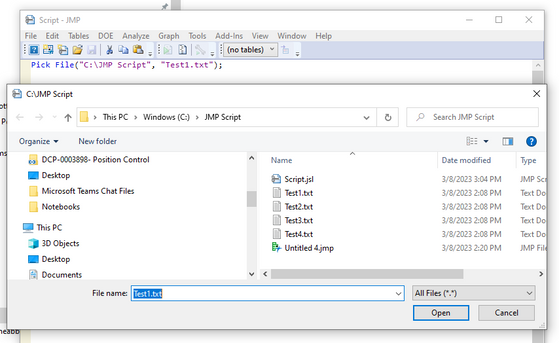
What I generally want is to sort out a large set of files based on their properties. For example:
1. From JMP table select files 2 and 4,
2. Run the script to select only files 2 and 4;
3. Move those files in a different directory.
Maybe there is another way?
Thanks!
- Mark as New
- Bookmark
- Subscribe
- Mute
- Subscribe to RSS Feed
- Get Direct Link
- Report Inappropriate Content
Re: How to select (but not open) file in a directory?
Hello @Alex19,
Could you explain what you mean by select? Using Pick File(), as @Jed_Campbell suggests, but save the resulting path to a variable, you can call upon it on other areas of your script. Below is an example.
mypath = Pick File( "Select a file", "$Desktop" );

show( mypath );
Edit:
Have you investigated Move File()? Together with Pick File(), you will be able to accomplish what you've outlined.
- Mark as New
- Bookmark
- Subscribe
- Mute
- Subscribe to RSS Feed
- Get Direct Link
- Report Inappropriate Content
Re: How to select (but not open) file in a directory?
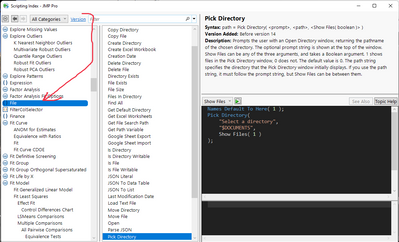
There's also the List Files in Directory function that can be useful.
lstFiles = Files In Directory ("$DESKTOP/");The Scripting Index has a bunch of file-related functions. To see them all, Select "File" in the left pane:
- Mark as New
- Bookmark
- Subscribe
- Mute
- Subscribe to RSS Feed
- Get Direct Link
- Report Inappropriate Content
Re: How to select (but not open) file in a directory?
Yes, I'm actually working on Move File now. I think I'll create a string to move all the selected files. It should work. Thanks!
Recommended Articles
- © 2026 JMP Statistical Discovery LLC. All Rights Reserved.
- Terms of Use
- Privacy Statement
- Contact Us