cancel
Showing results for 
Show  only  | Search instead for 
Did you mean: 
  • JMP will suspend normal business operations for our Winter Holiday beginning on Wednesday, Dec. 24, 2025, at 5:00 p.m. ET (2:00 p.m. ET for JMP Accounts Receivable).
    Regular business hours will resume at 9:00 a.m. EST on Friday, Jan. 2, 2026.
  • We’re retiring the File Exchange at the end of this year. The JMP Marketplace is now your destination for add-ins and extensions.

Discussions

Solve problems, and share tips and tricks with other JMP users.
%3CLINGO-SUB%20id%3D%22lingo-sub-282561%22%20slang%3D%22en-US%22%20mode%3D%22NONE%22%3EJSL%EC%9D%84%20%EC%82%AC%EC%9A%A9%ED%95%98%EC%97%AC%20%EC%A0%80%EB%84%90%EC%9D%84%20PPT%EB%A1%9C%20%EC%A0%80%EC%9E%A5%ED%95%98%EB%8A%94%20%EB%B0%A9%EB%B2%95(%EC%8A%AC%EB%9D%BC%EC%9D%B4%EB%93%9C%EB%8B%B9%20%EA%B7%B8%EB%9E%98%ED%94%84%202%EA%B0%9C)%3C%2FLINGO-SUB%3E%3CLINGO-BODY%20id%3D%22lingo-body-282561%22%20slang%3D%22en-US%22%20mode%3D%22NONE%22%3E%3CP%3E%EC%95%88%EB%85%95%ED%95%98%EC%84%B8%EC%9A%94.%3C%2FP%3E%3CP%3E%EC%9D%BC%EA%B8%B0%EB%A5%BC%20%ED%8C%8C%EC%9B%8C%ED%8F%AC%EC%9D%B8%ED%8A%B8%EB%A1%9C%20%EC%A0%80%EC%9E%A5%ED%95%98%EB%A0%A4%EA%B3%A0%20%ED%95%A9%EB%8B%88%EB%8B%A4.%20%ED%95%98%EB%82%98%EA%B0%80%20%EC%95%84%EB%8B%8C%20%ED%8C%8C%EC%9B%8C%ED%8F%AC%EC%9D%B8%ED%8A%B8%20%EC%8A%AC%EB%9D%BC%EC%9D%B4%EB%93%9C%EB%8B%B9%202%EA%B0%9C%EC%9D%98%20%EA%B7%B8%EB%9E%98%ED%94%84%EB%A5%BC%20%EC%A0%80%EC%9E%A5%ED%95%98%EA%B3%A0%20%EC%8B%B6%EC%8A%B5%EB%8B%88%EB%8B%A4.%3C%2FP%3E%3CP%3E%EC%A7%80%EA%B8%88%EC%9D%80%20%EC%8A%AC%EB%9D%BC%EC%9D%B4%EB%93%9C%EB%8B%B9%201%EA%B0%9C%EC%9D%98%20%EA%B7%B8%EB%9E%98%ED%94%84%EB%A5%BC%20%EC%96%BB%EC%8A%B5%EB%8B%88%EB%8B%A4.%20%EC%8A%AC%EB%9D%BC%EC%9D%B4%EB%93%9C%EB%8B%B9%202%EA%B0%9C%EC%9D%98%20%EA%B7%B8%EB%9E%98%ED%94%84%EB%A5%BC%20%EC%9B%90%ED%95%A9%EB%8B%88%EB%8B%A4.%3C%2FP%3E%3CP%3E%26nbsp%3B%3C%2FP%3E%3CP%3E%3CSPAN%20class%3D%22lia-inline-image-display-wrapper%20lia-image-align-inline%22%20image-alt%3D%22simon_2_0-1595967729809.png%22%20style%3D%22width%3A%20400px%3B%22%3E%3CSPAN%20class%3D%22lia-inline-image-display-wrapper%22%20image-alt%3D%22simon_2_0-1595967729809.png%22%20style%3D%22width%3A%20400px%3B%22%3E%3Cspan%20class%3D%22lia-inline-image-display-wrapper%22%20image-alt%3D%22simon_2_0-1595967729809.png%22%20style%3D%22width%3A%20400px%3B%22%3E%3Cimg%20src%3D%22https%3A%2F%2Fcommunity.jmp.com%2Ft5%2Fimage%2Fserverpage%2Fimage-id%2F25781i28EEAD1D22087257%2Fimage-size%2Fmedium%3Fv%3Dv2%26amp%3Bpx%3D400%22%20role%3D%22button%22%20title%3D%22simon_2_0-1595967729809.png%22%20alt%3D%22simon_2_0-1595967729809.png%22%20%2F%3E%3C%2Fspan%3E%3C%2FSPAN%3E%3C%2FSPAN%3E%3C%2FP%3E%3CP%3E%26nbsp%3B%3C%2FP%3E%3CP%3EJSL%EC%9D%84%20%EC%82%AC%EC%9A%A9%ED%95%98%EC%97%AC%20%EC%96%B4%EB%96%BB%EA%B2%8C%20%ED%95%B4%EC%95%BC%20%ED%95%A9%EB%8B%88%EA%B9%8C%3F%3C%2FP%3E%3CP%3E%26nbsp%3B%3C%2FP%3E%3CP%3E%EB%82%B4%20JSL%20%EC%8A%A4%ED%81%AC%EB%A6%BD%ED%8A%B8%EB%8A%94%20%EB%8B%A4%EC%9D%8C%EA%B3%BC%20%EA%B0%99%EC%8A%B5%EB%8B%88%EB%8B%A4.%3C%2FP%3E%3CP%3E%26nbsp%3B%3C%2FP%3E%3CPRE%3E%3CCODE%20class%3D%22%20language-jsl%22%3ENames%20Default%20To%20Here(%201%20)%3B%0Adt%20%3D%20Open(%20%22%24SAMPLE_DATA%2FFitness.jmp%22%20)%3B%0Aobj%20%3D%20Logistic(%20Y(%20%3AName%20)%2C%20X(%20%3ARstPulse%20)%2C%20By(%20%3AAge)%20)%3B%0Aobj%20%26lt%3B%26lt%3B%20journal%3B%0ACurrent%20Journal()%20%26lt%3B%26lt%3B%20Save%20Presentation(%22fitness_logistic.pptx%22)%3B%3C%2FCODE%3E%3C%2FPRE%3E%3CP%3E%EA%B0%90%EC%82%AC%ED%95%B4%EC%9A%94.%3C%2FP%3E%3C%2FLINGO-BODY%3E%3CLINGO-LABS%20id%3D%22lingo-labs-282561%22%20slang%3D%22en-US%22%20mode%3D%22NONE%22%3E%3CLINGO-LABEL%3E%EC%BD%98%ED%85%90%EC%B8%A0%20%EA%B5%AC%EC%84%B1%3C%2FLINGO-LABEL%3E%3CLINGO-LABEL%3E%EA%B2%B0%EA%B3%BC%20%EA%B3%B5%EC%9C%A0%20%EB%B0%8F%20%EC%86%8C%ED%86%B5%3C%2FLINGO-LABEL%3E%3C%2FLINGO-LABS%3E%3CLINGO-SUB%20id%3D%22lingo-sub-282631%22%20slang%3D%22en-US%22%20mode%3D%22NONE%22%3ERe%3A%20JSL%EC%9D%84%20%EC%82%AC%EC%9A%A9%ED%95%98%EC%97%AC%20%EC%A0%80%EB%84%90%EC%9D%84%20PPT%EB%A1%9C%20%EC%A0%80%EC%9E%A5%ED%95%98%EB%8A%94%20%EB%B0%A9%EB%B2%95(%EC%8A%AC%EB%9D%BC%EC%9D%B4%EB%93%9C%EB%8B%B9%20%EA%B7%B8%EB%9E%98%ED%94%84%202%EA%B0%9C)%3C%2FLINGO-SUB%3E%3CLINGO-BODY%20id%3D%22lingo-body-282631%22%20slang%3D%22en-US%22%20mode%3D%22NONE%22%3E%3CP%3E%EC%9D%B4%EA%B2%83%EC%9D%80%20%ED%9B%8C%EB%A5%AD%ED%95%98%EA%B2%8C%20%EC%9E%91%EB%8F%99%ED%95%A9%EB%8B%88%EB%8B%A4.%20%EA%B3%A0%EB%A7%88%EC%9B%8C%20%EC%A7%90.%3C%2FP%3E%3C%2FLINGO-BODY%3E%3CLINGO-SUB%20id%3D%22lingo-sub-282618%22%20slang%3D%22en-US%22%20mode%3D%22NONE%22%3ERe%3A%20JSL%EC%9D%84%20%EC%82%AC%EC%9A%A9%ED%95%98%EC%97%AC%20%EC%A0%80%EB%84%90%EC%9D%84%20PPT%EB%A1%9C%20%EC%A0%80%EC%9E%A5%ED%95%98%EB%8A%94%20%EB%B0%A9%EB%B2%95(%EC%8A%AC%EB%9D%BC%EC%9D%B4%EB%93%9C%EB%8B%B9%20%EA%B7%B8%EB%9E%98%ED%94%84%202%EA%B0%9C)%3C%2FLINGO-SUB%3E%3CLINGO-BODY%20id%3D%22lingo-body-282618%22%20slang%3D%22en-US%22%20mode%3D%22NONE%22%3E%3CP%3E%EB%8B%A4%EC%9D%8C%EC%9D%80%20%ED%8E%98%EC%9D%B4%EC%A7%80%EB%8B%B9%20%EB%91%90%20%EA%B0%9C%EC%9D%98%20%EA%B7%B8%EB%9E%98%ED%94%84%EC%97%90%EC%84%9C%20%EA%B7%B8%EB%9E%98%ED%94%84%EB%A5%BC%20%EC%83%9D%EC%84%B1%ED%95%98%EB%8A%94%20%EC%8A%A4%ED%81%AC%EB%A6%BD%ED%8A%B8%20%EC%88%98%EC%A0%95%EC%9E%85%EB%8B%88%EB%8B%A4.2%EA%B0%9C%EC%9D%98%20%EA%B7%B8%EB%9E%98%ED%94%84%20%EA%B7%B8%EB%A6%BC%EC%9D%84%20%EB%A7%8C%EB%93%A0%20%EB%8B%A4%EC%9D%8C%20%EC%9B%90%EB%B3%B8%20%EA%B7%B8%EB%9E%98%ED%94%84%EA%B0%80%20%EC%95%84%EB%8B%8C%20%EC%A0%80%EB%84%90%EC%97%90%20%EC%B6%94%EA%B0%80%ED%95%A9%EB%8B%88%EB%8B%A4.%3C%2FP%3E%0A%3CP%3E%3CSPAN%20class%3D%22lia-inline-image-display-wrapper%20lia-image-align-inline%22%20image-alt%3D%22ppt.PNG%22%20style%3D%22width%3A%20999px%3B%22%3E%3CSPAN%20class%3D%22lia-inline-image-display-wrapper%22%20image-alt%3D%22ppt.PNG%22%20style%3D%22width%3A%20999px%3B%22%3E%3Cspan%20class%3D%22lia-inline-image-display-wrapper%22%20image-alt%3D%22ppt.PNG%22%20style%3D%22width%3A%20999px%3B%22%3E%3Cimg%20src%3D%22https%3A%2F%2Fcommunity.jmp.com%2Ft5%2Fimage%2Fserverpage%2Fimage-id%2F25785iEFF03909EBD85634%2Fimage-size%2Flarge%3Fv%3Dv2%26amp%3Bpx%3D999%22%20role%3D%22button%22%20title%3D%22ppt.PNG%22%20alt%3D%22ppt.PNG%22%20%2F%3E%3C%2Fspan%3E%3C%2FSPAN%3E%3C%2FSPAN%3E%3C%2FP%3E%0A%3CPRE%3E%3CCODE%20class%3D%22%20language-jsl%22%3ENames%20Default%20To%20Here(%201%20)%3B%0Adt%20%3D%20Open(%20%22%24SAMPLE_DATA%2FFitness.jmp%22%20)%3B%0Aobj%20%3D%20Logistic(%20invisible%2C%20Y(%20%3AName%20)%2C%20X(%20%3ARstPulse%20)%2C%20By(%20%3AAge%20)%20)%3B%0Ajour%20%3D%20New%20Window(%20%22The%20Journal%22%2C%20%26lt%3B%3CJOURNAL%3E%3C%2FJOURNAL%3E%3C%2FCODE%3E%3C%2FPRE%3E%3C%2FLINGO-BODY%3E
Choose Language Hide Translation Bar
simon_2
Level III

How to save journal as PPT (2 graphs per slide) using JSL

Hello users,

I am trying to save a journal as powerpoint. I would like to save 2 graphs per powerpoint slide instead of just one.

Right now I get 1 graph per slide. I want 2 graphs per slide.
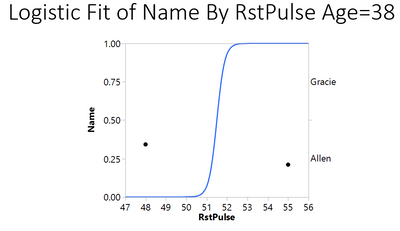
 

simon_2_0-1595967729809.png


How do I go about doing that using JSL?


My JSL script is:


Names Default To Here( 1 );
dt = Open( "$SAMPLE_DATA/Fitness.jmp" );
obj = Logistic( Y( :Name ), X( :RstPulse ), By( :Age) );
obj << journal;
Current Journal() << Save Presentation("fitness_logistic.pptx");

Thanks.

1 ACCEPTED SOLUTION

Accepted Solutions
txnelson
Super User

Re: How to save journal as PPT (2 graphs per slide) using JSL

Here is a modification of your script that produces the graphs at two graphs per page.  It does this by creating a picture of the 2 graphs, and then adding that to the journal, not the original graphs.
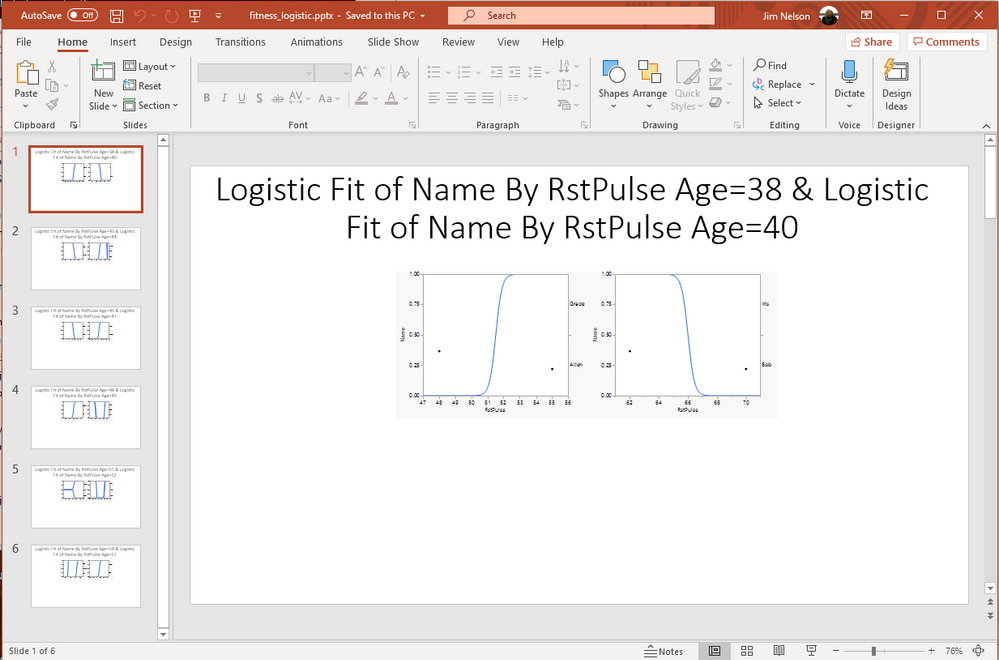
ppt.PNG

Names Default To Here( 1 );
dt = Open( "$SAMPLE_DATA/Fitness.jmp" );
obj = Logistic( invisible, Y( :Name ), X( :RstPulse ), By( :Age ) );
jour = New Window( "The Journal", <<journal, vlb = V List Box() );

// Loop through the outputs and put them into the journal
// as an Outline Box....to set the title
// and a picture of 2 of the logistic plots
// If the number of plots produced is an odd number, then
// don't allow the script to error out by using Try() on the second
// graphs in each loop
For( i = 1, i <= N Items( obj ), i = i + 2,
	ob = Outline Box( "OB", hlb1 = H List Box() );
	ob << set title( Report( obj[i] )[Outline Box( 1 )] << get title );
	hlb2 = H List Box();
	hlb2 << append( Report( obj[i] )[Picture Box( 1 )] );
	ob << set title(
		Char( Report( obj[i] )[Outline Box( 1 )] << get title ) || " & " || Char( Report( obj[i + 1] )[Outline Box( 1 )] << get title )
	);
	Try( hlb2 << append( Report( obj[i + 1] )[Picture Box( 1 )] ) );
	hlb1 << append( hlb2 << get picture );
	vlb << append( ob );
);
obj << delete;

jour << Save Presentation( "fitness_logistic.pptx" );
Jim

View solution in original post

2 REPLIES 2
txnelson
Super User

Re: How to save journal as PPT (2 graphs per slide) using JSL

Here is a modification of your script that produces the graphs at two graphs per page.  It does this by creating a picture of the 2 graphs, and then adding that to the journal, not the original graphs.

ppt.PNG

Names Default To Here( 1 );
dt = Open( "$SAMPLE_DATA/Fitness.jmp" );
obj = Logistic( invisible, Y( :Name ), X( :RstPulse ), By( :Age ) );
jour = New Window( "The Journal", <<journal, vlb = V List Box() );

// Loop through the outputs and put them into the journal
// as an Outline Box....to set the title
// and a picture of 2 of the logistic plots
// If the number of plots produced is an odd number, then
// don't allow the script to error out by using Try() on the second
// graphs in each loop
For( i = 1, i <= N Items( obj ), i = i + 2,
	ob = Outline Box( "OB", hlb1 = H List Box() );
	ob << set title( Report( obj[i] )[Outline Box( 1 )] << get title );
	hlb2 = H List Box();
	hlb2 << append( Report( obj[i] )[Picture Box( 1 )] );
	ob << set title(
		Char( Report( obj[i] )[Outline Box( 1 )] << get title ) || " & " || Char( Report( obj[i + 1] )[Outline Box( 1 )] << get title )
	);
	Try( hlb2 << append( Report( obj[i + 1] )[Picture Box( 1 )] ) );
	hlb1 << append( hlb2 << get picture );
	vlb << append( ob );
);
obj << delete;

jour << Save Presentation( "fitness_logistic.pptx" );
Jim
simon_2
Level III

Re: How to save journal as PPT (2 graphs per slide) using JSL

This works great. Thanks Jim.

Recommended Articles