cancel
Showing results for 
Show  only  | Search instead for 
Did you mean: 
  • JMP will suspend normal business operations for our Winter Holiday beginning on Wednesday, Dec. 24, 2025, at 5:00 p.m. ET (2:00 p.m. ET for JMP Accounts Receivable).
    Regular business hours will resume at 9:00 a.m. EST on Friday, Jan. 2, 2026.
  • We’re retiring the File Exchange at the end of this year. The JMP Marketplace is now your destination for add-ins and extensions.

Discussions

Solve problems, and share tips and tricks with other JMP users.
%3CLINGO-SUB%20id%3D%22lingo-sub-34647%22%20slang%3D%22en-US%22%20mode%3D%22NONE%22%3EWie%20benenne%20ich%20das%20Standard-Graph-Builder-Skript%20in%20einer%20Datentabelle%20um%3F%3C%2FLINGO-SUB%3E%3CLINGO-BODY%20id%3D%22lingo-body-34647%22%20slang%3D%22en-US%22%20mode%3D%22NONE%22%3E%3CP%3EDer%20folgende%20Code%20generiert%20ein%20Skript%20f%C3%BCr%20den%20Graph%20Builder%20und%20wird%20unter%20der%20Datentabelle%20gespeichert.%3CSTRONG%3E%3CBR%20%2F%3E%3C%2FSTRONG%3E%3C%2FP%3E%3CPRE%3Edt%20%3D%20Open(%20%22%24SAMPLE_DATA%2FBig%20Class.jmp%22%20)%3B%0Aobj%20%3D%20Graph%20Builder(%0A%20Variables(%20X(%20%3ASex%20)%2C%20Y(%20%3AHeight%20)%2C%20Group%20X(%20%3AAge%20)%20)%2C%0A%20Elements(%20Box%20Plot(%20X%2C%20Y%20)%20)%0A)%3B%0Aobj%20%26lt%3B%26lt%3B%20Save%20Script%20to%20Data%20Table%3B%3C%2FPRE%3E%3CP%3EDie%20Namen%20der%20Graph%20Builder-Objekte%20verwenden%20das%20Standardbenennungsmuster%20f%C3%BCr%20diese%20Plattform.%20Wie%20kann%20ich%20sie%20nach%20meiner%20Wahl%20umbenennen%3F%20(Ich%20habe%20einen%20Screenshot%20angeh%C3%A4ngt%20und%20die%20Namen%20der%20Graph%20Builder%20sind%20gelb%20hervorgehoben.)%3C%2FP%3E%3CP%3EIch%20habe%20versucht%2C%20%E2%80%9EName%20festlegen%E2%80%9C%20vor%20und%20nach%20dem%20Speichern%20des%20Skripts%20in%20der%20Datentabelle%20zu%20verwenden%2C%20aber%20es%20hat%20nicht%20funktioniert.%3C%2FP%3E%3CP%3EDank%20im%20Voraus!%3C%2FP%3E%3CP%3EAJ%3C%2FP%3E%3C%2FLINGO-BODY%3E%3CLINGO-SUB%20id%3D%22lingo-sub-34660%22%20slang%3D%22en-US%22%20mode%3D%22NONE%22%3EBetreff%3A%20Wie%20benenne%20ich%20das%20Standard-Graph-Builder-Skript%20in%20einer%20Datentabelle%20um%3F%3C%2FLINGO-SUB%3E%3CLINGO-BODY%20id%3D%22lingo-body-34660%22%20slang%3D%22en-US%22%20mode%3D%22NONE%22%3EVielen%20Dank%20f%C3%BCr%20Ihre%20M%C3%BChe!%20Das%20funktioniert%20perfekt%20f%C3%BCr%20mich.%3C%2FLINGO-BODY%3E%3CLINGO-SUB%20id%3D%22lingo-sub-34656%22%20slang%3D%22en-US%22%20mode%3D%22NONE%22%3EBetreff%3A%20Wie%20benenne%20ich%20das%20Standard-Graph-Builder-Skript%20in%20einer%20Datentabelle%20um%3F%3C%2FLINGO-SUB%3E%3CLINGO-BODY%20id%3D%22lingo-body-34656%22%20slang%3D%22en-US%22%20mode%3D%22NONE%22%3E%3CP%3EEs%20sieht%20so%20aus%2C%20als%20ob%20die%20M%C3%B6glichkeit%2C%20den%20Namen%20als%20Argument%20hinzuzuf%C3%BCgen%2C%20eine%20Funktion%20der%20Version%2013%20ist.%3C%2FP%3E%0A%3CP%3EHier%20ist%20eine%20Problemumgehung%3A%3C%2FP%3E%0A%3CPRE%3E%3CCODE%20class%3D%22%20language-jsl%22%3Eobj%20%26lt%3B%26lt%3B%20Save%20Script%20To%20Data%20Table%3B%0AlstNames%20%3D%20dt%20%26lt%3B%26lt%3B%20Get%20Table%20Script%20Names%3B%0Adt%20%26lt%3B%26lt%3B%20Rename%20Table%20Script(%20lstNames%5BNItems(lstNames)%5D%2C%20%22My%20Script%22%20)%3B%3C%2FCODE%3E%3C%2FPRE%3E%3C%2FLINGO-BODY%3E%3CLINGO-SUB%20id%3D%22lingo-sub-34654%22%20slang%3D%22en-US%22%20mode%3D%22NONE%22%3EBetreff%3A%20Wie%20benenne%20ich%20das%20Standard-Graph-Builder-Skript%20in%20einer%20Datentabelle%20um%3F%3C%2FLINGO-SUB%3E%3CLINGO-BODY%20id%3D%22lingo-body-34654%22%20slang%3D%22en-US%22%20mode%3D%22NONE%22%3E%3CP%3EDave%2C%3C%2FP%3E%3CP%3EVielen%20Dank%20f%C3%BCr%20Ihre%20Antwort.Ich%20muss%20das%20vom%20Graph%20Builder%20generierte%20Skript%20ausf%C3%BChren%20und%20habe%20daher%20Option%201%20ausprobiert.%3C%2FP%3E%3CPRE%3Eobj%20%26lt%3B%26lt%3B%20Save%20Script%20to%20Data%20Table(%22My%20Script%22)%3B%3C%2FPRE%3E%3CP%3ELeider%20wird%20das%20Skript%20immer%20noch%20unter%20dem%20Namen%20%E2%80%9EGraph%20Builder%E2%80%9C%20und%20nicht%20%E2%80%9EMein%20Skript%E2%80%9C%20gespeichert.%20Zu%20Ihrer%20Information%3A%20Ich%20verwende%20JMP%2012.%3C%2FP%3E%3C%2FLINGO-BODY%3E%3CLINGO-SUB%20id%3D%22lingo-sub-34649%22%20slang%3D%22en-US%22%20mode%3D%22NONE%22%3EBetreff%3A%20Wie%20benenne%20ich%20das%20Standard-Graph-Builder-Skript%20in%20einer%20Datentabelle%20um%3F%3C%2FLINGO-SUB%3E%3CLINGO-BODY%20id%3D%22lingo-body-34649%22%20slang%3D%22en-US%22%20mode%3D%22NONE%22%3E%3CP%3EHier%20sind%20ein%20paar%20Ans%C3%A4tze.%3C%2FP%3E%0A%3CP%3E%26nbsp%3B%3C%2FP%3E%0A%3CP%3EErste%20Methode%2C%20direkt%20basierend%20auf%20Ihrem%20Code.%20F%C3%BCgen%20Sie%20der%20Nachricht%20einfach%20ein%20Argument%20hinzu%3A%3C%2FP%3E%0A%3CP%3E%26nbsp%3B%3C%2FP%3E%0A%3CPRE%3Edt%20%3D%20Open(%20%22%24SAMPLE_DATA%2FBig%20Class.jmp%22%20)%3B%0Aobj%20%3D%20Graph%20Builder(%0A%20Variables(%20X(%20%3ASex%20)%2C%20Y(%20%3AHeight%20)%2C%20Group%20X(%20%3AAge%20)%20)%2C%0A%20Elements(%20Box%20Plot(%20X%2C%20Y%20)%20)%0A)%3B%0Aobj%20%26lt%3B%26lt%3B%20Save%20Script%20to%20Data%20Table(%22My%20Script%22)%3B%3C%2FPRE%3E%0A%3CP%3EDie%20zweite%20Methode%2C%20wenn%20Sie%20dem%20Skript%20lediglich%20einen%20Namen%20hinzuf%C3%BCgen%2C%20es%20aber%20nicht%20ausf%C3%BChren%20m%C3%B6chten%3A%3C%2FP%3E%0A%3CPRE%3E%3CCODE%20class%3D%22%20language-jsl%22%3Edt%20%3D%20Open(%20%22%24SAMPLE_DATA%2FBig%20Class.jmp%22%20)%3B%0Adt%20%26lt%3B%26lt%3B%20Set%20Property(%22My%20Script%2C%22%2C%20%0A%20Graph%20Builder(%0A%20%20Variables(%20X(%20%3ASex%20)%2C%20Y(%20%3AHeight%20)%2C%20Group%20X(%20%3AAge%20)%20)%2C%0A%20%20Elements(%20Box%20Plot(%20X%2C%20Y%20)%20)%0A%20)%3B%20%0A)%3B%3C%2FCODE%3E%3C%2FPRE%3E%3C%2FLINGO-BODY%3E
Choose Language Hide Translation Bar
AJ
AJ
Level II

How to rename the default graph builder script in a data table ?

Below code generates a script for graph builder and is saved under the data table.

dt = Open( "$SAMPLE_DATA/Big Class.jmp" );
obj = Graph Builder(
	Variables( X( :Sex ), Y( :Height ), Group X( :Age ) ),
	Elements( Box Plot( X, Y ) )
);
obj << Save Script to Data Table;

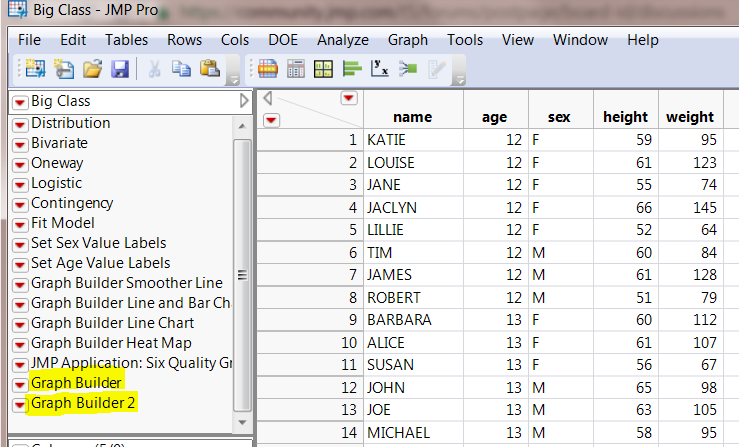
The names of the graph builder objects are using the default naming pattern for this platform. How do I rename them to my choice? (I have attached a screen shot and the graph builder names are highlighted in yellow)

I have tried using "set name" before and after saving the script to the data table but it didn't work. 

Thanks in advance!

AJ

2 ACCEPTED SOLUTIONS

Accepted Solutions
David_Burnham
Super User (Alumni)

Re: How to rename the default graph builder script in a data table ?

It looks like the ability to add the name as an argument is a version 13 feature.

Here is a workaround:

obj << Save Script To Data Table;
lstNames = dt << Get Table Script Names;
dt << Rename Table Script( lstNames[NItems(lstNames)], "My Script" );
-Dave

View solution in original post

AJ
AJ
Level II

Re: How to rename the default graph builder script in a data table ?

Thanks a lot for your effort! This works perfect for me.

View solution in original post

4 REPLIES 4
David_Burnham
Super User (Alumni)

Re: How to rename the default graph builder script in a data table ?

Here's a couple of approaches.


First method, based directly on your code.  Just add an argument to the message:


dt = Open( "$SAMPLE_DATA/Big Class.jmp" );
obj = Graph Builder(
	Variables( X( :Sex ), Y( :Height ), Group X( :Age ) ),
	Elements( Box Plot( X, Y ) )
);
obj << Save Script to Data Table("My Script");

The second method, if you simply want to attacth the script with a name, but not execute it:

dt = Open( "$SAMPLE_DATA/Big Class.jmp" );
dt << Set Property("My Script,",	
	Graph Builder(
		Variables( X( :Sex ), Y( :Height ), Group X( :Age ) ),
		Elements( Box Plot( X, Y ) )
	);	
);
-Dave
AJ
AJ
Level II

Re: How to rename the default graph builder script in a data table ?

Dave, 

  Thanks for your response. I need to execute the script generated from graph builder and hence I tried  option 1.

obj << Save Script to Data Table("My Script");

Unfortunately, it still saves the script by the name "Graph builder" and not "My script".  For your information, I am using JMP 12. 

David_Burnham
Super User (Alumni)

Re: How to rename the default graph builder script in a data table ?

It looks like the ability to add the name as an argument is a version 13 feature.

Here is a workaround:

obj << Save Script To Data Table;
lstNames = dt << Get Table Script Names;
dt << Rename Table Script( lstNames[NItems(lstNames)], "My Script" );
-Dave
AJ
AJ
Level II

Re: How to rename the default graph builder script in a data table ?

Thanks a lot for your effort! This works perfect for me.

Recommended Articles