Turn on suggestions
Auto-suggest helps you quickly narrow down your search results by suggesting possible matches as you type.
- Don’t miss your chance to experience Discovery Summit Europe at our best available rate! Early bird registration through 31 Oct.
- Graph Builder Toolbar streamlines interactive graphing. Creates shortcuts on Report and GraphBuilder Helpers toolbars. Download and install the extension.
Options
- Subscribe to RSS Feed
- Mark Topic as New
- Mark Topic as Read
- Float this Topic for Current User
- Bookmark
- Subscribe
- Mute
- Printer Friendly Page
Discussions
Solve problems, and share tips and tricks with other JMP users.- User Community
- :
- Discussions
- :
- How to remove border box frame properties

Level V
- Mark as New
- Bookmark
- Subscribe
- Mute
- Subscribe to RSS Feed
- Get Direct Link
- Report Inappropriate Content
How to remove border box frame properties
Created:
Feb 15, 2022 12:22 AM
| Last Modified: Jun 11, 2023 4:21 AM
(3033 views)
Hi all,
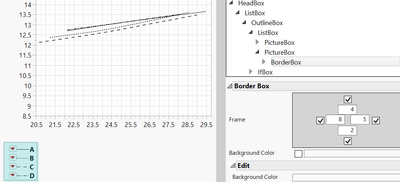
I need to delete the border box frame only from bivariate plot. How can I uncheck the frame properties using jsl to remove its frame without removing the line legends? Please help
- Tags:
- Mass Customization
1 ACCEPTED SOLUTION
Accepted Solutions


Super User
Solution
- Mark as New
- Bookmark
- Subscribe
- Mute
- Subscribe to RSS Feed
- Get Direct Link
- Report Inappropriate Content
Re: How to remove border box frame properties
Try setting sides to 0:
Names Default To Here(1);
New Window("Example",
	bb = Border Box(Left(10), Right(10), Top(10), Bottom(10), Sides(15), Text Box("Hello World!"))
);
wait(1);
bb << Sides(0);
-Jarmo
3 REPLIES 3
Super User
- Mark as New
- Bookmark
- Subscribe
- Mute
- Subscribe to RSS Feed
- Get Direct Link
- Report Inappropriate Content
Re: How to remove border box frame properties
Try getting the reference to the Border Box and then using << Visibility("Collapse") or << Visibility("Hidden") to that border boxes reference
-Jarmo
Level V
- Mark as New
- Bookmark
- Subscribe
- Mute
- Subscribe to RSS Feed
- Get Direct Link
- Report Inappropriate Content
Re: How to remove border box frame properties
Hi, I only need the border line gone, not the whole border box
Super User
Solution
- Mark as New
- Bookmark
- Subscribe
- Mute
- Subscribe to RSS Feed
- Get Direct Link
- Report Inappropriate Content
Re: How to remove border box frame properties
Try setting sides to 0:
Names Default To Here(1);
New Window("Example",
	bb = Border Box(Left(10), Right(10), Top(10), Bottom(10), Sides(15), Text Box("Hello World!"))
);
wait(1);
bb << Sides(0);
-Jarmo
Recommended Articles
- © 2026 JMP Statistical Discovery LLC. All Rights Reserved.
- Terms of Use
- Privacy Statement
- Contact Us