cancel
Showing results for 
Show  only  | Search instead for 
Did you mean: 
  • Learn how to build custom Python data connectors and further customize JMP’s Data Connector Framework with the Python Data Connector Demo, available now in the JMP Marketplace!
  • See how to create experiments to support product design and ID useful product features. Register for June 12 webinar, 2pm US Eastern Time.

Discussions

Solve problems, and share tips and tricks with other JMP users.
Choose Language Hide Translation Bar
FabioSaragoni
Level II

How to prevent unlocking data table?

Hi,

I am really new to JMP.

I created a script to import data from an Access DB through Query Builder.

I used the following to get a locked data table and it worked. 

dt << Lock Data Table( 1 )

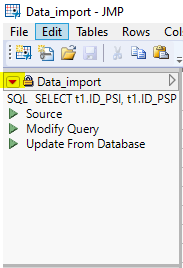
I need users to open this locked table to review data but I noticed that it is possible to unlock data by clicking on the top-left red triangle (see screenshot attached) and selecting Unlock Data Table.


Is there an easy way to prevent users from unlocking an open data table?


Thanks!

1 REPLY 1
ian_jmp
Level X

Re: How to prevent unlocking data table?

You may be able to use 'SetEditLock()' in the post-processing script that Query Builder allows:

Names Default To Here( 1 );
dt = Open( "$SAMPLE_DATA/Big Class.jmp" );
dt << Set Edit Lock( "Modify Cells", "Add Rows", "Delete Columns" );

Recommended Articles