- Image to Table JMP extension imports single or batch images as data tables. Useful to extract curves from pictures or convert image data to curve data to use in analyses like Functional Data Explorer. Download and install the extension.
- Subscribe to RSS Feed
- Mark Topic as New
- Mark Topic as Read
- Float this Topic for Current User
- Bookmark
- Subscribe
- Mute
- Printer Friendly Page
Discussions
Solve problems, and share tips and tricks with other JMP users.- User Community
- :
- Discussions
- :
- How to permanently change the green color and all JMP graphs ?

- Mark as New
- Bookmark
- Subscribe
- Mute
- Subscribe to RSS Feed
- Get Direct Link
- Report Inappropriate Content
How to permanently change the green color and all JMP graphs ?
Hi,
By default, many graphs in jmp (particularly in the graph builder) use a green color, which, I clearly do not like. I can change the color or each graph, but this is not very practical. I know Preferences -> Styles, Preferences -> Style, Preferences -> Platforms, but I can not find a way to change this color... I have asked this question in the past, with no answer. Really, a software like JMP can do so many things but can not change the preference of the default color used in all graphs ?
Thanks for any help. F.
- Tags:
- Mass Customization
- Mark as New
- Bookmark
- Subscribe
- Mute
- Subscribe to RSS Feed
- Get Direct Link
- Report Inappropriate Content
Re: How to permanently change the green color and all JMP graphs ?
Thanks !

- Mark as New
- Bookmark
- Subscribe
- Mute
- Subscribe to RSS Feed
- Get Direct Link
- Report Inappropriate Content
Re: How to permanently change the green color and all JMP graphs ?
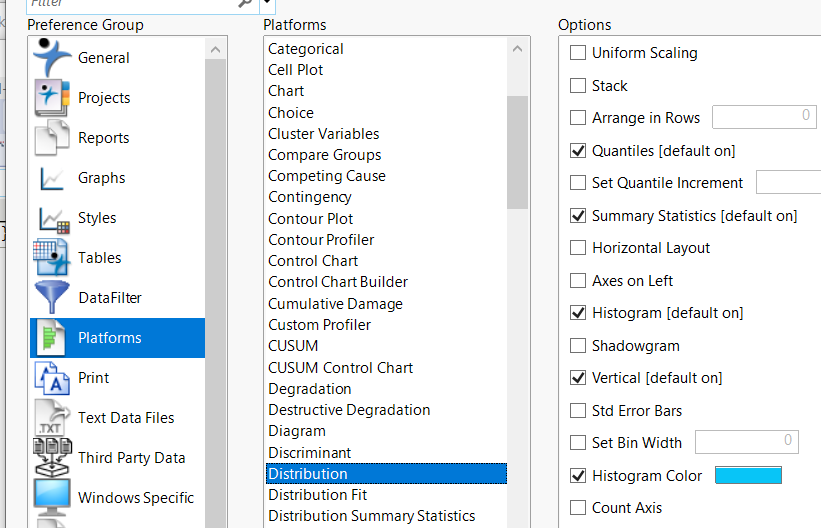
You can use the Preferences panel to change the Distribution Histogram color.
But that does not affect the color of the Histogram in the Graph Builder.
- Mark as New
- Bookmark
- Subscribe
- Mute
- Subscribe to RSS Feed
- Get Direct Link
- Report Inappropriate Content
Re: How to permanently change the green color and all JMP graphs ?
My bad, I tried the JSL fragment and it works for the Graph Builder histogram. It is not the same Preference as the one in Distribution, as I thought it was. Apologies.
- « Previous
-
- 1
- 2
- Next »
Recommended Articles
- © 2026 JMP Statistical Discovery LLC. All Rights Reserved.
- Terms of Use
- Privacy Statement
- Contact Us