- Discovery Summit 2026: Early User Edition - September 23-24.Register. It's free.
- Graph Builder Toolbar streamlines interactive graphing. Creates shortcuts on Report and GraphBuilder Helpers toolbars. Download and install the extension.
- Subscribe to RSS Feed
- Mark Topic as New
- Mark Topic as Read
- Float this Topic for Current User
- Bookmark
- Subscribe
- Mute
- Printer Friendly Page
Discussions
Solve problems, and share tips and tricks with other JMP users.- User Community
- :
- Discussions
- :
- How to open a model without requiring re-fitting? Or minimize the opening time f...

- Mark as New
- Bookmark
- Subscribe
- Mute
- Subscribe to RSS Feed
- Get Direct Link
- Report Inappropriate Content
How to open a model without requiring re-fitting? Or minimize the opening time for complex model files?
Hi Folks,
I noticed every time I re-open an existing JMP model file (*.jrp files), it reruns the model fitting. This process can take a long time depending on the amount of data and model complexity (PLS vs. Neural Network). Does anyone have any guidance on if it is possible to save a model in such a way as to eliminate the need for it to refit when opening later? Or is there a more efficient way to save and open model files to reduce the refitting time?
Example:
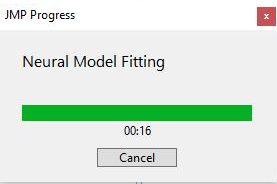
Every time I open an existing model file I get the re-fitting pop-up like the one below that can take a long time to re-fit. I have tried the radial option to embed the original data set when saving the model file and that doesn't appear to make any noticeable difference.
My Version:
JMP Pro 17.0.0
Thanks,
- Tags:
- jmp pro


- Mark as New
- Bookmark
- Subscribe
- Mute
- Subscribe to RSS Feed
- Get Direct Link
- Report Inappropriate Content
Re: How to open a model without requiring re-fitting? Or minimize the opening time for complex model files?
I suggest that you move the report output to a JMP Journal. If you just move the report output, it will just save the display. A ..jrp file saves a script, that has to be run to recreate the report output.


- Mark as New
- Bookmark
- Subscribe
- Mute
- Subscribe to RSS Feed
- Get Direct Link
- Report Inappropriate Content
Re: How to open a model without requiring re-fitting? Or minimize the opening time for complex model files?
You might also consider using a JMP Project
Recommended Articles
- © 2026 JMP Statistical Discovery LLC. All Rights Reserved.
- Terms of Use
- Privacy Statement
- Contact Us