Turn on suggestions
Auto-suggest helps you quickly narrow down your search results by suggesting possible matches as you type.
- Don’t miss your chance to experience Discovery Summit Europe at our best available rate! Early bird registration through 31 Oct.
- Graph Builder Toolbar streamlines interactive graphing. Creates shortcuts on Report and GraphBuilder Helpers toolbars. Download and install the extension.
Options
- Subscribe to RSS Feed
- Mark Topic as New
- Mark Topic as Read
- Float this Topic for Current User
- Bookmark
- Subscribe
- Mute
- Printer Friendly Page
Discussions
Solve problems, and share tips and tricks with other JMP users.- User Community
- :
- Discussions
- :
- Re: How to make Uppercase, Regex and Contain function efficient?

Level IV
- Mark as New
- Bookmark
- Subscribe
- Mute
- Subscribe to RSS Feed
- Get Direct Link
- Report Inappropriate Content
How to make Uppercase, Regex and Contain function efficient?
Mar 3, 2026 09:32 AM
(1130 views)
I have a script to that takes user input and scanned through the entire table and tag the user input in the new column. I have tables with >10M rows and this script is taking few minutes. How can I make it faster? Thanks in advance.
// Capture the start time
start_time = Tick Seconds();

// --- Setup & guards ---
dt = Current Data Table();
If( Is Empty( dt ), Throw( "No active data table." ));

colNames = dt << Get Column Names("String");
Case sensitive = 0;

// Open a dialog to select exactly one column
nw = New Window("User Inputs",
    <<Modal,
    <<Return Result,
    V List Box(
        Text Box("Select Column:"),
        colDropdown = Combo Box(colNames),
   		Spacer Box(Size(0, 10)),

   		CasesensitiveCB = Check Box("Case sensitive", 0),
        Spacer Box(Size(0, 5)),

        Text Box("Enter the List "),
        variablebox = Text Edit Box("", <<Set N Lines(30), <<Set Width(180)),

        Spacer Box(Size(0, 10)),
        Button Box("OK",
			selectedCol = colDropdown << Get Selected;
			Case sensitive   = CasesensitiveCB << Get;),
        Button Box("Cancel")
    )
);

If( nw["Button"] != 1, Stop(); );

unique = Collapse Whitespace(nw["variablebox"]);
unique = Substitute(unique, ";", ",");

// 1. Process userentry: Uppercase if needed, then remove leading zeros from each word
wordList = Words(unique, ", ");
If( Case sensitive == 0, wordList = Words(Uppercase(unique), ", ") );

For( i = 1, i <= N Items( wordList ), i++,
	wordList[i] = Regex( wordList[i], "^0*", "", GLOBALREPLACE )
);
userentry = Associative Array( wordList );

Show(userentry);

// 2. Process column values: Uppercase if needed, then remove leading zeros in the formula
dt << New Column( "Suspected " || selectedCol,
	Formula(
		target_val = Char( As Column( selectedCol ) );
		If( Case sensitive == 0, target_val = Uppercase( target_val ) );

		// Remove leading zeros from column value before comparison
		target_val = Regex( target_val, "^0*", "", GLOBALREPLACE );

		If( userentry << Contains( target_val ),
			"Yes",
			"No"
		)
	)
);


dt << Move Selected Columns({Name Expr( As Column( "Suspected " || selectedCol ) )},After( As Column( selectedCol ) ));

// Capture the end time
end_time = Tick Seconds();

// Calculate total duration
duration = end_time - start_time;
3 REPLIES 3


Super User
- Mark as New
- Bookmark
- Subscribe
- Mute
- Subscribe to RSS Feed
- Get Direct Link
- Report Inappropriate Content
Re: How to make Uppercase, Regex and Contain function efficient?
What is the script supposed to do?
-Jarmo
Level IV
- Mark as New
- Bookmark
- Subscribe
- Mute
- Subscribe to RSS Feed
- Get Direct Link
- Report Inappropriate Content
Re: How to make Uppercase, Regex and Contain function efficient?
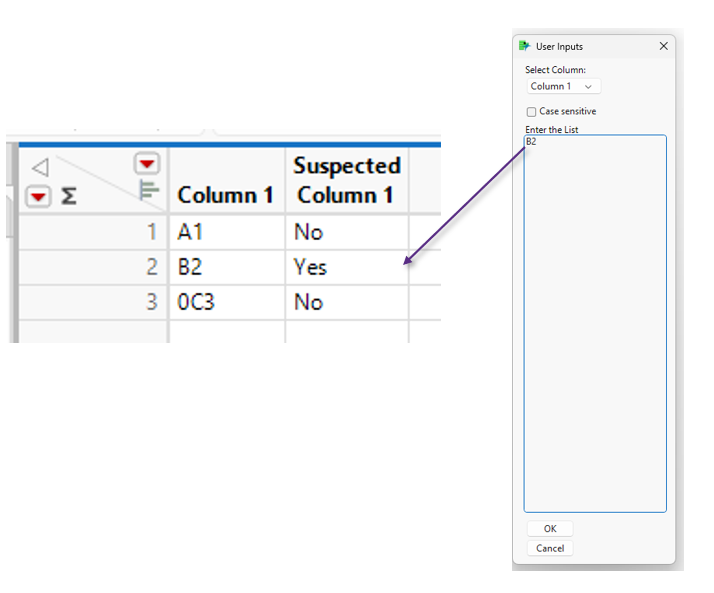
It creates a “Suspected Column1” column and marks “Yes” when the value in Column1 matches the user input. I have few additional steps that summarizes which user inputs were found and which were missing. But Those steps are efficient so I did not included them.
Super User
- Mark as New
- Bookmark
- Subscribe
- Mute
- Subscribe to RSS Feed
- Get Direct Link
- Report Inappropriate Content
Re: How to make Uppercase, Regex and Contain function efficient?
Created:
Mar 3, 2026 09:47 AM
| Last Modified: Mar 3, 2026 10:35 PM
(1126 views)
| Posted in reply to message from ConfidenceOwl94 03-03-2026
In your example table you are comparing numeric values to characters. What types of checks are you trying to do:
You say match but the code is saying contain- Code is also saying
containWITH data modifications - The example table you provided has numeric values, but you are comparing them to characters
- Edit: are all the values unique?
Edit: the code is looking for "exact matches" as it utilizes Contains with Associative Array. Biggest issue here is the amount of data and comparison between numbers and characters. The check can be most likely optimized with some evaluations but depending on the real issue, there might be plenty other optimizations to be done.
-Jarmo
Recommended Articles
- © 2026 JMP Statistical Discovery LLC. All Rights Reserved.
- Terms of Use
- Privacy Statement
- Contact Us