- Don’t miss your chance to experience Discovery Summit Europe at our best available rate! Early bird registration through 31 Oct.
- Graph Builder Toolbar streamlines interactive graphing. Creates shortcuts on Report and GraphBuilder Helpers toolbars. Download and install the extension.
- Subscribe to RSS Feed
- Mark Topic as New
- Mark Topic as Read
- Float this Topic for Current User
- Bookmark
- Subscribe
- Mute
- Printer Friendly Page
Discussions
Solve problems, and share tips and tricks with other JMP users.- User Community
- :
- Discussions
- :
- Re: How to insert X axis break in graph builder?

- Mark as New
- Bookmark
- Subscribe
- Mute
- Subscribe to RSS Feed
- Get Direct Link
- Report Inappropriate Content
How to insert X axis break in graph builder?
Hi everyone,
I am trying to insert a simple X axis break in JMP, but can't find the option for it in the Graph Builder.
In Origin Lab for example this was easily achievable using x axis breaks. I am quite new to JMP, so any help would be much appreciated!
My X axis data are timestamps, spread over multiple days, but on a single day they are only in the range of up to one hours. If I put all timestamps as X, the trend of the data during a single day gets lost, because the distance to the next day is so much larger.
I want to only display the X data on each day during the time where measurements were taken. I have added a small graphic to hopefully better explain the problem.
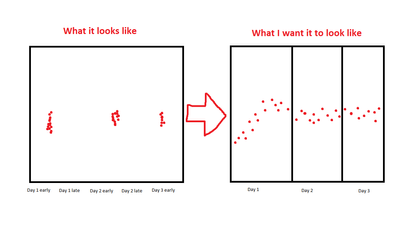
Thank you!

- Mark as New
- Bookmark
- Subscribe
- Mute
- Subscribe to RSS Feed
- Get Direct Link
- Report Inappropriate Content
Re: How to insert X axis break in graph builder?
for professional breaks like in Origin or Graphana, please vote:
wish handed in after this discussion: Add easily configurable axis breaks to the Graph Builder
similar wish: Broken axis in graph builder
- Mark as New
- Bookmark
- Subscribe
- Mute
- Subscribe to RSS Feed
- Get Direct Link
- Report Inappropriate Content
Re: How to insert X axis break in graph builder?
Data Builder by @Ben_BarrIngh is great to create a dummy dataset for discussions:
https://marketplace.jmp.com/appdetails/Data+Builder
- Mark as New
- Bookmark
- Subscribe
- Mute
- Subscribe to RSS Feed
- Get Direct Link
- Report Inappropriate Content
Re: How to insert X axis break in graph builder?
For the special case of "trend within the day", one can use the Wrap option in GraphBuilder

... or a transform column with "Time of Day":

For ranges > 1 day, one can calculate a zoomed timestamp [:day:hour] by subtracting the date of the first entry per group:


New Column( "timestamp_zoom",
	Format( ":day:hr:m", 16 ),
	Formula(
		(:date - Col Minimum( :date, :Group ))
		+Col Minimum( Time Of Day( :date ), :Group )
	)
)- « Previous
-
- 1
- 2
- Next »
Recommended Articles
- © 2026 JMP Statistical Discovery LLC. All Rights Reserved.
- Terms of Use
- Privacy Statement
- Contact Us