- Don’t miss your chance to experience Discovery Summit Europe at our best available rate! Early bird registration through 31 Oct.
- Graph Builder Toolbar streamlines interactive graphing. Creates shortcuts on Report and GraphBuilder Helpers toolbars. Download and install the extension.
- Subscribe to RSS Feed
- Mark Topic as New
- Mark Topic as Read
- Float this Topic for Current User
- Bookmark
- Subscribe
- Mute
- Printer Friendly Page
Discussions
Solve problems, and share tips and tricks with other JMP users.- User Community
- :
- Discussions
- :
- Re: How to include superscript numbers in column headings?

- Mark as New
- Bookmark
- Subscribe
- Mute
- Subscribe to RSS Feed
- Get Direct Link
- Report Inappropriate Content
How to include superscript numbers in column headings?
Hi,
I want to create some figures (PCA biplot) with stable isotope variables in them. How can I include superscripts in the headings of my column? Specifically δ15N and δ13C?


- Mark as New
- Bookmark
- Subscribe
- Mute
- Subscribe to RSS Feed
- Get Direct Link
- Report Inappropriate Content
Re: How to include superscript numbers in column headings?

- Mark as New
- Bookmark
- Subscribe
- Mute
- Subscribe to RSS Feed
- Get Direct Link
- Report Inappropriate Content
Re: How to include superscript numbers in column headings?
The solution presented (alt 253) did not work in jmp 14 for a mac and for other numbers, I could only guess its alt X53. The option of a unicode character did not work either. I need to express the following on an axis title and, if possible, column header: d15Nb where the d is a lower case greek d, the 15 is superscripted and the b is a lower case greek beta. I was able to copy all of this from word into jmp but 15 was not superscripted. I also tried going to file preferences, and fonts but unicode characters are not available there


- Mark as New
- Bookmark
- Subscribe
- Mute
- Subscribe to RSS Feed
- Get Direct Link
- Report Inappropriate Content
Re: How to include superscript numbers in column headings?
This way should always work, but there are a few steps.
- Open a script editor: select File > New > Script.
- Enter this character string: "\!U03B4\!U00B9\!U2075\!U03B2"
- Run the script.
- Find the result in the Log: select Window > Log (Macintosh)
- Select the result "δ¹⁵β" and copy the result to paste over the axis label.
Hope this helps.
(Actually, you should be able to copy the result shown in step 5 this time and skip all the previous steps! But now you know how to do it for another string.)
- Mark as New
- Bookmark
- Subscribe
- Mute
- Subscribe to RSS Feed
- Get Direct Link
- Report Inappropriate Content
Re: How to include superscript numbers in column headings?
Thank-you. The solution is imperfect. In the column header and the graph y-axis title, both the 1 and 5 are superscripted but the 5 is higher than the 1. Is there an issue with the script you provided or is this the best we can do? The outcome is unacceptable for publication. I hope that jmp will be able to resolve issues with superscripts, subscripts and greek letters as scripting and finding unicode symbols is cumbersome.
- Mark as New
- Bookmark
- Subscribe
- Mute
- Subscribe to RSS Feed
- Get Direct Link
- Report Inappropriate Content
Re: How to include superscript numbers in column headings?
I see this result:
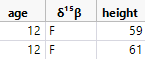
and this result:
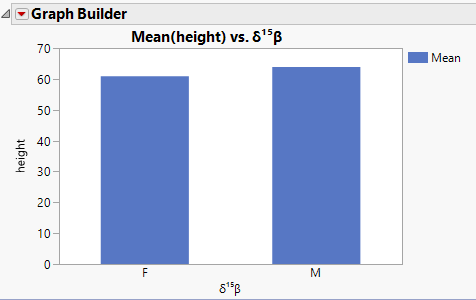
- Mark as New
- Bookmark
- Subscribe
- Mute
- Subscribe to RSS Feed
- Get Direct Link
- Report Inappropriate Content
Re: How to include superscript numbers in column headings?
The results above used JMP for Windows on my work computer. I repeated the test on my personal Macintosh and now I see the same result as you:
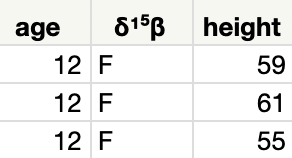
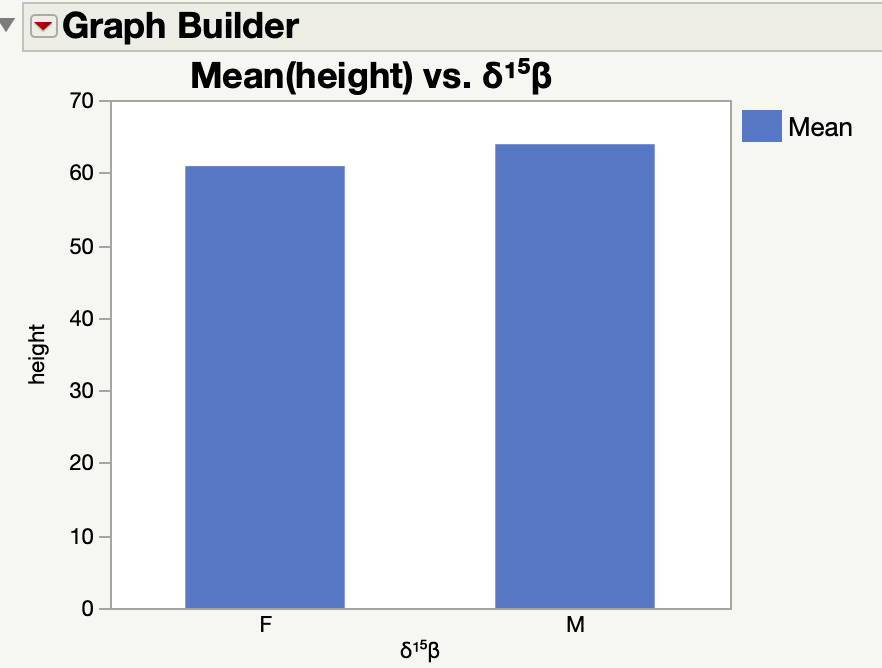
So this result is a bug and should be reported to JMP Technical Support ([email protected]).

 Community Manager
- Mark as New
- Bookmark
- Subscribe
- Mute
- Subscribe to RSS Feed
- Get Direct Link
- Report Inappropriate Content
Re: How to include superscript numbers in column headings?
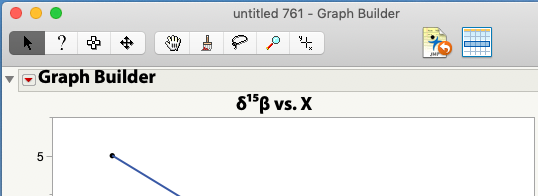
Instead of using the script editor solution that @Mark_Bailey provided, I would use the Emoji and Symbols tools (Ctrl-Command-Space) to enter these special characters.
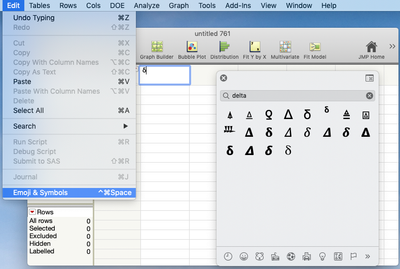
You can type the name of the character you're looking for into the window and see the choices.
As for the different line heights for the 1 and 5, it's not so much a bug in JMP. Instead it's the way the font chosen for the column headings and the titles renders the UNICODE characters for superscript 1 and superscript 5. That's not something JMP has control over.
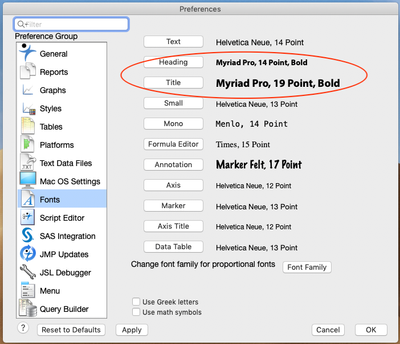
Instead, you'll need to find a font that renders them at the same line height. I used Pages on my Mac to experiment with various fonts and found that Myriad Pro, which I suspect I got with one of my Adobe products, does a good job of rendering them at the same line height. You may have to search a bit to find a font that you have installed that works the way you want.
Once you've found a font that does what you want you can change the preferences in JMP to use that font.
- Mark as New
- Bookmark
- Subscribe
- Mute
- Subscribe to RSS Feed
- Get Direct Link
- Report Inappropriate Content
Re: How to include superscript numbers in column headings?
This is quite frustrating and I understood the issue with unicode double superscripts - I have read for about 4 hours trying to solve the issue. Michigan state University does JMP and SAS a great service by promoting and offering JMP to its faculty. While it is a unicode problem, ultimately, the problem is that jmp does not have a clean solution to the superscript issue for Mac users and it is implied that their users find a work around. I, personally, spoke with JMP about its capacities before purchasing. In addition to its statitical capabilities I was worried about publication quality graphics. I was assured that this product was trouble free and excelled on both accounts. But, I am about ready to give up on the graphics, and perhaps jmp as a whole, because of the superscript issue - a common commodity among scientists. I also don't feel that it is my job to hunt for fonts and fix issues that the software should support. I would appreciate a solid clear solution that I can impliment with ease. There are many isotope biogeochemists, like myself, that would be interested or use jmp on macs. Without a solution to this issue provided by jmp, I will feel it my duty to let them know of this difficiency. Once again, I reach out to you for a solid clear solution to the superscript option.
- Mark as New
- Bookmark
- Subscribe
- Mute
- Subscribe to RSS Feed
- Get Direct Link
- Report Inappropriate Content
Re: How to include superscript numbers in column headings?
I found a font that worked for the coumn header but when I made a graph using this column, the superscripts were misaligned. I tried changing the text in the axis title, no luck. So Jeff's solution was also imperfect.
Recommended Articles
- © 2026 JMP Statistical Discovery LLC. All Rights Reserved.
- Terms of Use
- Privacy Statement
- Contact Us