cancel
Showing results for 
Show  only  | Search instead for 
Did you mean: 
  • Learn how to build custom Python data connectors and further customize JMP’s Data Connector Framework with the Python Data Connector Demo, available now in the JMP Marketplace!
  • See how to move from signal modeling to system modeling at the first JMP Aerospace Analytics webinar. Register. June 18, 1 p.m. US Eastern Time.

Discussions

Solve problems, and share tips and tricks with other JMP users.
Choose Language Hide Translation Bar

How to edit the statistics text of Graph Builder's Line of Fit

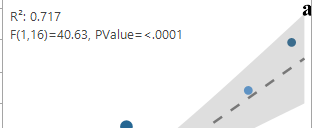
I draw regression graphs, when i add  f test report, by default "f and p" value show at the graph. but i want only p values. how can i edit


Edit (jthi): changed title from "Editing" to "How to edit the statistics text of Graph Builder's Line of Fit" to make it more descriptive of the problem


1 REPLY 1
jthi
Super User

Re: Editing

I think you have to use some scripting Formatting elements in Graph Builder. You will have to modify the logic of building the text but you can get something like this

jthi_0-1768559095342.png

jthi_1-1768559101763.png


-Jarmo

Recommended Articles