- Don’t miss your chance to experience Discovery Summit Europe at our best available rate! Early bird registration through 31 Oct.
- Graph Builder Toolbar streamlines interactive graphing. Creates shortcuts on Report and GraphBuilder Helpers toolbars. Download and install the extension.
- Subscribe to RSS Feed
- Mark Topic as New
- Mark Topic as Read
- Float this Topic for Current User
- Bookmark
- Subscribe
- Mute
- Printer Friendly Page
Discussions
Solve problems, and share tips and tricks with other JMP users.- User Community
- :
- Discussions
- :
- How to determine a column has formula?

- Mark as New
- Bookmark
- Subscribe
- Mute
- Subscribe to RSS Feed
- Get Direct Link
- Report Inappropriate Content
How to determine a column has formula?
I would like to remove all formulas from all columns with script. I wrote a forloop but whether a column has formula needs to be determined. How to do that with scripts?
Accepted Solutions


- Mark as New
- Bookmark
- Subscribe
- Mute
- Subscribe to RSS Feed
- Get Direct Link
- Report Inappropriate Content
Re: How to determine a column has formula?
One option is to use <<Get Formula with Is Empty()
Names Default To Here(1);
dt = Open("$SAMPLE_DATA/Big Class.jmp");
col1 = dt << New Column("Ratio", Numeric, Continuous);
col1 << Formula(:height / :weight);
wait(1);

For Each({col_name}, dt << Get Column Names("String"),
	col = Column(dt, col_name);
	If(!Is Empty(col << get formula),
		Column(dt, col_name) << Delete Formula
	);
);
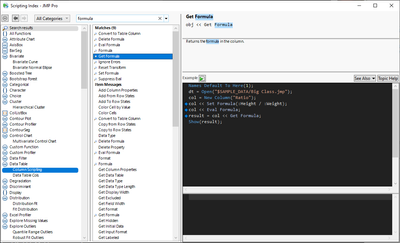
Scripting Index has a lot of information and you can find it directly from JMP's menu Help / Scripting Index
If you add those formulas yourself and don't really need them for formula usage, you can avoid adding them all together by using << Set Each Value()
- Mark as New
- Bookmark
- Subscribe
- Mute
- Subscribe to RSS Feed
- Get Direct Link
- Report Inappropriate Content
Re: How to determine a column has formula?
One option is to use <<Get Formula with Is Empty()
Names Default To Here(1);
dt = Open("$SAMPLE_DATA/Big Class.jmp");
col1 = dt << New Column("Ratio", Numeric, Continuous);
col1 << Formula(:height / :weight);
wait(1);

For Each({col_name}, dt << Get Column Names("String"),
	col = Column(dt, col_name);
	If(!Is Empty(col << get formula),
		Column(dt, col_name) << Delete Formula
	);
);
Scripting Index has a lot of information and you can find it directly from JMP's menu Help / Scripting Index
If you add those formulas yourself and don't really need them for formula usage, you can avoid adding them all together by using << Set Each Value()
- Mark as New
- Bookmark
- Subscribe
- Mute
- Subscribe to RSS Feed
- Get Direct Link
- Report Inappropriate Content
Re: How to determine a column has formula?
It worked!
Thank you so much!
Recommended Articles
- © 2026 JMP Statistical Discovery LLC. All Rights Reserved.
- Terms of Use
- Privacy Statement
- Contact Us