- JMP will suspend normal business operations for our Winter Holiday beginning on Wednesday, Dec. 24, 2025, at 5:00 p.m. ET (2:00 p.m. ET for JMP Accounts Receivable).
Regular business hours will resume at 9:00 a.m. EST on Friday, Jan. 2, 2026. - We’re retiring the File Exchange at the end of this year. The JMP Marketplace is now your destination for add-ins and extensions.
- Subscribe to RSS Feed
- Mark Topic as New
- Mark Topic as Read
- Float this Topic for Current User
- Bookmark
- Subscribe
- Mute
- Printer Friendly Page
Discussions
Solve problems, and share tips and tricks with other JMP users.- JMP User Community
- :
- Discussions
- :
- How to delete some rows in a table box from a Variability Summary table?

- Mark as New
- Bookmark
- Subscribe
- Mute
- Subscribe to RSS Feed
- Get Direct Link
- Report Inappropriate Content
How to delete some rows in a table box from a Variability Summary table?
Hello,
I have a "Variability Chart" with the associated "Variability Summary" table which includes 32 rows.
In this Summary table, I need to keep only the first 11 rows and to delete all the others.
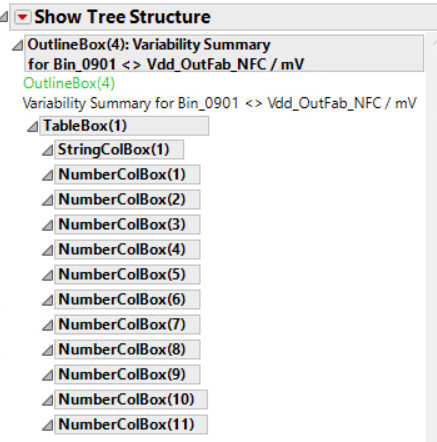
In the Show Tree Structure (see below snapshot), I can see the StringColBox and the NumberColBox I want to modify.
So far, I have tried the "Remove Element" function.
This function returns no error, however no rows are deleted in my summary table.
Below an extract of the code, I have tried:
rVarChart = VarChart << Report;
rVarChart["Variability Summary?"][NumberColBox("Observations")] << remove element ( 12 );
In addition, this function works for the StringColBox but not for all the rows I want to delete...
Which function and what code should I use to perform this action in my Variability Summary Table?
Regards,
Fab


- Mark as New
- Bookmark
- Subscribe
- Mute
- Subscribe to RSS Feed
- Get Direct Link
- Report Inappropriate Content
Re: How to delete some rows in a table box from a Variability Summary table?
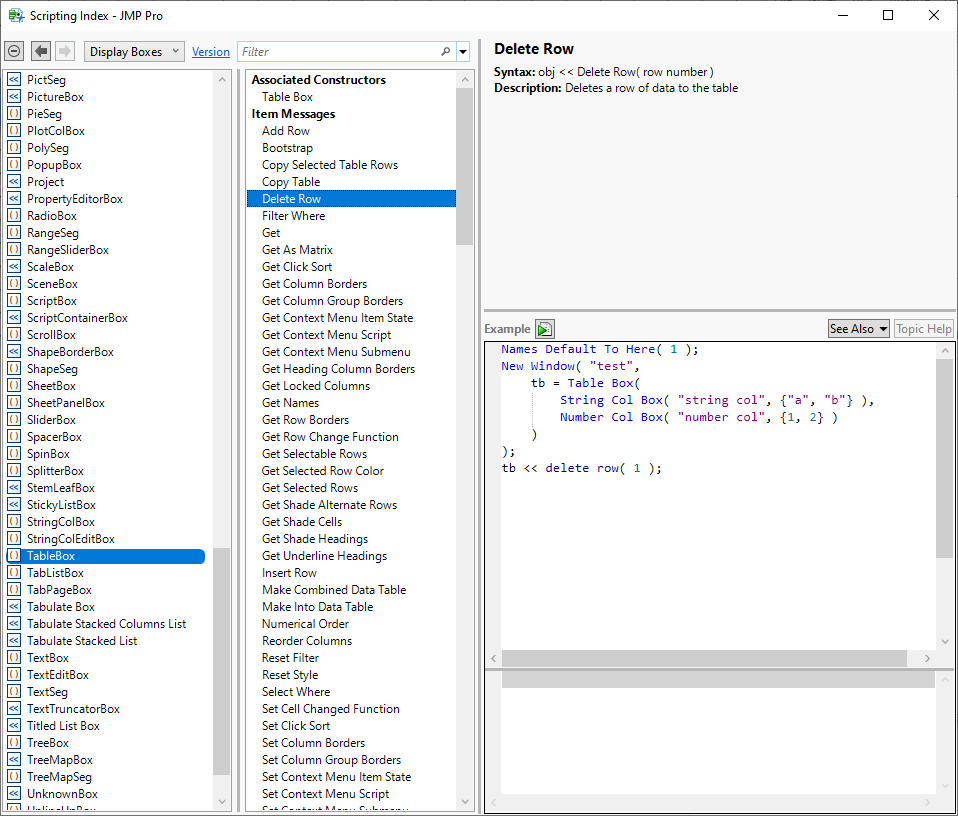
You need to use the Table Box object to affect rows. See Help > Scripting Index > Display Boxes > TableBox.
- Mark as New
- Bookmark
- Subscribe
- Mute
- Subscribe to RSS Feed
- Get Direct Link
- Report Inappropriate Content
Re: How to delete some rows in a table box from a Variability Summary table?
After reading your solution, I have tried unsuccessfully several jsl codes...
Here is an example of what I have tried:
- rVarChart = VarChart << Report; // VarChart is my Variability Chart which includes the Variability Summary table
- tb = rVarChart["Variability Summary?"][TableBox(1)];
- tb << select; // I can select/deselect the Variability Summary table
- tb << delete row (2); // I get the message "Unable to delete row 2 from table"
What is missing or incorrect in this code?
Regards,
FabSTM

- Mark as New
- Bookmark
- Subscribe
- Mute
- Subscribe to RSS Feed
- Get Direct Link
- Report Inappropriate Content
Re: How to delete some rows in a table box from a Variability Summary table?
Any response on this? I too need to do something similar -- the first row is of a different domain / different type than all the other rows and I'd like to remove it, but I'm not seeing how to

- Mark as New
- Bookmark
- Subscribe
- Mute
- Subscribe to RSS Feed
- Get Direct Link
- Report Inappropriate Content
Re: How to delete some rows in a table box from a Variability Summary table?
Deleting from a live report is restricted in many situations and this is one of them. If you journal the report then you should be able to successfully delete rows from the table box. If simply hiding the rows is good enough and you are running Jmp 17 then you can try filtering out the rows so they don't get shown
Names Default To Here( 1 );
dt = Open( "$SAMPLE_DATA/Variability Data/2 Factors Crossed.jmp" );
obj = dt << Variability Chart( Y( :Measurement ), X( :Operator, :part# ) );
obj << (Variability Analysis[1] << Variability Summary Report( 1 ));
tb = (obj<<report)["Variability Summary?"][TableBox(1)];
tb << filter where(Observations > 4)
Recommended Articles
- © 2026 JMP Statistical Discovery LLC. All Rights Reserved.
- Terms of Use
- Privacy Statement
- Contact Us