- Don’t miss your chance to experience Discovery Summit Europe at our best available rate! Early bird registration through 31 Oct.
- Image to Table JMP extension imports single or batch images as data tables. Useful to extract curves from pictures or convert image data to curve data to use in analyses like Functional Data Explorer. Download and install the extension.
- Subscribe to RSS Feed
- Mark Topic as New
- Mark Topic as Read
- Float this Topic for Current User
- Bookmark
- Subscribe
- Mute
- Printer Friendly Page
Discussions
Solve problems, and share tips and tricks with other JMP users.- User Community
- :
- Discussions
- :
- How to create a table from a datatable(as it is)?

- Mark as New
- Bookmark
- Subscribe
- Mute
- Subscribe to RSS Feed
- Get Direct Link
- Report Inappropriate Content
How to create a table from a datatable(as it is)?
Hi,
Would like to create a table out of Datatable as it is, by scripting.
Tried with the Tabulate option (Analyze -> Tabulate), however it is letting to tabulate the statistics for the columns included in the Datatable.
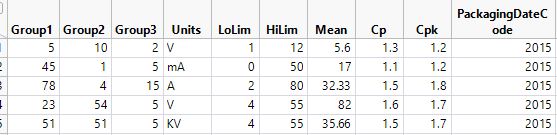
Reason: Want to combine several parameters (Names, units, Lowimit, HighLimit, Cp, & Cpk )in a single data table as in the attached screenshot and to tabulate it.
Thanks!!
Accepted Solutions


- Mark as New
- Bookmark
- Subscribe
- Mute
- Subscribe to RSS Feed
- Get Direct Link
- Report Inappropriate Content
Re: How to create a table from a datatable(as it is)?
The best way to develop a script in JMP, is to have JMP provide as much as possible of the JSL. To do that, one typically executes each step interactively, requests from JMP to save the script from the step, and then go on to the next step, and continue repeating for each step in the process. Therefore, I suggest that you attempt that process in developing the script you need. Your final step to create a report output from the final data table can be as simple as
names default to here(1);
dt=current data table();
nw=new window("Journal",<<journal);
dt<<journal;
If you are running JMP 16, the new annotated log will provide the JSL for the steps you run. In earlier versions, there is an option under the various JMP platforms that will create the script that will run the step. Or, if the step ceates a data table as it's output, the "Source" entry in the Table Panel in the data table display will contain the JSL required to create the output data table.

- Mark as New
- Bookmark
- Subscribe
- Mute
- Subscribe to RSS Feed
- Get Direct Link
- Report Inappropriate Content
Re: How to create a table from a datatable(as it is)?
Hi Alex,
It sounds like you are trying to reorganize your data table to match the output you shared from Excel. JMP offers a broad range of tools to reshape data tables (e.g., SPLIT, STACK) that may be useful in your case. You can create a rearranged version of your data table only for display.
However, without knowing the structure of your original data table, it is difficult to provide a complete answer. Could you share an example (real or mock) of the original data table?
Best,
TS
- Mark as New
- Bookmark
- Subscribe
- Mute
- Subscribe to RSS Feed
- Get Direct Link
- Report Inappropriate Content
Re: How to create a table from a datatable(as it is)?
Hi Thierry,
Thank you for your response & Sorry for the brief question.
You are right that I am reorganizing my datatable into a new table to get overview as per the required format.
Reason for doing so is, I want to summarize my data in a new table (as separate columns) by extracting the following information’s from imported table:
- Name of the columns (Parameters Names), along with their Units, & Spec Limits
- Compute Cp and Cpk values for each measurement parameters present in the input data &
- To compute additional informations like number of dies failed (dies with measured data out of spec) for each parameters
Because of the required parameters i scripted in a way to compute required parameters in a new table and then to tabulate it.
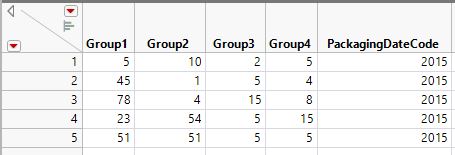
AttachedPics:
ImportedData - Screenshot from the imported table (each column is setup with spec limits, & Units)
ComputedTable - Screeshot from the computed table which i would like to convert it into a new table.
Please let me know if it you require any additional informations.
Thank you !!

- Mark as New
- Bookmark
- Subscribe
- Mute
- Subscribe to RSS Feed
- Get Direct Link
- Report Inappropriate Content
Re: How to create a table from a datatable(as it is)?
The best way to develop a script in JMP, is to have JMP provide as much as possible of the JSL. To do that, one typically executes each step interactively, requests from JMP to save the script from the step, and then go on to the next step, and continue repeating for each step in the process. Therefore, I suggest that you attempt that process in developing the script you need. Your final step to create a report output from the final data table can be as simple as
names default to here(1);
dt=current data table();
nw=new window("Journal",<<journal);
dt<<journal;
If you are running JMP 16, the new annotated log will provide the JSL for the steps you run. In earlier versions, there is an option under the various JMP platforms that will create the script that will run the step. Or, if the step ceates a data table as it's output, the "Source" entry in the Table Panel in the data table display will contain the JSL required to create the output data table.
- Mark as New
- Bookmark
- Subscribe
- Mute
- Subscribe to RSS Feed
- Get Direct Link
- Report Inappropriate Content
Re: How to create a table from a datatable(as it is)?
Thanks Jim & Thierry!!
Lesson Learnt. From now on i will look for the inbuilt JMP functionality to reach the objective step by step.
Recommended Articles
- © 2026 JMP Statistical Discovery LLC. All Rights Reserved.
- Terms of Use
- Privacy Statement
- Contact Us