cancel
Showing results for 
Show  only  | Search instead for 
Did you mean: 
  • DownloadSemiconductor Toolkit: Tools to create wafer maps, add wafer geometry to graphics, explore die defects & compare wafers.
  • Discovery Summit 2026: Early User Edition - September 23-24.Register. It's free.
  • Use JMP Clinical with CDISC-compliant data. Review studies, ID safety and efficacy signals & communicate findings with interactive graphics. Register to see how. Aug. 27, 2 pm US ET.

Discussions

Solve problems, and share tips and tricks with other JMP users.
Choose Language Hide Translation Bar
KillerNO1314
Level I

How to configure the second Y axis when editing graph builder using script?

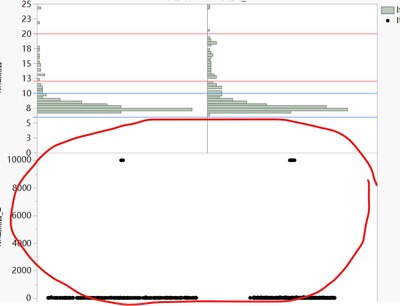
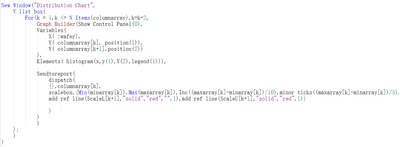
I want to use the histogram to display y(2)  as y(1), but only  Y1 had been displayed correctly ,how to write this script,anyone can help me?

KillerNO1314_2-1688613823074.pngKillerNO1314_2-1688613823074.png


KillerNO1314_1-1688613755702.pngKillerNO1314_1-1688613755702.png


1 REPLY 1
txnelson
Super User

Re: How to configure the second Y axis when editing graph builder using script?

The simplest way to do this is to build the graph interactively, and then under the red triangle, specify to have JMP save the script that will generate the chart as you have interactively built.

Jim

Recommended Articles