cancel
Showing results for 
Show  only  | Search instead for 
Did you mean: 
  • JMP will suspend normal business operations for our Winter Holiday beginning on Wednesday, Dec. 24, 2025, at 5:00 p.m. ET (2:00 p.m. ET for JMP Accounts Receivable).
    Regular business hours will resume at 9:00 a.m. ET on Friday, Jan. 2, 2026.
  • We’re retiring the File Exchange at the end of this year. The JMP Marketplace is now your destination for add-ins and extensions.

Discussions

Solve problems, and share tips and tricks with other JMP users.
Choose Language Hide Translation Bar
JasonWS
Level II

How to condense a table based on grouping columns?

I have a table that looks like this:

JasonWS_0-1747848134915.png

I want to condense the table and group by Serial, then Run so the table looks like this:

JasonWS_1-1747848253431.png

Is there a Tables or Cols menu function I'm missing that can do this, or will it have to be accomplished with a script?

1 REPLY 1
jthi
Super User

Re: How to condense a table based on grouping columns?

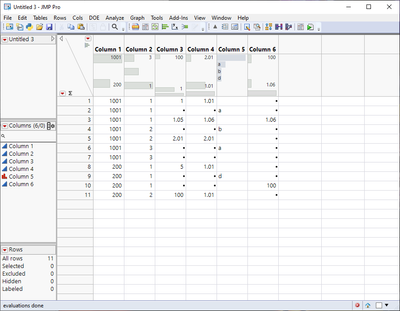
Most likely this will require few steps due to the character column. This process should work, I didn't have your data so there might be same mistakes / misunderstandings.


Starting table
jthi_2-1747850518858.png


Create summary table (ignore the character for now)

jthi_1-1747850416536.png

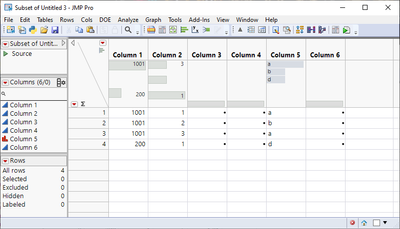
Then delete rows which have no character (column 5) or create subset with only those which have values
jthi_3-1747850528302.png

And use update and join with the first two columns

jthi_4-1747850561890.png

jthi_5-1747850577804.png

JMP is most likely able to write a script for this whole process or create a workflow

-Jarmo

Recommended Articles
