cancel
Showing results for 
Show  only  | Search instead for 
Did you mean: 
  • Image to Table JMP extension imports single or batch images as data tables. Useful to extract curves from pictures or convert image data to curve data to use in analyses like Functional Data Explorer. Download and install the extension.

Discussions

Solve problems, and share tips and tricks with other JMP users.
Choose Language Hide Translation Bar
JasonWS
Level II

How to condense a table based on grouping columns?

I have a table that looks like this:

JasonWS_0-1747848134915.png

I want to condense the table and group by Serial, then Run so the table looks like this:

JasonWS_1-1747848253431.png

Is there a Tables or Cols menu function I'm missing that can do this, or will it have to be accomplished with a script?

1 REPLY 1
jthi
Super User

Re: How to condense a table based on grouping columns?

Most likely this will require few steps due to the character column. This process should work, I didn't have your data so there might be same mistakes / misunderstandings.


Starting table
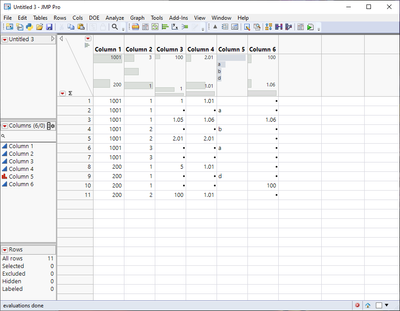
jthi_2-1747850518858.png


Create summary table (ignore the character for now)

jthi_1-1747850416536.png

Then delete rows which have no character (column 5) or create subset with only those which have values
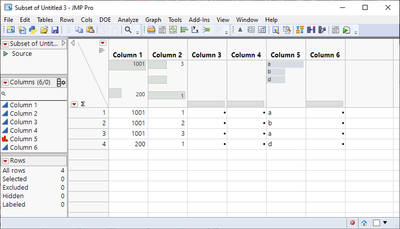
jthi_3-1747850528302.png

And use update and join with the first two columns

jthi_4-1747850561890.png

jthi_5-1747850577804.png

JMP is most likely able to write a script for this whole process or create a workflow

-Jarmo

Recommended Articles