Turn on suggestions
Auto-suggest helps you quickly narrow down your search results by suggesting possible matches as you type.
- JMP will suspend normal business operations for our Winter Holiday beginning on Wednesday, Dec. 24, 2025, at 5:00 p.m. ET (2:00 p.m. ET for JMP Accounts Receivable).
Regular business hours will resume at 9:00 a.m. EST on Friday, Jan. 2, 2026. - We’re retiring the File Exchange at the end of this year. The JMP Marketplace is now your destination for add-ins and extensions.
Options
- Subscribe to RSS Feed
- Mark Topic as New
- Mark Topic as Read
- Float this Topic for Current User
- Bookmark
- Subscribe
- Mute
- Printer Friendly Page
Discussions
Solve problems, and share tips and tricks with other JMP users.- JMP User Community
- :
- Discussions
- :
- How to change the number of decimal places?
Level IV
- Mark as New
- Bookmark
- Subscribe
- Mute
- Subscribe to RSS Feed
- Get Direct Link
- Report Inappropriate Content
How to change the number of decimal places?
Created:
Apr 11, 2022 06:12 PM
| Last Modified: Jun 11, 2023 4:23 AM
(2352 views)
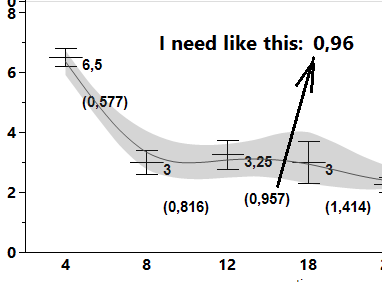
Where can I change the number of decimal places in Graph Builder (when the mean and SE were calculated automatically). I think it's around here somewhere: File->Preferences->Platforms->Graph Buider->?
Thank you in advance for your help!
2 REPLIES 2

Level IV
- Mark as New
- Bookmark
- Subscribe
- Mute
- Subscribe to RSS Feed
- Get Direct Link
- Report Inappropriate Content
回复: How to change the number of decimal places?
Hi Ted
我并没有找到关于Caption Box的任何设置,但我之前有做过如下的尝试。希望可以帮助到你。
我会在图形中单机鼠标右键,然后选择“customize”。 然后再窗口中点击“+”并选择添加一个“Text”。如图。
然后通过Text命令中的参数设置我需要的文本的位置和内容,并通过char()显示我需要的统计结果。
如,我利用“Big Class”的数据源,针对身高求取平均值。如果你需要更多的数据显示格式,可以在里面嵌入Format()。
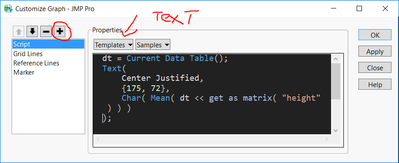
附代码如下:
dt = Current Data Table();
Text(
	Center Justified,
	{175, 72},
	Char( Mean( dt << get as matrix( "height" ) ) )
);
心若止水
Level IV
- Mark as New
- Bookmark
- Subscribe
- Mute
- Subscribe to RSS Feed
- Get Direct Link
- Report Inappropriate Content
回复: How to change the number of decimal places?
Created:
Apr 12, 2022 01:31 AM
| Last Modified: Apr 13, 2022 5:01 AM
(2323 views)
| Posted in reply to message from frank_wang 04-11-2022
Thanks frank_wang, but I got: "Graphics script reported errors in log".
So, I would like to have another way.
Recommended Articles
- © 2026 JMP Statistical Discovery LLC. All Rights Reserved.
- Terms of Use
- Privacy Statement
- Contact Us