cancel
Showing results for 
Show  only  | Search instead for 
Did you mean: 
  • Learn how to build custom Python data connectors and further customize JMP’s Data Connector Framework with the Python Data Connector Demo, available now in the JMP Marketplace!
  • See how to create experiments to support product design and ID useful product features. Register for June 12 webinar, 2pm US Eastern Time.

Discussions

Solve problems, and share tips and tricks with other JMP users.
Choose Language Hide Translation Bar

How to change order on a "compare means" chart

Hey everyone, 


Im trying to change the order on a Tukey-Kramer compare means chart and cannot figure out how.

Our response variable is a swell property, where lower swell is desired. How do I get my charts to show the lowest values at the top and largest at the bottom (specifically for a connecting letters report)? I've tried hitting 'reverse' on the value order on the columns of said variable, to no avail


Thanks

1 REPLY 1

Re: How to change order on a "compare means" chart

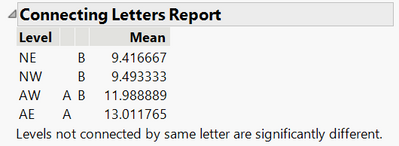
Right-click on the Connecting Letters Report table and choose Sort by Column. Choose the Mean column and check the Ascending checkbox.

Here is what a sorted report looks like on a sample dataset.


Dan_Obermiller_0-1655230281536.png


Dan Obermiller

Recommended Articles