Turn on suggestions
Auto-suggest helps you quickly narrow down your search results by suggesting possible matches as you type.
- JMP Statement Regarding Critical PHP Remote Code Execution Vulnerabilities (CVE-2026-109618, CVE-2026-109619)
- Don’t miss your chance to experience Discovery Summit Europe at our best available rate! Early bird registration through 31 Oct.
- Graph Builder Toolbar streamlines interactive graphing. Creates shortcuts on Report and GraphBuilder Helpers toolbars. Download and install the extension.
Options
- Subscribe to RSS Feed
- Mark Topic as New
- Mark Topic as Read
- Float this Topic for Current User
- Bookmark
- Subscribe
- Mute
- Printer Friendly Page
Discussions
Solve problems, and share tips and tricks with other JMP users.- User Community
- :
- Discussions
- :
- Re: How to change font size in pie chart

Level II
- Mark as New
- Bookmark
- Subscribe
- Mute
- Subscribe to RSS Feed
- Get Direct Link
- Report Inappropriate Content
How to change font size in pie chart
Created:
Jun 29, 2020 11:43 PM
| Last Modified: Jun 11, 2023 4:02 AM
(5533 views)
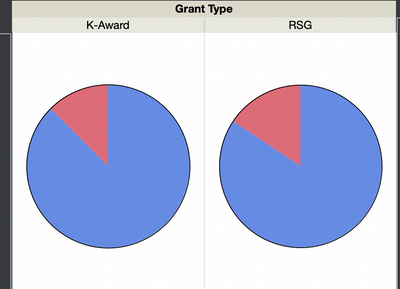
How do I change the font sizes of the titles "K-Award" and "RSG" in graph builder? How about "Grant Type"?
Thank you!
- Tags:
- Mass Customization
1 ACCEPTED SOLUTION
Accepted Solutions


Super User
Solution
- Mark as New
- Bookmark
- Subscribe
- Mute
- Subscribe to RSS Feed
- Get Direct Link
- Report Inappropriate Content
Re: How to change font size in pie chart
This is set in the Preferences for JMP. Specifically the Font preferences, for the Text font.
File==>Preferences...……….Fonts==>Text
File==>Preferences...……….Fonts==>Text
Jim
4 REPLIES 4
Super User
Solution
- Mark as New
- Bookmark
- Subscribe
- Mute
- Subscribe to RSS Feed
- Get Direct Link
- Report Inappropriate Content
Re: How to change font size in pie chart
This is set in the Preferences for JMP. Specifically the Font preferences, for the Text font.
File==>Preferences...……….Fonts==>Text
File==>Preferences...……….Fonts==>Text
Jim

Super User
- Mark as New
- Bookmark
- Subscribe
- Mute
- Subscribe to RSS Feed
- Get Direct Link
- Report Inappropriate Content
Re: How to change font size in pie chart
Another quick (and dirty trick) is to hold "CTRL" + "SHIFT" + "+" to increase the overall font size across all elements (table, plots...) in JMP
To reduce font size, hold "CTRL" + "SHIFT" + "-"
To reduce font size, hold "CTRL" + "SHIFT" + "-"
Thierry R. Sornasse


Super User (Alumni)
- Mark as New
- Bookmark
- Subscribe
- Mute
- Subscribe to RSS Feed
- Get Direct Link
- Report Inappropriate Content
Re: How to change font size in pie chart
The method that @Thierry_S suggests is great when you are doing a presentation. One thing I've never known - is there a way to reset the size (without counting the number of times you've clicked the plus sign?). Something like CTRL+Shift+0 ?
-Dave

Level XIII
- Mark as New
- Bookmark
- Subscribe
- Mute
- Subscribe to RSS Feed
- Get Direct Link
- Report Inappropriate Content
Re: How to change font size in pie chart
Recommended Articles
- © 2026 JMP Statistical Discovery LLC. All Rights Reserved.
- Terms of Use
- Privacy Statement
- Contact Us