- Discovery Summit 2026: Early User Edition - September 23-24.Register. It's free.
- Graph Builder Toolbar streamlines interactive graphing. Creates shortcuts on Report and GraphBuilder Helpers toolbars. Download and install the extension.
- Subscribe to RSS Feed
- Mark Topic as New
- Mark Topic as Read
- Float this Topic for Current User
- Bookmark
- Subscribe
- Mute
- Printer Friendly Page
Discussions
Solve problems, and share tips and tricks with other JMP users.- User Community
- :
- Discussions
- :
- Re: How to assign Multiple values to SQL variable

- Mark as New
- Bookmark
- Subscribe
- Mute
- Subscribe to RSS Feed
- Get Direct Link
- Report Inappropriate Content
How to assign Multiple values to SQL variable
Hi,
I'm trying to input multiple values from the jmp file into SQL variable. Something doesn't seem to work
User will input the following file and the columns values are stored in the variable specVal .
I declared @ SPEC = ^specVal^ (Contains 3 values ) in SQL
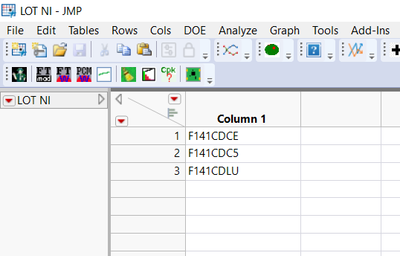
Something doesn't seem to be correct.
Names Default To Here( 1 );
Clear Globals();
Clear Log();

specVal = "";
NW = New Window( "DLT Data",
	<<Modal(),
	<<Return Result,
	Text Box( "" ),
	Spacer Box( Size( 20, 10 ) ),

	Lineup Box( N Col( 3 ), Text Box( "Lot id" ), Spacer Box( Size( 20, 20 ) ), lotnum = Text Edit Box( "F141", <<set width( 100 ) ) ),
	Panel Box( , Button Box( "Select file", dt = Open() ) ),

	Spacer Box( Size( 20, 20 ) ),
	H List Box(
		Text Box( "Start data" ),

		Start_date = Text Edit Box( "1/1/2022", <<set width( 60 ) )
	),
	Lineup Box( N Col( 2 ), Text Box( "End data" ), End_date = Text Edit Box( "", <<set width( 60 ) ) ),

	Panel Box( ,
		H List Box(
			Button Box( "OK",
				specVal = :Column 1 << Get Values;
				specVal1 = Start_date << get text();
				specVal2 = End_date << get text();
			),
			Button Box( "Cancel" )
		)
	)

,
	<<Size Window( 250, 300 )
	//Button Box( "OK", specVal = specCB << get text())
);


If( specVal != "",

	(ODBC = Create Database Connection( "DSN=xxx;;UID=xxx;PWD=;APP=JMP;WSID=xxx;DATABASE=xxx;" ) ;

	SQL =
	Eval Insert(
		"

DECLARE @SPEC1 VARCHAR (50)


SET @SPEC1 = '^specVal^'

SELECT t1.[vcLotCode]
FROM [dbo].[vSMTDatat]  t1
WHERE  (  (  (  ( t1.[vcLotCode] IN  ( @SPEC1 )  )  )  ) ;" // Input from the user
	) ;

	DT = Execute SQL( ODBC, SQL, "DLT Data" ) << Maximize window ;


	Close Database Connection( ODBC ) ;

	)
);
Thanks
Accepted Solutions


- Mark as New
- Bookmark
- Subscribe
- Mute
- Subscribe to RSS Feed
- Get Direct Link
- Report Inappropriate Content
Re: How to assign Multiple values to SQL variable
@jthi is on the right track. Print out the SQL code and try running it manually in SQL server.
I would point a variable at the data table to avoid scoping errors.
This is what your SQL code looks like:
DECLARE @SPEC1 VARCHAR (50)
SET @SPEC1 = '{"F14CDCE", "F141CDC5", "F141CDLU"}'
SELECT t1.[vcLotCode]
FROM [dbo].[vSMTDatat]  t1
WHERE  (  (  (  ( t1.[vcLotCode] IN  ( @SPEC1 )  )  )  ) ;
Will that work in SQL Server? In Oracle I create IN lists and substitute them like this:
// Point dt to your table of values
dt = New Table( "SpecValues", Add Rows( 3 ),
	New Column( "Column 1", Character, "Nominal",
		Set Values( {"F14CDCE", "F141CDC5", "F141CDLU"} ) )
);

// Relevant section to create IN list
			Button Box( "OK",
				specVal = dt:Column 1 << Get Values;
				spec_in_list = "'" || concat items(specval, "', '") || "'";
				specVal1 = Start_date << get text();
				specVal2 = End_date << get text();
			),

// SQL Code
	SQL = Eval Insert(
"SELECT t1.[vcLotCode]
   FROM [dbo].[vSMTDatat]  t1
  WHERE  (  (  (  ( t1.[vcLotCode] IN  ( ^spec_in_list^ )  )  )  ) ;" // Input from the user
	) ;
	write(sql);
- Mark as New
- Bookmark
- Subscribe
- Mute
- Subscribe to RSS Feed
- Get Direct Link
- Report Inappropriate Content
Re: How to assign Multiple values to SQL variable
Any suggestion?

- Mark as New
- Bookmark
- Subscribe
- Mute
- Subscribe to RSS Feed
- Get Direct Link
- Report Inappropriate Content
Re: How to assign Multiple values to SQL variable
I would suggest printing the SQL-query to see that it is being built as you want it to be built.
- Mark as New
- Bookmark
- Subscribe
- Mute
- Subscribe to RSS Feed
- Get Direct Link
- Report Inappropriate Content
Re: How to assign Multiple values to SQL variable
@jthi is on the right track. Print out the SQL code and try running it manually in SQL server.
I would point a variable at the data table to avoid scoping errors.
This is what your SQL code looks like:
DECLARE @SPEC1 VARCHAR (50)
SET @SPEC1 = '{"F14CDCE", "F141CDC5", "F141CDLU"}'
SELECT t1.[vcLotCode]
FROM [dbo].[vSMTDatat]  t1
WHERE  (  (  (  ( t1.[vcLotCode] IN  ( @SPEC1 )  )  )  ) ;
Will that work in SQL Server? In Oracle I create IN lists and substitute them like this:
// Point dt to your table of values
dt = New Table( "SpecValues", Add Rows( 3 ),
	New Column( "Column 1", Character, "Nominal",
		Set Values( {"F14CDCE", "F141CDC5", "F141CDLU"} ) )
);

// Relevant section to create IN list
			Button Box( "OK",
				specVal = dt:Column 1 << Get Values;
				spec_in_list = "'" || concat items(specval, "', '") || "'";
				specVal1 = Start_date << get text();
				specVal2 = End_date << get text();
			),

// SQL Code
	SQL = Eval Insert(
"SELECT t1.[vcLotCode]
   FROM [dbo].[vSMTDatat]  t1
  WHERE  (  (  (  ( t1.[vcLotCode] IN  ( ^spec_in_list^ )  )  )  ) ;" // Input from the user
	) ;
	write(sql);
- Mark as New
- Bookmark
- Subscribe
- Mute
- Subscribe to RSS Feed
- Get Direct Link
- Report Inappropriate Content
Re: How to assign Multiple values to SQL variable
I really appreciate this. Thanks a LOT
Recommended Articles
- © 2026 JMP Statistical Discovery LLC. All Rights Reserved.
- Terms of Use
- Privacy Statement
- Contact Us