- Don’t miss your chance to experience Discovery Summit Europe at our best available rate! Early bird registration through 31 Oct.
- Graph Builder Toolbar streamlines interactive graphing. Creates shortcuts on Report and GraphBuilder Helpers toolbars. Download and install the extension.
- Subscribe to RSS Feed
- Mark Topic as New
- Mark Topic as Read
- Float this Topic for Current User
- Bookmark
- Subscribe
- Mute
- Printer Friendly Page
Discussions
Solve problems, and share tips and tricks with other JMP users.- User Community
- :
- Discussions
- :
- Re: How to add a y = x reference line in Graph Builder without creating a new co...

- Mark as New
- Bookmark
- Subscribe
- Mute
- Subscribe to RSS Feed
- Get Direct Link
- Report Inappropriate Content
How to add a y = x reference line in Graph Builder without creating a new column?
Hi,
I’m trying to add a reference line like y = x in Graph Builder, but I’d like to do this without creating an additional column.
I know I can add constant reference lines (e.g., y = 100), but I couldn’t find a way to directly input a function like y = x or y = ax + b.
Is there any way to add a function-based reference line directly in Graph Builder?
Or is using a new formula column or a graphics script the only option?
Thanks in advance!


- Mark as New
- Bookmark
- Subscribe
- Mute
- Subscribe to RSS Feed
- Get Direct Link
- Report Inappropriate Content
Re: How to add a y = x reference line in Graph Builder without creating a new column?


- Mark as New
- Bookmark
- Subscribe
- Mute
- Subscribe to RSS Feed
- Get Direct Link
- Report Inappropriate Content
Re: How to add a y = x reference line in Graph Builder without creating a new column?
You can easily create a virtual column in Graph Builder and then use it in the graph.
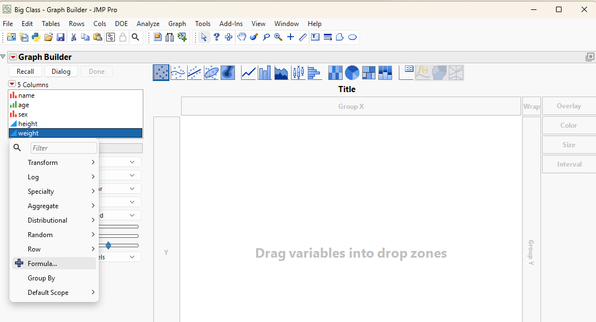
Right click in the Column selection window and select "Formula".
Set the formula to the column that is going to be your X column in the graph
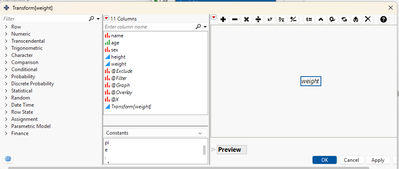
Click OK and your new virtual column will be displayed
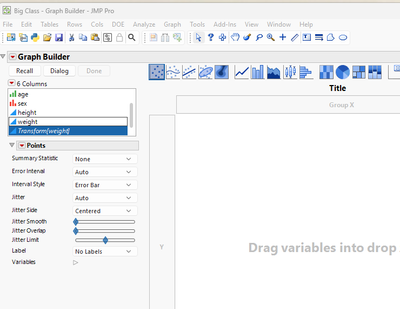
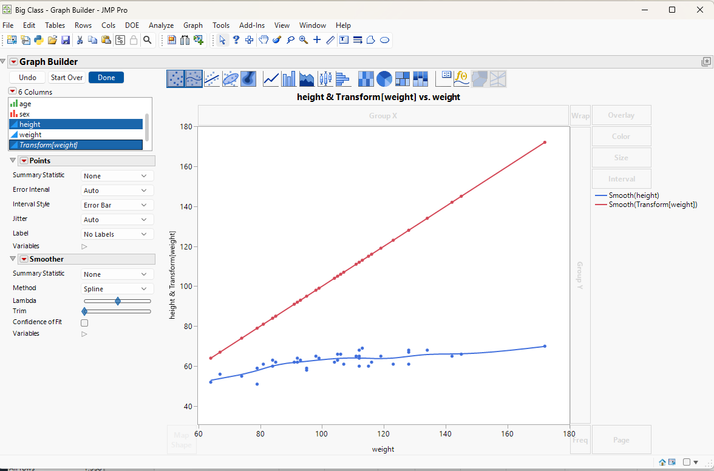
Now just drag you X column to the X drop area, and your Y column and the new virtual column to the Y drop area and you will have your graph.


- Mark as New
- Bookmark
- Subscribe
- Mute
- Subscribe to RSS Feed
- Get Direct Link
- Report Inappropriate Content
Re: How to add a y = x reference line in Graph Builder without creating a new column?
Adding to @txnelson's suggestion, note that you can rename the formula column (right click the name after building it), and then add a line chart element (right click in the graph space, add, line), and then hide the points on the 1:1 line and hide the line on the x variable (see screenshot) so you get a clean looking graph:


- Mark as New
- Bookmark
- Subscribe
- Mute
- Subscribe to RSS Feed
- Get Direct Link
- Report Inappropriate Content
Re: How to add a y = x reference line in Graph Builder without creating a new column?
Here a script to do it for a single frame chart
Recommended Articles
- © 2026 JMP Statistical Discovery LLC. All Rights Reserved.
- Terms of Use
- Privacy Statement
- Contact Us