- Subscribe to RSS Feed
- Mark Topic as New
- Mark Topic as Read
- Float this Topic for Current User
- Bookmark
- Subscribe
- Mute
- Printer Friendly Page
Discussions
Solve problems, and share tips and tricks with other JMP users.- JMP User Community
- :
- Discussions
- :
- How does JSL implement a click-to-get variable value in such a graph?

- Mark as New
- Bookmark
- Subscribe
- Mute
- Subscribe to RSS Feed
- Get Direct Link
- Report Inappropriate Content
How does JSL implement a click-to-get variable value in such a graph?
Follow the script below.
dt = Open( "$SAMPLE_DATA/Big Class.jmp" );
p1 = dt << Graph Builder(
	Variables( X( :weight ), Y( :height ), Group X( :age ), Color( :sex ) ),
	Elements( Bar( X, Y, Legend( 5 ), Response Axis( "X" ), Summary Statistic( "Sum" ) ) )
);
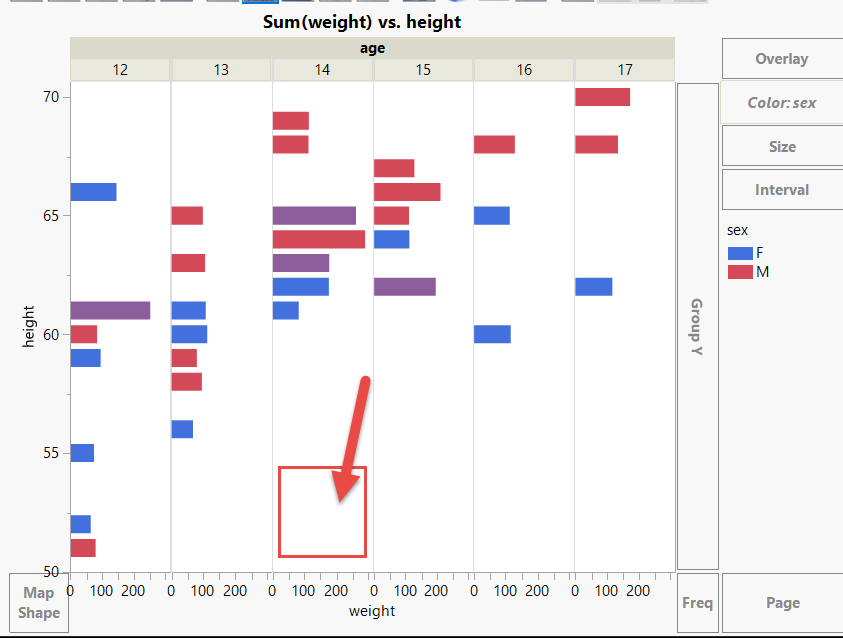
How to write JSL How to achieve in the graph by clicking on a certain age bar, get this age value?And use this value to perform subsequent operations.
Thanks!
Accepted Solutions


- Mark as New
- Bookmark
- Subscribe
- Mute
- Subscribe to RSS Feed
- Get Direct Link
- Report Inappropriate Content
回复: How does JSL implement a click-to-get variable value in such a graph?
I grabbed this
"(//OutlineBox[text()='Graph Builder']//FrameBox)"from here
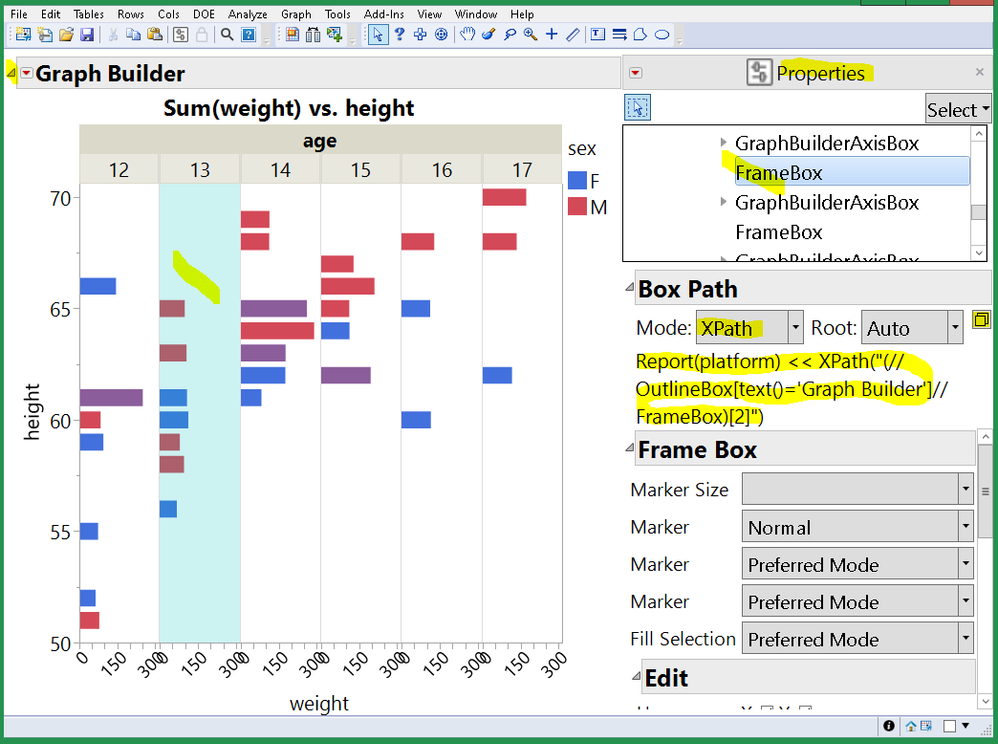
you might simplify it to
framelist = Report( p1 ) << XPath( "(//FrameBox)" );
- Mark as New
- Bookmark
- Subscribe
- Mute
- Subscribe to RSS Feed
- Get Direct Link
- Report Inappropriate Content
回复: How does JSL implement a click-to-get variable value in such a graph?
If click on the space indicated by this arrow, can get the age value =14?
It's a left mouse click, not Hover Labels.
- Mark as New
- Bookmark
- Subscribe
- Mute
- Subscribe to RSS Feed
- Get Direct Link
- Report Inappropriate Content
回复: How does JSL implement a click-to-get variable value in such a graph?
??
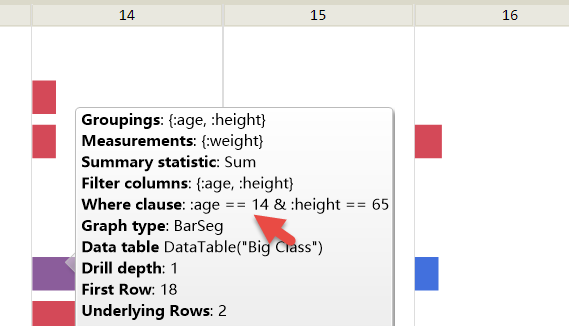
frame = (p1 << report)[FrameBox( 1 )];
frame << Set Graphlet(
	Picture(
		dataage = Parse( age:_where );//??
		d2 = Open( "$SAMPLE_DATA/Big Class Families.jmp" );
		d2 << Select Where( age == dataage );
		d3 = d2 << Subset( Output Table( "test" ), Selected Rows( 1 ), selected columns( 0 ) );
		Try( d3 << Delete Table Property( "Source" ) );

	),
	Reapply( 1 )
);- Mark as New
- Bookmark
- Subscribe
- Mute
- Subscribe to RSS Feed
- Get Direct Link
- Report Inappropriate Content
回复: How does JSL implement a click-to-get variable value in such a graph?
How to execute this JSL with a mouse click?
- Mark as New
- Bookmark
- Subscribe
- Mute
- Subscribe to RSS Feed
- Get Direct Link
- Report Inappropriate Content
回复: How does JSL implement a click-to-get variable value in such a graph?
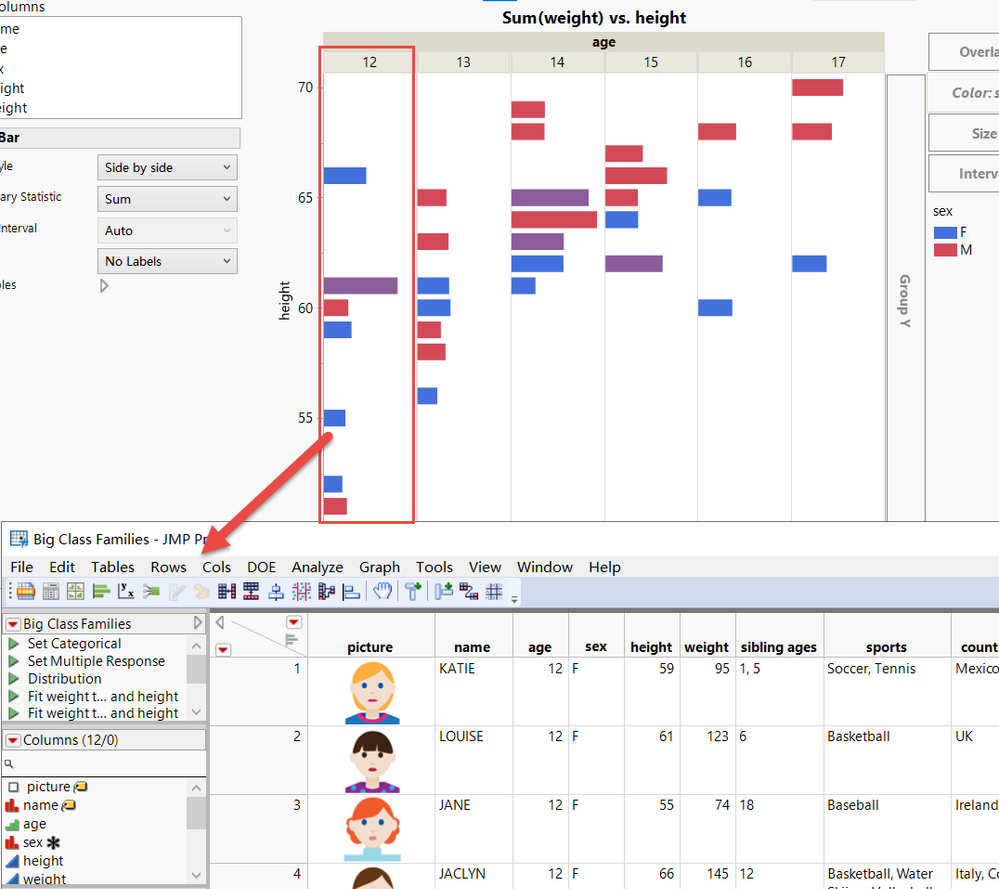
If it is triggered with Hover Labels, why can it only be triggered to open Big Class Families.jmp at age ==12?
How can I make other age columns trigger as well?
Thanks!
txt = "a";
Set Clipboard( txt );
dt = Open( "$SAMPLE_DATA/Big Class.jmp" );
p1 = dt << Graph Builder(
	Variables( X( :weight ), Y( :height ), Group X( :age ), Color( :sex ) ),
	Elements( Bar( X, Y, Legend( 5 ), Response Axis( "X" ), Summary Statistic( "Sum" ) ) )

,
	SendToReport(
		Dispatch(
			{},
			"Graph Builder",
			FrameBox,
			Set Textlet(
				Setup(
					expr = Parse( local:_where );
					a = local:_dataTable << Get Rows Where( expr );
					Set Clipboard( a[1] );
					local:r = local:_dataTable << Get Rows Where( expr );
				),
				Markup( "{local:r}rows" )
			)
		)
	)
);
txt = Get Clipboard();
frame = (p1 << report)[FrameBox( 1 )];
frame << Set Graphlet(
	Picture(
		dataage = txt; //Parse( age:_where );//??
		d2 = Open( "$SAMPLE_DATA/Big Class Families.jmp" );
		d2 << Select Where( age == dataage );
		d3 = d2 << Subset( Output Table( "test" ), Selected Rows( 1 ), selected columns( 0 ) );
		Try( d3 << Delete Table Property( "Source" ) );
	),
	Reapply( 1 )
);
- Mark as New
- Bookmark
- Subscribe
- Mute
- Subscribe to RSS Feed
- Get Direct Link
- Report Inappropriate Content
回复: How does JSL implement a click-to-get variable value in such a graph?
dt = Open( "$SAMPLE_DATA/Big Class.jmp", invisible );
p1 = dt << Graph Builder(
	Show Control Panel( 0 ),
	Variables( X( :weight ), Y( :height ), Group X( :age ), Color( :sex ) ),
	Elements( Bar( X, Y, Legend( 5 ), Response Axis( "X" ), Summary Statistic( "Sum" ) ) )
);
// this graphbuilder chart has multiple FrameBoxes. Get a list of them.
framelist = Report( p1 ) << XPath( "(//OutlineBox[text()='Graph Builder']//FrameBox)" );
// each framebox needs a graphis script with a Mousetrap to detect clicks.
For( iFrame = 1, iFrame <= N Items( framelist ), iFrame += 1,
	frame = framelist[iFrame];
	// the mousetrap needs to capture the iFrame value when it is
	// built so it can report it later; use eval(evalexpr(...expr()...))
	Eval(
		Eval Expr(
			frame << Addgraphicsscript(
				Mousetrap(
					{/*nothing on mouse drag, it happens a lot*/}//
				, // but on mouse up, do something. MouseUp only happens once per click.
					xx = x;
					yy = y;
					Show( xx, yy, Expr( iFrame ) );
					// run your script here
				)
			)
		)
	);
);- Mark as New
- Bookmark
- Subscribe
- Mute
- Subscribe to RSS Feed
- Get Direct Link
- Report Inappropriate Content
回复: How does JSL implement a click-to-get variable value in such a graph?
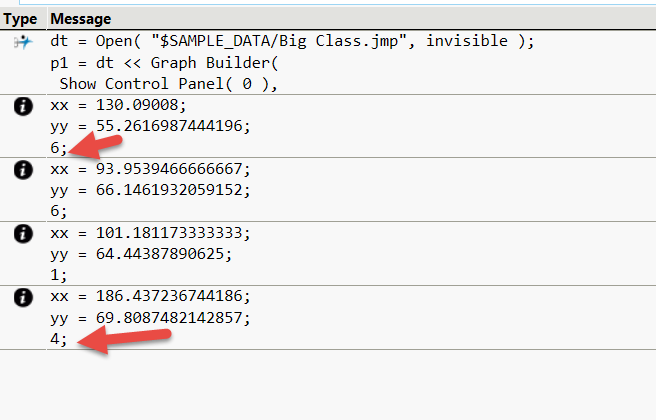
Thanks Experts!
Very amazing, have seen xx, yy and Expr(iFrame) changes.
- Mark as New
- Bookmark
- Subscribe
- Mute
- Subscribe to RSS Feed
- Get Direct Link
- Report Inappropriate Content
回复: How does JSL implement a click-to-get variable value in such a graph?
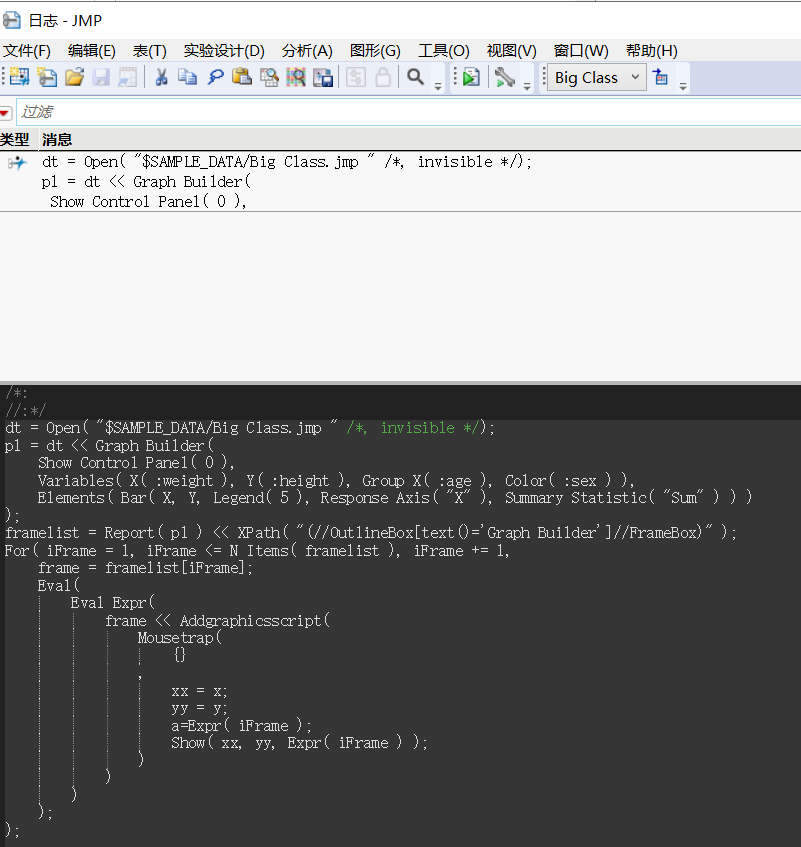
But why doesn't this script work in the Chinese version of JMP Pro 17.0?
win10
Thanks!
- Mark as New
- Bookmark
- Subscribe
- Mute
- Subscribe to RSS Feed
- Get Direct Link
- Report Inappropriate Content
回复: How does JSL implement a click-to-get variable value in such a graph?
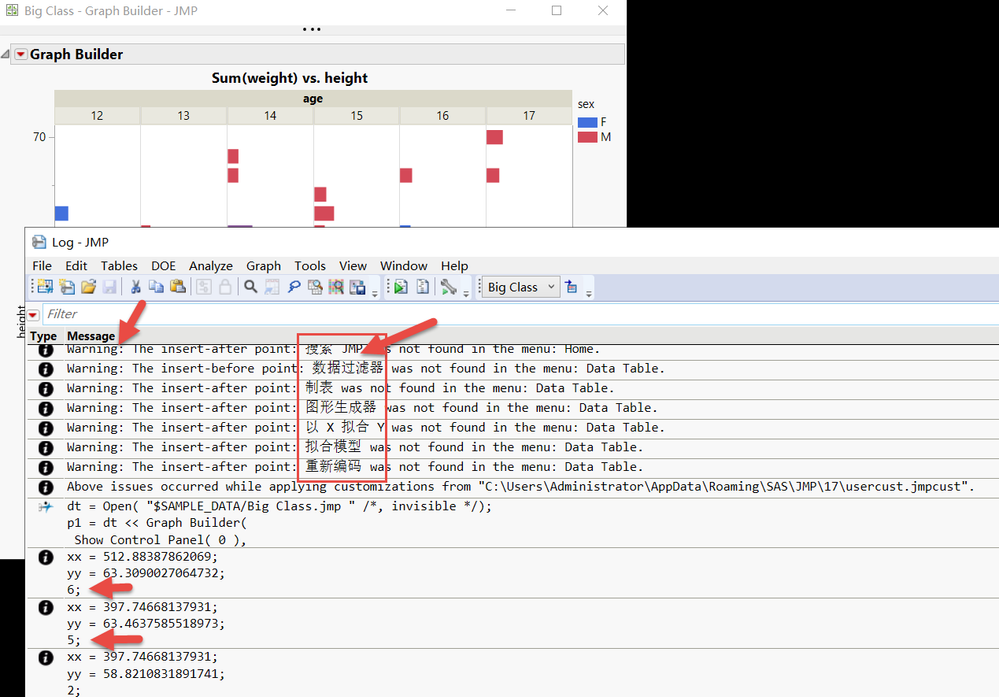
Set my version 17 of JMP to English.
It works, but there will be Chinese in the log?
Thanks!
- Mark as New
- Bookmark
- Subscribe
- Mute
- Subscribe to RSS Feed
- Get Direct Link
- Report Inappropriate Content
回复: How does JSL implement a click-to-get variable value in such a graph?
I grabbed this
"(//OutlineBox[text()='Graph Builder']//FrameBox)"from here
you might simplify it to
framelist = Report( p1 ) << XPath( "(//FrameBox)" );
Recommended Articles
- © 2026 JMP Statistical Discovery LLC. All Rights Reserved.
- Terms of Use
- Privacy Statement
- Contact Us