- Don’t miss your chance to experience Discovery Summit Europe at our best available rate! Early bird registration through 31 Oct.
- Graph Builder Toolbar streamlines interactive graphing. Creates shortcuts on Report and GraphBuilder Helpers toolbars. Download and install the extension.
- Subscribe to RSS Feed
- Mark Topic as New
- Mark Topic as Read
- Float this Topic for Current User
- Bookmark
- Subscribe
- Mute
- Printer Friendly Page
Discussions
Solve problems, and share tips and tricks with other JMP users.- User Community
- :
- Discussions
- :
- How do you write a column formula which can group by rows defined by another col...

- Mark as New
- Bookmark
- Subscribe
- Mute
- Subscribe to RSS Feed
- Get Direct Link
- Report Inappropriate Content
How do you write a column formula which can group by rows defined by another column?
Hi,
I would like to be able to write column formulae which can perform various column formula functions within groups defined by rows in, for example, a column called 'group'. There are various mentions of the 'group by' button when using gemini, but I cannot find this.
For example, I would like to calculate the first cycle in the below table when the retention first passes 60 % (cycle where retention <= 60 %) for each group, A, B, and C.
How can I go about doing this? Thanks for the help :)
My JMP version is JMP18 .

Accepted Solutions


- Mark as New
- Bookmark
- Subscribe
- Mute
- Subscribe to RSS Feed
- Get Direct Link
- Report Inappropriate Content
Re: How do you write a column formula which can group by rows defined by another column?
Here are few examples using my example table
Column 4:
:C[Col Min(If(:R <= 60, Row(), .), :G)]If your data is always in order (by Cycle and Retention) and Retention always reaches 60, using :C[] could be unnecessary and you could calculate the row in "reverse" by calculating how many items are above 60, Column 5:
Col Sum(:R > 60, :G) + 1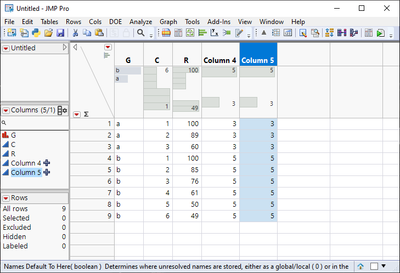
Edit: You could also combine Col Min and Col Number
m = Col Sum(:R <= 60, :G);
If(m > 0,
	Col Number(:G, :G) - m + 1;
,
	.
);

- Mark as New
- Bookmark
- Subscribe
- Mute
- Subscribe to RSS Feed
- Get Direct Link
- Report Inappropriate Content
Re: How do you write a column formula which can group by rows defined by another column?
Here's what I came up with.
g = :Group[Row()];
Min( :Cycle[Where( :Group == g & :Retention <= 60 )] );- Mark as New
- Bookmark
- Subscribe
- Mute
- Subscribe to RSS Feed
- Get Direct Link
- Report Inappropriate Content
Re: How do you write a column formula which can group by rows defined by another column?
Here are few examples using my example table
Column 4:
:C[Col Min(If(:R <= 60, Row(), .), :G)]If your data is always in order (by Cycle and Retention) and Retention always reaches 60, using :C[] could be unnecessary and you could calculate the row in "reverse" by calculating how many items are above 60, Column 5:
Col Sum(:R > 60, :G) + 1
Edit: You could also combine Col Min and Col Number
m = Col Sum(:R <= 60, :G);
If(m > 0,
	Col Number(:G, :G) - m + 1;
,
	.
);
Recommended Articles
- © 2026 JMP Statistical Discovery LLC. All Rights Reserved.
- Terms of Use
- Privacy Statement
- Contact Us