- Don’t miss your chance to experience Discovery Summit Europe at our best available rate! Early bird registration through 31 Oct.
- Image to Table JMP extension imports single or batch images as data tables. Useful to extract curves from pictures or convert image data to curve data to use in analyses like Functional Data Explorer. Download and install the extension.
- Subscribe to RSS Feed
- Mark Topic as New
- Mark Topic as Read
- Float this Topic for Current User
- Bookmark
- Subscribe
- Mute
- Printer Friendly Page
Discussions
Solve problems, and share tips and tricks with other JMP users.- User Community
- :
- Discussions
- :
- How do I update a script for variability table to draw reference lines that ref...

- Mark as New
- Bookmark
- Subscribe
- Mute
- Subscribe to RSS Feed
- Get Direct Link
- Report Inappropriate Content
How do I update a script for variability table to draw reference lines that refer to data filter settings?
Hello,
I am working on a Variability Chart where I have continuous data that I am plotting by subgroup. I have 3 temperature bands of data "1C to 13C", "16C to 28C" and "30C to 45C". I would like to have reference lines drawn for each filter category I select in the data, there are 3 different reference lines groups.
See the attached file and Variability script.
I am relatively new to scripting. I have seen how the JMP scripting command allows you to write the command for each reference line. I want to make the command dynamic based on what is selected by the data filter. (bold underlined section of the script.
Please advise,
Thanks
Matt
New Window( "Sample set 1 - Variability Chart by Lot",
	V List Box(
		Variability Chart(
			Y( :Test 1 ),
			X( :Lot ),
			Std Dev Chart( 0 ),
			Local Data Filter( Add Filter( columns( :Temp Band 2 ) ) ),
			SendToReport(
				Dispatch(
					{"Variability Chart for Test 1"},
					"2",
					ScaleBox,
					{Min( 0.814090277777778 ), Max( 1.13166666666667 ), Inc( 0.05 ),
					Minor Ticks( 1 ), Add Ref Line(
						0, "Dotted", "Medium Light Gray", "", 1
					), Add Ref Line( 1.1, "Solid", "Black", "", 1 ),
					Add Ref Line( 0.9, "Solid", "Black", "", 1 )}
				)
			)
		),
		Variability Chart(
			Y( :Test 2 ),
			X( :Lot ),
			Std Dev Chart( 0 ),
			Local Data Filter( Add Filter( columns( :Temp Band 2 ) ) )
		),
		Variability Chart(
			Y( :Test3 ),
			X( :Lot ),
			Std Dev Chart( 0 ),
			Local Data Filter( Add Filter( columns( :Temp Band 2 ) ) )
		)
	)
)


- Mark as New
- Bookmark
- Subscribe
- Mute
- Subscribe to RSS Feed
- Get Direct Link
- Report Inappropriate Content
Re: How do I update a script for variability table to draw reference lines that refer to data filter settings?
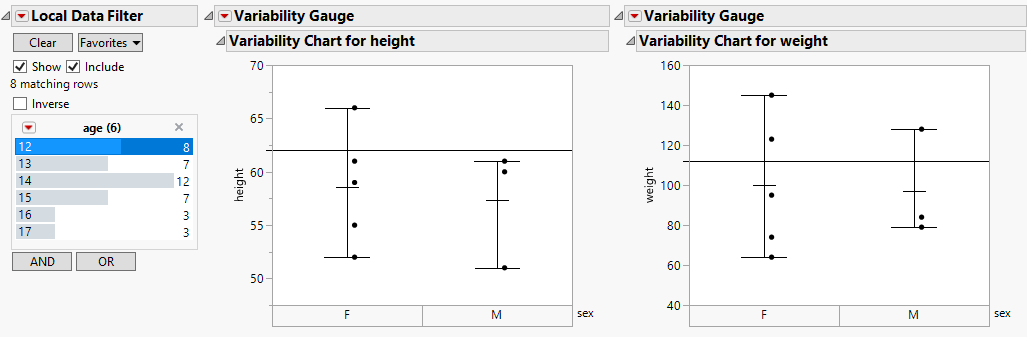
Hi @mcastner, I would say you picked a fairly complicated task to start scripting! Below is a way to do what you asked (if I interpreted you correctly), but I wonder if you could make this easier by using graph builder to draw a box plot and line at the same time. How do you come up with values for the reference lines? Any chance that is a summary of the available data (median, quantile, etc), or could you do that in a formula column?
Names default to here(1);

dt = Open( "$Sample_data/big class.jmp" );

//Valeus for ref lines - hopefully populated by your script
reflines = Associative Array({
	{"height",
		Associative Array({
			{ 12, 62 },
			{ 13, 63 },
			{ 14, 64 },
			{ 15, 65 },
			{ 16, 66 },
			{ 17, 67 }
		})
	},
	{"weight",
		Associative Array({
			{ 12, 112 },
			{ 13, 113 },
			{ 14, 114 },
			{ 15, 115 },
			{ 16, 116 },
			{ 17, 117 }
		})
	}
});

//A window with a single data filter that will be applied to all graphs inside it
New Window("charts",
	Data Filter Context Box(
		H List Box(
			ldf = dt << Data Filter( Local,
				Add Filter(
					columns( :age ),
					Where( :age == 13 ),
					Display( :age, N Items( 6 ) )
				),
				Mode( Select( 0 ), Show( 1 ), Include( 1 ) )
			),
			vc1 = Variability Chart(
				Y( :height ),
				X( :sex )
			);
			vc2 = Variability Chart(
				Y( :weight ),
				X( :sex )
			);
		)
	)
);

//Function that is called when data filter changes and when the window is first opened, this will redraw lines on charts
UpdateRefLines = function({},

	//find out what ages were selected, there is probably a better way to do this too
	filteredagelast = filteredage;
	filteredage = median(dt:age[ldf << get filtered rows()]);

	//detect if there was a change in the age (prevents flickering of the screen)
	if(is missing(filteredagelast) | (filteredagelast != filteredage),

		//remove any existing ref lines
		(vc1 << XPath("//AxisBox[@charID=2]"))[1] << Revert Axis;
		(vc2 << XPath("//AxisBox[@charID=2]"))[1] << Revert Axis;

		//draw new lines
		(vc1 << XPath("//ScaleBox[@ID=2]")) << Add Ref Line( reflines["height"][FilteredAge], "Solid", "Black", "", 1 );
		(vc2 << XPath("//ScaleBox[@ID=2]")) << Add Ref Line( reflines["weight"][FilteredAge], "Solid", "Black", "", 1 );
	)
);

//function called when data filter changes, here it only redraws reference lines
UpdatesOnRowStateChanges = function({x}, if(is matrix(x), UpdateRefLines ) );

//variable used to keep track of the last filter applied
filteredage = .;

//Assign function to data filter
rsh = vc1 << Make Row State Handler( dt, UpdatesOnRowStateChanges );

//draw initial reference lines
UpdateRefLines();
Recommended Articles
- © 2026 JMP Statistical Discovery LLC. All Rights Reserved.
- Terms of Use
- Privacy Statement
- Contact Us