- Don’t miss your chance to experience Discovery Summit Europe at our best available rate! Early bird registration through 31 Oct.
- Graph Builder Toolbar streamlines interactive graphing. Creates shortcuts on Report and GraphBuilder Helpers toolbars. Download and install the extension.
- Subscribe to RSS Feed
- Mark Topic as New
- Mark Topic as Read
- Float this Topic for Current User
- Bookmark
- Subscribe
- Mute
- Printer Friendly Page
Discussions
Solve problems, and share tips and tricks with other JMP users.- User Community
- :
- Discussions
- :
- Re: How do I sort data individually in a column when the data is given as a grou...

- Mark as New
- Bookmark
- Subscribe
- Mute
- Subscribe to RSS Feed
- Get Direct Link
- Report Inappropriate Content
How do I sort data individually in a column when the data is given as a group?
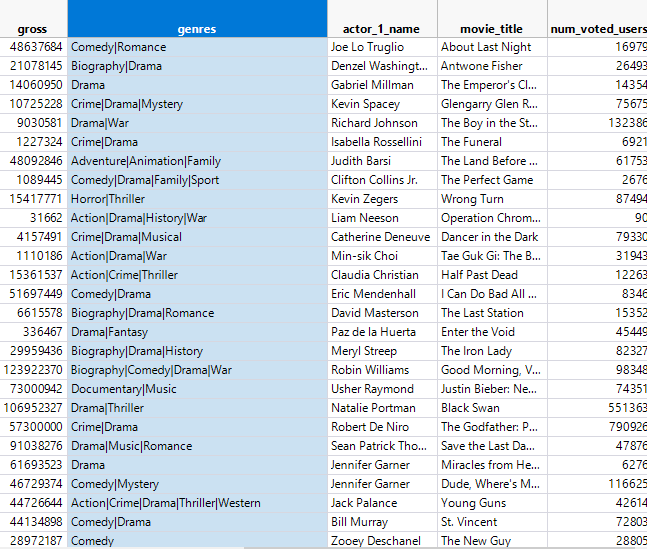
The data I am looking at is movies and one of the columns is genres. However JMP has the genres that a particular movie is categorized under grouped as one data set "Fantasy|Horror|Romance|Thriller" rather than as individual movie genres "Fantasy", "Horror", "Romance", "Thriller". I want to separate the genre column so that I can analyze the genres individually. How would I clean the data so that when I go to sort the movies based on genre it gives me the individual genre rather than the grouped set?
Accepted Solutions


- Mark as New
- Bookmark
- Subscribe
- Mute
- Subscribe to RSS Feed
- Get Direct Link
- Report Inappropriate Content
Re: How do I sort data individually in a column when the data is given as a group?
Click on the column header for the column in question(genres). Then go to the column pull down menu and select
Cols=>Utilities=>Text to Columns
Fill out the simple dialog box that pops up to specify your "|"
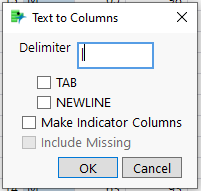
and click OK, and the different fields from the multiple field column will be separated into new columns.
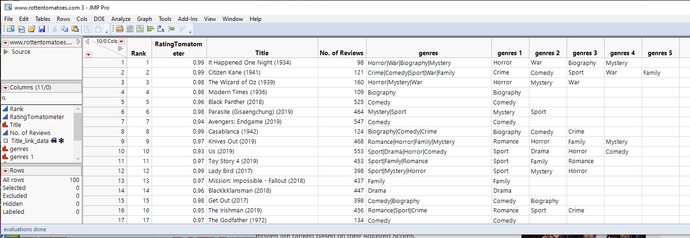
Note: This is a data table I just threw together. The genres are just random values
Now just go to
Tables=>Stack
and stack all of the new genres columns
This will give you a table that actually will give you a nice way to select Genres.
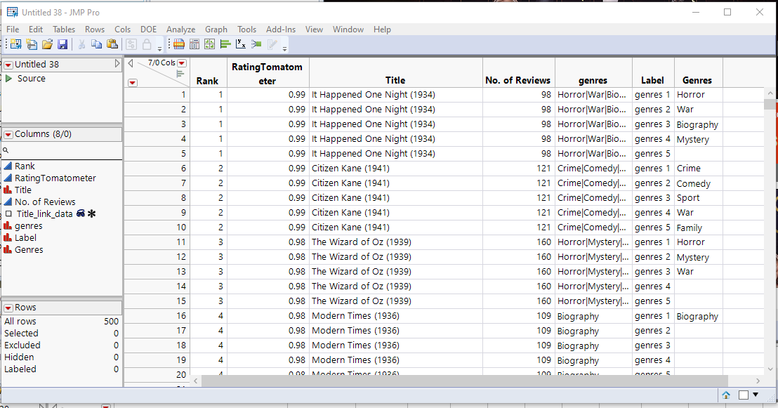
You can also go another step, and split the data
Tables=>Split
Where you Split By the Genres column, Group by the Title column, and also specify the Genres column as the Split column
It will give you a data table like the one below
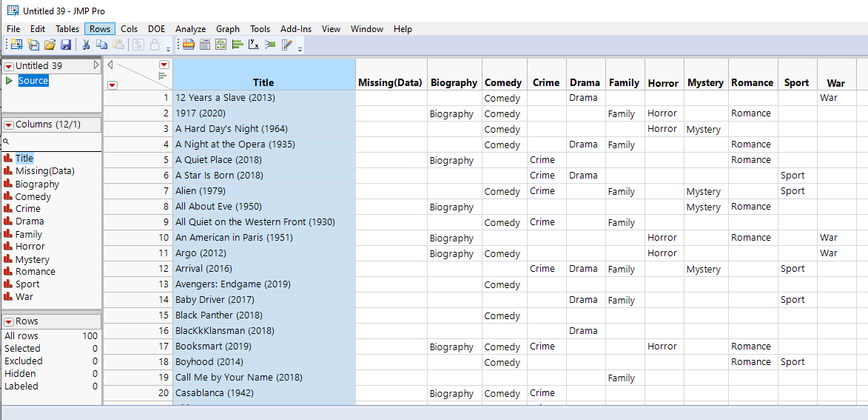
If this doesn't meet your requirements, please specify what you want the data table to look like, and I am sure the Community can come up with an answer on how to transform your data.
- Mark as New
- Bookmark
- Subscribe
- Mute
- Subscribe to RSS Feed
- Get Direct Link
- Report Inappropriate Content
Re: How do I sort data individually in a column when the data is given as a group?
Click on the column header for the column in question(genres). Then go to the column pull down menu and select
Cols=>Utilities=>Text to Columns
Fill out the simple dialog box that pops up to specify your "|"
and click OK, and the different fields from the multiple field column will be separated into new columns.
Note: This is a data table I just threw together. The genres are just random values
Now just go to
Tables=>Stack
and stack all of the new genres columns
This will give you a table that actually will give you a nice way to select Genres.
You can also go another step, and split the data
Tables=>Split
Where you Split By the Genres column, Group by the Title column, and also specify the Genres column as the Split column
It will give you a data table like the one below
If this doesn't meet your requirements, please specify what you want the data table to look like, and I am sure the Community can come up with an answer on how to transform your data.
Recommended Articles
- © 2026 JMP Statistical Discovery LLC. All Rights Reserved.
- Terms of Use
- Privacy Statement
- Contact Us