cancel
Showing results for 
Show  only  | Search instead for 
Did you mean: 
  • JMP will suspend normal business operations for our Winter Holiday beginning on Wednesday, Dec. 24, 2025, at 5:00 p.m. ET (2:00 p.m. ET for JMP Accounts Receivable).
    Regular business hours will resume at 9:00 a.m. EST on Friday, Jan. 2, 2026.
  • We’re retiring the File Exchange at the end of this year. The JMP Marketplace is now your destination for add-ins and extensions.

Discussions

Solve problems, and share tips and tricks with other JMP users.
%3CLINGO-SUB%20id%3D%22lingo-sub-542335%22%20slang%3D%22en-US%22%20mode%3D%22NONE%22%3ECome%20faccio%20ad%20aggiungere%20una%20casella%20di%20testo%20a%20un%20rapporto%20Web%3F%3C%2FLINGO-SUB%3E%3CLINGO-BODY%20id%3D%22lingo-body-542335%22%20slang%3D%22en-US%22%20mode%3D%22NONE%22%3E%3CP%3ECiao%2C%3C%2FP%3E%3CP%3E%3CFONT%20size%3D%222%22%3EVorrei%20aggiungere%20una%20casella%20di%20testo%20nella%20parte%20superiore%20del%20rapporto%20che%20descrive%20il%3C%2FFONT%3E%3CFONT%20size%3D%222%22%3E%20contenuto%20della%20relazione%20sulla%20pagina%20web.%3C%2FFONT%3E%3C%2FP%3E%3CP%3E%3CFONT%20size%3D%222%22%3EVoglio%20inserire%20la%20descrizione%20del%20testo%20in%20cui%20la%20freccia%20rossa%20%C3%A8%20---%26gt%3B%20%C3%A8%20sullo%20schermo.%3C%2FFONT%3E%3CFONT%20size%3D%222%22%3ESiamo%20spiacenti%2C%20proprio%20non%20riesco%20a%20trovare%20l'appropriato%3C%2FFONT%3E%3CFONT%20size%3D%222%22%3E%20JSL%20per%20raggiungere%20questo%20obiettivo.%3C%2FFONT%3E%3CFONT%20size%3D%222%22%3EEsecuzione%20di%20JMP%2015.2.1%3C%2FFONT%3E%3CFONT%20size%3D%222%22%3E%20Grazie%2C%20Ricco%3C%2FFONT%3E%3C%2FP%3E%3CPRE%3E%3CCODE%20class%3D%22%20language-jsl%22%3Edt1%20%3D%20Open(%20%22C%3A%5CPublic%5Cgsod%5Cgis_873950_detail_t.csv%22%20%2C%20invisible%20)%3B%0ACurrent%20Data%20Table(%20dt1%20)%3B%0ASidebySide%20%3D%20Fit%20Group(%0ABivariate(%0AY(%20%3AAverage%20Temperature%20)%2C%0AX(%20%3AYear%20)%2C%0AFit%20Mean(%20%7BLine%20Color(%20%7B212%2C%2073%2C%2088%7D%20)%7D%20)%2C%0AFit%20Line(%20%7BLine%20Color(%20%7B61%2C%20174%2C%2070%7D%20)%7D%20)%2C%0ASendToReport(%0ADispatch(%20%7B%7D%2C%20%22Bivariate%20Plot%20Average%20Temperature%20by%20Year%22%2C%20FrameBox%2C%20%7BFrame%20Size(%20370%2C%20240%20)%7D%20)%0A)%0A)%2C%0AOneway(%20Y(%20%3AAverage%20Temperature%20)%2C%20X(%20%3Aco_2%20)%2C%20Means(%201%20)%2C%20Mean%20Diamonds(%201%20)%20)%2C%0A%26lt%3B%26lt%3B%7BArrange%20in%20Rows(%202%20)%7D%0A)%3B%0A%0Areport(%20SidebySide%20)%5BOutline%20Box(1)%5D%20%26lt%3B%26lt%3B%20set%20title(%22USAF%3A%20873950%20COMODORO%20PIERRESTEGUI%2C%20AR%2031.3%20S%2058.0%20W%22)%3B%0Areport(%20SidebySide%20)%5BOutline%20Box(2)%5D%20%26lt%3B%26lt%3B%20set%20title(%22Bivariate%20Fit%20of%20Average%20Temperature%20By%20Year%22%20)%3B%0Areport(%20SidebySide%20)%5BOutline%20Box(9)%5D%20%26lt%3B%26lt%3B%20set%20title(%22Oneway%20Analysis%20of%20Average%20Temperature%20By%20co_2%22%20)%3B%0AReportSidebySide%20%3D%20SidebySide%20%26lt%3B%26lt%3B%20report%3B%0AReportSidebySide%20%26lt%3B%26lt%3B%20Save%20Interactive%20HTML%20(%20%22C%3A%5CPublic%5CgsodReports%5CCOMODORO_PIERRESTEGUI_AR_873950.t_mean.WIP.htm%22%20)%3B%0Aclose(%20dt1%20%2C%20%22nosave%22%20)%3B%3C%2FCODE%3E%3C%2FPRE%3E%3C%2FLINGO-BODY%3E%3CLINGO-LABS%20id%3D%22lingo-labs-542335%22%20slang%3D%22en-US%22%20mode%3D%22NONE%22%3E%3CLINGO-LABEL%3ESceneggiatura%3C%2FLINGO-LABEL%3E%3C%2FLINGO-LABS%3E%3CLINGO-SUB%20id%3D%22lingo-sub-542354%22%20slang%3D%22en-US%22%20mode%3D%22NONE%22%3ERe%3A%20Come%20si%20aggiunge%20una%20casella%20di%20testo%20a%20un%20report%20Web%3F%3C%2FLINGO-SUB%3E%3CLINGO-BODY%20id%3D%22lingo-body-542354%22%20slang%3D%22en-US%22%20mode%3D%22NONE%22%3E%3CP%3EDevi%20inserire%20la%20casella%20di%20testo%20prima%20della%20prima%20casella%20di%20contorno.%20Una%20cosa%20che%20potresti%20provare%2C%20%C3%A8%20costruire%20il%20rapporto%20in%20una%20nuova%20finestra%20(oppure%20potresti%20usare%20ad%20esempio%20Sib%20%26lt%3B%26lt%3B%20Anteponi%2C%20ma%3CSTRONG%3E%20Vorrei%20costruire%20il%20rapporto%20con%20Nuova%20finestra%3C%2FSTRONG%3E%20)%3C%2FP%3E%0A%3CPRE%3E%3CCODE%20class%3D%22%20language-jsl%22%3ENames%20Default%20To%20Here(1)%3B%0Adt%20%3D%20Open(%22%24SAMPLE_DATA%2FBig%20Class.jmp%22)%3B%0A%0Anw%20%3D%20New%20Window(%22HTML%20WINDOW%20NAME%22%2C%0A%20V%20List%20Box(%0A%20%20Text%20Box(%22Text%20here%22)%2C%0A%20%20biv%20%3D%20dt%20%26lt%3B%26lt%3B%20Bivariate(Y(%3AHeight)%2C%20X(%3AWeight))%3B%0A%20)%3B%0A)%3B%0AReport(biv)%5BOutlineBox(1)%5D%20%26lt%3B%26lt%3B%20Set%20Title(%22New%20title%22)%3B%0A%0Anw%20%26lt%3B%26lt%3B%20Save%20Interactive%20HTML(%22%24TEMP%2Fdeleteme1.html%22)%3B%0Aopen(%22%24TEMP%22)%3B%0Anw%20%26lt%3B%26lt%3B%20close%20window(1)%3B%0A%0Astop()%3B%0Abiv%20%3D%20dt%20%26lt%3B%26lt%3B%20Bivariate(Y(%3AHeight)%2C%20X(%3AWeight))%3B%0Aob_ref%20%3D%20Report(biv)%5BOutlineBox(1)%5D%3B%0Aob_ref%20%26lt%3B%26lt%3B%20Set%20Title(%22New%20title%22)%3B%0Aob_ref%20%26lt%3B%26lt%3B%20Sib%20Prepend(Text%20Box(%22TEXT%20HERE%22))%3B%0A(biv%20%26lt%3B%26lt%3B%20top%20parent)%20%26lt%3B%26lt%3B%20Save%20Interactive%20HTML(%22%24TEMP%2Fdeleteme2.html%22)%3B%0A%3C%2FCODE%3E%3C%2FPRE%3E%0A%3CP%3E%3CCODE%20class%3D%22%20language-jsl%22%3E%3C%2FCODE%3E%3C%2FP%3E%0A%3CP%3E%3CSPAN%20class%3D%22lia-inline-image-display-wrapper%20lia-image-align-inline%22%20image-alt%3D%22jthi_0-1662658150233.png%22%20style%3D%22width%3A%20400px%3B%22%3E%3CSPAN%20class%3D%22lia-inline-image-display-wrapper%22%20image-alt%3D%22jthi_0-1662658150233.png%22%20style%3D%22width%3A%20400px%3B%22%3E%3CSPAN%20class%3D%22lia-inline-image-display-wrapper%22%20image-alt%3D%22jthi_0-1662658150233.png%22%20style%3D%22width%3A%20400px%3B%22%3E%3CSPAN%20class%3D%22lia-inline-image-display-wrapper%22%20image-alt%3D%22jthi_0-1662658150233.png%22%20style%3D%22width%3A%20400px%3B%22%3E%3CSPAN%20class%3D%22lia-inline-image-display-wrapper%22%20image-alt%3D%22jthi_0-1662658150233.png%22%20style%3D%22width%3A%20400px%3B%22%3E%3CSPAN%20class%3D%22lia-inline-image-display-wrapper%22%20image-alt%3D%22jthi_0-1662658150233.png%22%20style%3D%22width%3A%20400px%3B%22%3E%3CSPAN%20class%3D%22lia-inline-image-display-wrapper%22%20image-alt%3D%22jthi_0-1662658150233.png%22%20style%3D%22width%3A%20400px%3B%22%3E%3CSPAN%20class%3D%22lia-inline-image-display-wrapper%22%20image-alt%3D%22jthi_0-1662658150233.png%22%20style%3D%22width%3A%20400px%3B%22%3E%3Cspan%20class%3D%22lia-inline-image-display-wrapper%22%20image-alt%3D%22jthi_0-1662658150233.png%22%20style%3D%22width%3A%20400px%3B%22%3E%3Cimg%20src%3D%22https%3A%2F%2Fcommunity.jmp.com%2Ft5%2Fimage%2Fserverpage%2Fimage-id%2F45311iDB3BA761BAE227B7%2Fimage-size%2Fmedium%3Fv%3Dv2%26amp%3Bpx%3D400%22%20role%3D%22button%22%20title%3D%22jthi_0-1662658150233.png%22%20alt%3D%22jthi_0-1662658150233.png%22%20%2F%3E%3C%2Fspan%3E%3C%2FSPAN%3E%3C%2FSPAN%3E%3C%2FSPAN%3E%3C%2FSPAN%3E%3C%2FSPAN%3E%3C%2FSPAN%3E%3C%2FSPAN%3E%3C%2FSPAN%3E%3C%2FP%3E%0A%3CP%3E%26nbsp%3B%3C%2FP%3E%3C%2FLINGO-BODY%3E%3CLINGO-SUB%20id%3D%22lingo-sub-542805%22%20slang%3D%22en-US%22%20mode%3D%22NONE%22%3ERe%3A%20Come%20si%20aggiunge%20una%20casella%20di%20testo%20a%20un%20report%20Web%3F%3C%2FLINGO-SUB%3E%3CLINGO-BODY%20id%3D%22lingo-body-542805%22%20slang%3D%22en-US%22%20mode%3D%22NONE%22%3E%3CP%3EEcco%20un%20rapido%20esempio%20su%20Big%20Class%3A%3C%2FP%3E%3CPRE%3E%3CCODE%20class%3D%22%20language-jsl%22%3EOpen(%22%24SAMPLE_DATA%5CBig%20Class.jmp%22)%3B%0ASidebySide%20%3D%20Fit%20Group(%0A%20biv%20%20%3D%20Bivariate(%0A%20%20Y(%20%3Aweight%20)%2C%0A%20%20X(%20%3Aheight%20)%2C%0A%20%20Fit%20Mean(%20%7BLine%20Color(%20%7B212%2C%2073%2C%2088%7D%20)%7D%20)%2C%0A%20%20Fit%20Line(%20%7BLine%20Color(%20%7B61%2C%20174%2C%2070%7D%20)%7D%20)%2C%0A%20%20By(%20%3Asex%20)%0A%20)%2C%0A%20Oneway(%20Y(%20%3Aheight%20)%2C%20X(%20%3Asex%20)%2C%20Mean%20Diamonds(%201%20)%20)%2C%0A%20%26lt%3B%26lt%3B%7BArrange%20in%20Rows(%202%20)%7D%0A)%3B%0A%0AReport(SidebySide)%5BOutlineBox(1)%5D%20%26lt%3B%26lt%3B%20prepend(Text%20box(%22Your%20text%20description%22))%3B%3C%2FCODE%3E%3C%2FPRE%3E%3C%2FLINGO-BODY%3E
Choose Language Hide Translation Bar
RichPletcher
Level I

How do I pre-append a text box to a web report?

Hello,  

I would like to add a text box at the top of the report that describes the contents of the report on the web page. 

I want to insert the text description where the red arrow is ---> is on the screen shot.   Sorry, just can't seem to find the appropriate JSL to accomplish this.   Running JMP 15.2.1 Thanks, Rich

dt1 = Open( "C:\Public\gsod\gis_873950_detail_t.csv" , invisible );
Current Data Table( dt1 );
SidebySide = Fit Group(
Bivariate(
Y( :Average Temperature ),
X( :Year ),
Fit Mean( {Line Color( {212, 73, 88} )} ),
Fit Line( {Line Color( {61, 174, 70} )} ),
SendToReport(
Dispatch( {}, "Bivariate Plot Average Temperature by Year", FrameBox, {Frame Size( 370, 240 )} )
)
),
Oneway( Y( :Average Temperature ), X( :co_2 ), Means( 1 ), Mean Diamonds( 1 ) ),
<<{Arrange in Rows( 2 )}
);

report( SidebySide )[Outline Box(1)] << set title("USAF: 873950 COMODORO PIERRESTEGUI, AR 31.3 S 58.0 W");
report( SidebySide )[Outline Box(2)] << set title("Bivariate Fit of Average Temperature By Year" );
report( SidebySide )[Outline Box(9)] << set title("Oneway Analysis of Average Temperature By co_2" );
ReportSidebySide = SidebySide << report;
ReportSidebySide << Save Interactive HTML ( "C:\Public\gsodReports\COMODORO_PIERRESTEGUI_AR_873950.t_mean.WIP.htm" );
close( dt1 , "nosave" );
2 REPLIES 2

jthi
Super User

Re: How do I pre-append a text box to a web report?

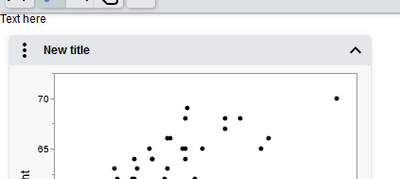
You have to insert text box before the first outline box. One thing you could try, is to build the report into a new window (or you could use for example Sib << Prepend, but I would build the report with New Window)

Names Default To Here(1);
dt = Open("$SAMPLE_DATA/Big Class.jmp");

nw = New Window("HTML WINDOW NAME",
	V List Box(
		Text Box("Text here"),
		biv = dt << Bivariate(Y(:Height), X(:Weight));
	);
);
Report(biv)[OutlineBox(1)] << Set Title("New title");

nw << Save Interactive HTML("$TEMP/deleteme1.html");
open("$TEMP");
nw << close window(1);

stop();
biv = dt << Bivariate(Y(:Height), X(:Weight));
ob_ref = Report(biv)[OutlineBox(1)];
ob_ref << Set Title("New title");
ob_ref << Sib Prepend(Text Box("TEXT HERE"));
(biv << top parent) << Save Interactive HTML("$TEMP/deleteme2.html");
jthi_0-1662658150233.png


-Jarmo
pauldeen
Level VI

Re: How do I pre-append a text box to a web report?

Here is a quick example on Big Class:

Open("$SAMPLE_DATA\Big Class.jmp");
SidebySide = Fit Group(
	biv  = Bivariate(
		Y( :weight ),
		X( :height ),
		Fit Mean( {Line Color( {212, 73, 88} )} ),
		Fit Line( {Line Color( {61, 174, 70} )} ),
		By( :sex )
	),
	Oneway( Y( :height ), X( :sex ), Mean Diamonds( 1 ) ),
	<<{Arrange in Rows( 2 )}
);

Report(SidebySide)[OutlineBox(1)] << prepend(Text box("Your text description"));

Recommended Articles