- Don’t miss your chance to experience Discovery Summit Europe at our best available rate! Early bird registration through 31 Oct.
- Graph Builder Toolbar streamlines interactive graphing. Creates shortcuts on Report and GraphBuilder Helpers toolbars. Download and install the extension.
- Subscribe to RSS Feed
- Mark Topic as New
- Mark Topic as Read
- Float this Topic for Current User
- Bookmark
- Subscribe
- Mute
- Printer Friendly Page
Discussions
Solve problems, and share tips and tricks with other JMP users.- User Community
- :
- Discussions
- :
- Re: How do I normalize multiple curves using JMP?

- Mark as New
- Bookmark
- Subscribe
- Mute
- Subscribe to RSS Feed
- Get Direct Link
- Report Inappropriate Content
How do I normalize multiple curves using JMP?
I have an XPS data with multiple curves based on different conditions. I want to normalize so that it can be compared. Attaching image as an example. Can something like be done using JMP?
JMP version 16.0
Accepted Solutions


- Mark as New
- Bookmark
- Subscribe
- Mute
- Subscribe to RSS Feed
- Get Direct Link
- Report Inappropriate Content
Re: How do I normalize multiple curves using JMP?
Hi @Harigovind : Perhaps this: For each X, try the following,
(:X - Col Mean( :X )) / Col Std Dev( :X ) + Col Mean( :X )This will result in each having a common spread (SD =1), but the means will be shifted apart as your plot shows.
In a column formula, it would look like the following:
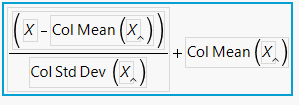
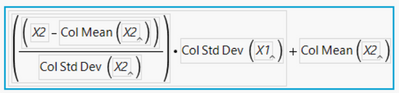
Further...say you want them all to have the same spread (SD) as one of them. For example, if I have X1 and X2, and I want to shift and scale X2 so it has the same SD as X1, but a different mean (as you want to show). Leave X1 as it is, then shift and scale X2 as follows:



- Mark as New
- Bookmark
- Subscribe
- Mute
- Subscribe to RSS Feed
- Get Direct Link
- Report Inappropriate Content
Re: How do I normalize multiple curves using JMP?
You might try the built-in transforms in the Functional Data Explorer if you have JMP Pro.
- Mark as New
- Bookmark
- Subscribe
- Mute
- Subscribe to RSS Feed
- Get Direct Link
- Report Inappropriate Content
Re: How do I normalize multiple curves using JMP?
Hi @Harigovind : Perhaps this: For each X, try the following,
(:X - Col Mean( :X )) / Col Std Dev( :X ) + Col Mean( :X )This will result in each having a common spread (SD =1), but the means will be shifted apart as your plot shows.
In a column formula, it would look like the following:
Further...say you want them all to have the same spread (SD) as one of them. For example, if I have X1 and X2, and I want to shift and scale X2 so it has the same SD as X1, but a different mean (as you want to show). Leave X1 as it is, then shift and scale X2 as follows:
- Mark as New
- Bookmark
- Subscribe
- Mute
- Subscribe to RSS Feed
- Get Direct Link
- Report Inappropriate Content
Re: How do I normalize multiple curves using JMP?
You might try the built-in transforms in the Functional Data Explorer if you have JMP Pro.
Recommended Articles
- © 2026 JMP Statistical Discovery LLC. All Rights Reserved.
- Terms of Use
- Privacy Statement
- Contact Us