Turn on suggestions
Auto-suggest helps you quickly narrow down your search results by suggesting possible matches as you type.
- JMP Statement Regarding Critical PHP Remote Code Execution Vulnerabilities (CVE-2026-109618, CVE-2026-109619)
- Don’t miss your chance to experience Discovery Summit Europe at our best available rate! Early bird registration through 31 Oct.
- Graph Builder Toolbar streamlines interactive graphing. Creates shortcuts on Report and GraphBuilder Helpers toolbars. Download and install the extension.
Options
- Subscribe to RSS Feed
- Mark Topic as New
- Mark Topic as Read
- Float this Topic for Current User
- Bookmark
- Subscribe
- Mute
- Printer Friendly Page
Discussions
Solve problems, and share tips and tricks with other JMP users.- User Community
- :
- Discussions
- :
- Re: How do I create 2 or more legend boxes in Graph Builder and place each in th...

Level III
- Mark as New
- Bookmark
- Subscribe
- Mute
- Subscribe to RSS Feed
- Get Direct Link
- Report Inappropriate Content
How do I create 2 or more legend boxes in Graph Builder and place each in the respective framebox/scalebox?
Created:
May 11, 2023 04:06 PM
| Last Modified: Jun 11, 2023 4:32 AM
(9216 views)
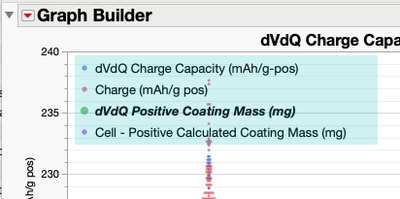
I've highlighted a legend box that contains 2 legend models. I'd like to put the first legend model in a stand alone legend box and place that legend box in the first framebox. For the second legend model, I'd like to put it in a stand alone legend box and place that second legend box in the second framebox. Is this possible by manipulating the graphbuilder script?
Thanks!
12 REPLIES 12
Level III
- Mark as New
- Bookmark
- Subscribe
- Mute
- Subscribe to RSS Feed
- Get Direct Link
- Report Inappropriate Content
Re: How do I create 2 or more legend boxes in Graph Builder and place each in the respective framebox/scalebox?
Hi @hogi, thanks for checking in. No, I'm afraid not.


Super User
Solution
- Mark as New
- Bookmark
- Subscribe
- Mute
- Subscribe to RSS Feed
- Get Direct Link
- Report Inappropriate Content
Re: How do I create 2 or more legend boxes in Graph Builder and place each in the respective framebox/scalebox?
You can script this with images but they are just images
Names Default To Here(1);

dt = Open("$SAMPLE_DATA/Semiconductor Capability.jmp");
gb = dt << Graph Builder(
	Size(900, 600),
	Show Control Panel(0),
	Show Legend(1), // left here to check correct colors
	Graph Spacing(20),
	Variables(
		X(:lot_id),
		Y(:NPN1),
		Y(:PNP1, Position(1)),
		Y(:PNP2, Position(1)),
		Y(:NPN2),
		Y(:PNP3, Position(2)),
		Y(:IVP1, Position(2))
	),
	Elements(Position(1, 1), Smoother(X, Y(1), Y(2), Y(3), Legend(3))),
	Elements(Position(1, 2), Smoother(X, Y(1), Y(2), Y(3), Legend(4)))
);

Report(gb)[LegendBox(1)] << Legend Position({3, [0, 1, 2], 4, [-1, -1, -1]});
lgnd_img1 = Report(gb)[LegendBox(1)] << get picture;

Report(gb)[LegendBox(1)] << Legend Position({3, [-1, -1, -1], 4, [0, 1, 2]});
lgnd_img2 = Report(gb)[LegendBox(1)] << get picture;

Report(gb)[FrameBox(1)] <<Add Image(image(lgnd_img1), Move(11.5, 650));
Report(gb)[FrameBox(2)] <<Add Image(image(lgnd_img2), Move(11.5, 150));

Report(gb)[LegendBox(1)] << Legend Position({3, [0, 1, 2], 4, [3, 4, 5]}); // // left here to check correct colors
-Jarmo
Level III
- Mark as New
- Bookmark
- Subscribe
- Mute
- Subscribe to RSS Feed
- Get Direct Link
- Report Inappropriate Content
Re: How do I create 2 or more legend boxes in Graph Builder and place each in the respective framebox/scalebox?
@jthi Thank you! That works for my needs, no worries if it's an image at this point!
- « Previous
-
- 1
- 2
- Next »
Recommended Articles
- © 2026 JMP Statistical Discovery LLC. All Rights Reserved.
- Terms of Use
- Privacy Statement
- Contact Us