- Discovery Summit 2026: Early User Edition - September 23-24.Register. It's free.
- Graph Builder Toolbar streamlines interactive graphing. Creates shortcuts on Report and GraphBuilder Helpers toolbars. Download and install the extension.
- Subscribe to RSS Feed
- Mark Topic as New
- Mark Topic as Read
- Float this Topic for Current User
- Bookmark
- Subscribe
- Mute
- Printer Friendly Page
Discussions
Solve problems, and share tips and tricks with other JMP users.- User Community
- :
- Discussions
- :
- Re: How do I apply different error intervals to different lines (or series of po...

- Mark as New
- Bookmark
- Subscribe
- Mute
- Subscribe to RSS Feed
- Get Direct Link
- Report Inappropriate Content
How do I apply different error intervals to different lines (or series of points) in Graph Builder?
Hello,
I'm building a graph in JMP 19. I have measured a parameter (DAR) for four samples over a number of days. I also have a reportable error on my parameter which I've measure as 2.8% of the measured DAR. I'm plotting the DAR over time with a separate line per sample, so it looks like this:
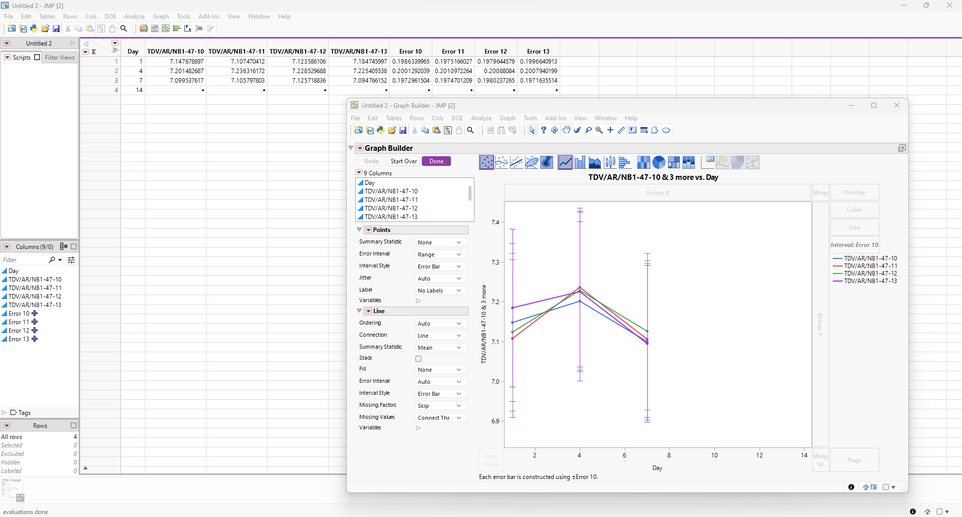
My problem is that I can't manage to associate different error intervals to different lines (or series of points). The different errors are ready as columns in the data table (as you can see beyond the graph). However, only the column "Error 10" seems to be applied to all points.
If you have any suggestions I'd be really grateful to hear them! Thank you :)
Accepted Solutions


- Mark as New
- Bookmark
- Subscribe
- Mute
- Subscribe to RSS Feed
- Get Direct Link
- Report Inappropriate Content
Re: How do I apply different error intervals to different lines (or series of points) in Graph Builder?
I think stacking your data might work. As no data was provided, I will use simplified example like this


Clean columns slightly


- Mark as New
- Bookmark
- Subscribe
- Mute
- Subscribe to RSS Feed
- Get Direct Link
- Report Inappropriate Content
Re: How do I apply different error intervals to different lines (or series of points) in Graph Builder?
I think stacking your data might work. As no data was provided, I will use simplified example like this
Clean columns slightly
- Mark as New
- Bookmark
- Subscribe
- Mute
- Subscribe to RSS Feed
- Get Direct Link
- Report Inappropriate Content
Re: How do I apply different error intervals to different lines (or series of points) in Graph Builder?
Thank you so much, it worked perfectly!
Recommended Articles
- © 2026 JMP Statistical Discovery LLC. All Rights Reserved.
- Terms of Use
- Privacy Statement
- Contact Us