- JMP will suspend normal business operations for our Winter Holiday beginning on Wednesday, Dec. 24, 2025, at 5:00 p.m. ET (2:00 p.m. ET for JMP Accounts Receivable).
Regular business hours will resume at 9:00 a.m. EST on Friday, Jan. 2, 2026. - We’re retiring the File Exchange at the end of this year. The JMP Marketplace is now your destination for add-ins and extensions.
- Subscribe to RSS Feed
- Mark Topic as New
- Mark Topic as Read
- Float this Topic for Current User
- Bookmark
- Subscribe
- Mute
- Printer Friendly Page
Discussions
Solve problems, and share tips and tricks with other JMP users.- JMP User Community
- :
- Discussions
- :
- How can I show in Graph Builder that there are outliers not shown?

- Mark as New
- Bookmark
- Subscribe
- Mute
- Subscribe to RSS Feed
- Get Direct Link
- Report Inappropriate Content
How can I show in Graph Builder that there are outliers not shown?
Good morning!
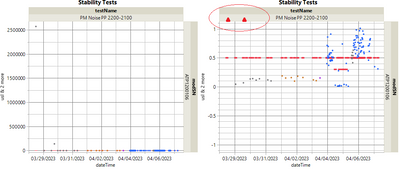
I run into this problem almost daily where I have a graph with outliers that are many orders of magnitude out of range of the rest of my data (graph on left). I need to adjust the y-axis to show the detail of the collected data (graph on right), but I'd still like to indicate to the viewer that there are outliers that aren't shown (like the red triangles I mocked up in MS Paint and circled in red). Is there a way to do something like this? Or any other ideas on how to show that there are outliers while having the y axis from -1 to 1? JMP 16.
Thank you kindly,
Andy
Accepted Solutions

- Mark as New
- Bookmark
- Subscribe
- Mute
- Subscribe to RSS Feed
- Get Direct Link
- Report Inappropriate Content
Re: How can I show in Graph Builder that there are outliers not shown?
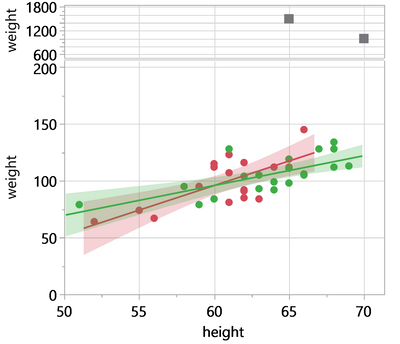
Or keep the original graph and add the Y variable a second time, then adjust the scales
... of the original graph to focus on the main distribution
... of the additional graph to indicate that there are outliers:
Names Default to Here(1);
dt = Open( "$SAMPLE_DATA/Big Class.jmp" );

:sex[18]="";
:sex[40]="";
:weight[18]=1500;
:weight[40]=1000;

Graph Builder(
	Size( 462, 468 ),
	Show Control Panel( 0 ),
	Variables( X( :height ), Y( :weight ), Y( :weight ), Overlay( :sex ) ),
	Relative Sizes( "Y", [77 341] ),
	Elements( Position( 1, 1 ), Points( X, Y, Legend( 37 ) ) ),
	Elements( Position( 1, 2 ), Points( X, Y, Legend( 39 ) ) ),
	SendToReport(
		Dispatch(
			{},
			"weight",
			ScaleBox,
			{Min( 200 ), Max( 2000 ), Inc( 200 ),
			Minor Ticks( 1 )}
		),
		Dispatch(
			{},
			"weight",
			ScaleBox( 2 ),
			{Min( 0 ), Max( 200 ), Inc( 50 )}
		)
	)
)


- Mark as New
- Bookmark
- Subscribe
- Mute
- Subscribe to RSS Feed
- Get Direct Link
- Report Inappropriate Content
Re: How can I show in Graph Builder that there are outliers not shown?
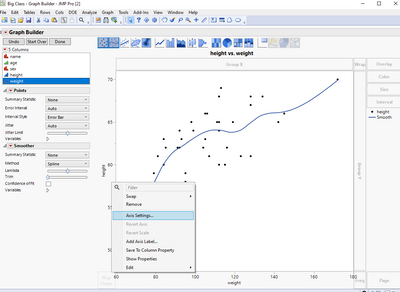
Hi @Andy8 , have you tried to change the Y-axis scale? You may try to right click on the Y-axis and select axis settings.
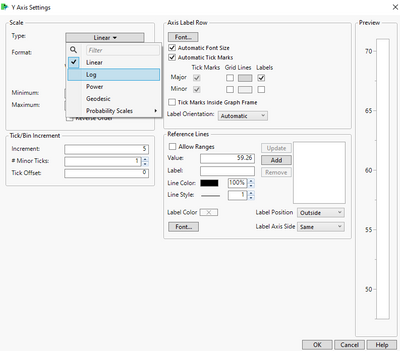
On scale panel, you may change linear to log/power/...
Hope this may help!
- Mark as New
- Bookmark
- Subscribe
- Mute
- Subscribe to RSS Feed
- Get Direct Link
- Report Inappropriate Content
Re: How can I show in Graph Builder that there are outliers not shown?
Or keep the original graph and add the Y variable a second time, then adjust the scales
... of the original graph to focus on the main distribution
... of the additional graph to indicate that there are outliers:
Names Default to Here(1);
dt = Open( "$SAMPLE_DATA/Big Class.jmp" );

:sex[18]="";
:sex[40]="";
:weight[18]=1500;
:weight[40]=1000;

Graph Builder(
	Size( 462, 468 ),
	Show Control Panel( 0 ),
	Variables( X( :height ), Y( :weight ), Y( :weight ), Overlay( :sex ) ),
	Relative Sizes( "Y", [77 341] ),
	Elements( Position( 1, 1 ), Points( X, Y, Legend( 37 ) ) ),
	Elements( Position( 1, 2 ), Points( X, Y, Legend( 39 ) ) ),
	SendToReport(
		Dispatch(
			{},
			"weight",
			ScaleBox,
			{Min( 200 ), Max( 2000 ), Inc( 200 ),
			Minor Ticks( 1 )}
		),
		Dispatch(
			{},
			"weight",
			ScaleBox( 2 ),
			{Min( 0 ), Max( 200 ), Inc( 50 )}
		)
	)
)
Recommended Articles
- © 2026 JMP Statistical Discovery LLC. All Rights Reserved.
- Terms of Use
- Privacy Statement
- Contact Us