Turn on suggestions
Auto-suggest helps you quickly narrow down your search results by suggesting possible matches as you type.
- JMP Statement Regarding Critical PHP Remote Code Execution Vulnerabilities (CVE-2026-109618, CVE-2026-109619)
- Don’t miss your chance to experience Discovery Summit Europe at our best available rate! Early bird registration through 31 Oct.
- Graph Builder Toolbar streamlines interactive graphing. Creates shortcuts on Report and GraphBuilder Helpers toolbars. Download and install the extension.
Options
- Subscribe to RSS Feed
- Mark Topic as New
- Mark Topic as Read
- Float this Topic for Current User
- Bookmark
- Subscribe
- Mute
- Printer Friendly Page
Discussions
Solve problems, and share tips and tricks with other JMP users.- User Community
- :
- Discussions
- :
- How Do You display Regression Equation on Bivariate fit graph

Level II
- Mark as New
- Bookmark
- Subscribe
- Mute
- Subscribe to RSS Feed
- Get Direct Link
- Report Inappropriate Content
How Do You display Regression Equation on Bivariate fit graph
Created:
Jul 17, 2020 12:54 AM
| Last Modified: Jun 11, 2023 5:04 AM
(3239 views)
2 REPLIES 2


Staff
- Mark as New
- Bookmark
- Subscribe
- Mute
- Subscribe to RSS Feed
- Get Direct Link
- Report Inappropriate Content
Re: How Do You display Regression Equation on Bivariate fit graph
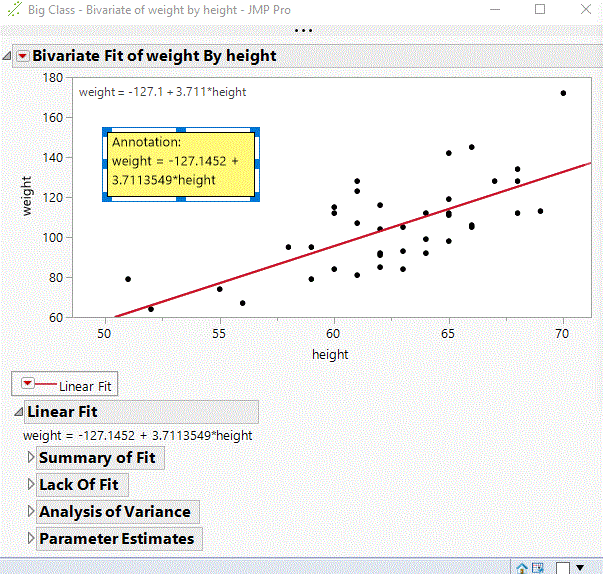
The easiest way is probably to copy the equation and paste it into the plot using Annotate (Tools-->Annotate).

Staff
- Mark as New
- Bookmark
- Subscribe
- Mute
- Subscribe to RSS Feed
- Get Direct Link
- Report Inappropriate Content
Re: How Do You display Regression Equation on Bivariate fit graph
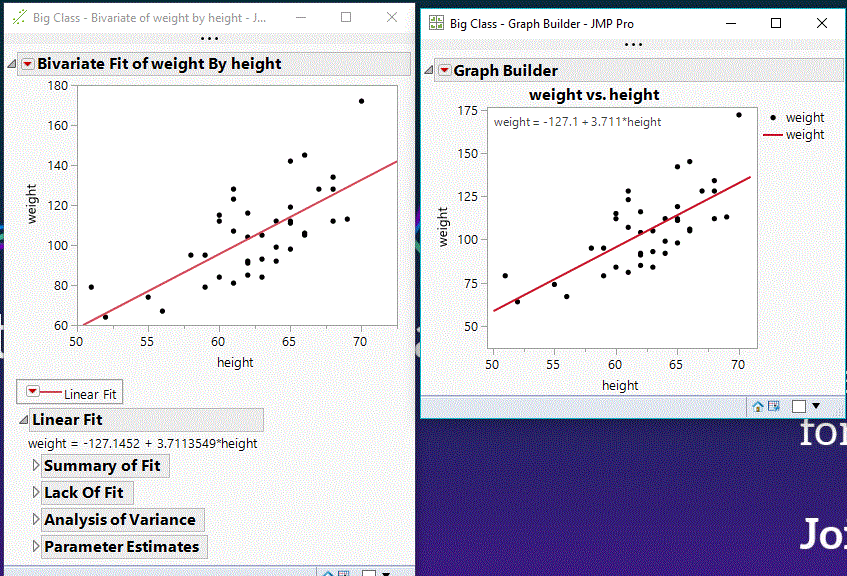
Another approach is to do the bivartiate fit in Graph Builder and adding the equation and maybe other stats to the graph.
If you need the bivariate stats and you want to just add the equation, you can then right click into the graph builder plot, select Edit ->copy frame content, go back to the bivariate plot, right click paste frame content and the equation will stay at the top left corner. The annotation will move when you rescale the axes as it belongs to the position you inserted it. THe paste frame content adds an layer which keeps the size of the graph not the position on the axis.
/****NeverStopLearning****/
Recommended Articles
- © 2026 JMP Statistical Discovery LLC. All Rights Reserved.
- Terms of Use
- Privacy Statement
- Contact Us