cancel
Showing results for 
Show  only  | Search instead for 
Did you mean: 
  • JMP will suspend normal business operations for our Winter Holiday beginning on Wednesday, Dec. 24, 2025, at 5:00 p.m. ET (2:00 p.m. ET for JMP Accounts Receivable).
    Regular business hours will resume at 9:00 a.m. EST on Friday, Jan. 2, 2026.
  • We’re retiring the File Exchange at the end of this year. The JMP Marketplace is now your destination for add-ins and extensions.

Discussions

Solve problems, and share tips and tricks with other JMP users.
%3CLINGO-SUB%20id%3D%22lingo-sub-70256%22%20slang%3D%22en-US%22%20mode%3D%22NONE%22%3ERasterlinie%20im%20Graph%20Builder%3C%2FLINGO-SUB%3E%3CLINGO-BODY%20id%3D%22lingo-body-70256%22%20slang%3D%22en-US%22%20mode%3D%22NONE%22%3E%3CP%3EHallo%20zusammen%3C%2FP%3E%3CP%3E%26nbsp%3B%3C%2FP%3E%3CP%3EIch%20habe%20den%20folgenden%20Teil%20eines%20Benutzereingabeskripts.%20Das%20Skript%20funktioniert%20tats%C3%A4chlich%20gut.%20Das%20Problem%20entstand%2C%20als%20ich%20versuchte%2C%20mit%20jsl%20eine%20Gitterlinie%20zum%20Diagramm%20hinzuzuf%C3%BCgen.%20Dieser%20Teil%20schien%20nicht%20zu%20funktionieren.%20Ich%20habe%20versucht%2C%20X1%20durch%20x1col%2C%20Y1%20durch%20y1col%20(usw.)%20zu%20ersetzen%2C%20aber%20es%20scheint%20auch%20nicht%20zu%20funktionieren.%20Wenn%20ich%20mit%20der%20Maus%20beispielsweise%20%C3%BCber%20X1%20fahre%2C%20wird%20die%20richtige%20Spalte%20angezeigt.%20Ich%20wusste%2C%20dass%20ich%20einfach%20per%20Drag%20%26amp%3B%20Drop%20arbeiten%20kann%2C%20aber%20da%20ich%20an%20gro%C3%9Fen%20Datens%C3%A4tzen%20arbeite%20und%20Diagramme%20erstelle%2C%20ist%20es%20gut%2C%20dass%20ich%20sie%20automatisiert%20habe.%20Bitte%20geben%20Sie%20an%2C%20wie%20ich%20dieses%20Problem%20l%C3%B6sen%20kann.%3C%2FP%3E%3CP%3E%26nbsp%3B%3C%2FP%3E%3CPRE%3E%3CCODE%20class%3D%22%20language-jsl%22%3Ex1col%20%3D%20Column(dt%2C%20X1)%3B%0Ay1col%20%3D%20Column(dt%2C%20Y1)%3B%0Ay2col%20%3D%20Column(dt%2C%20Y2)%3B%0Ay3col%20%3D%20Column(dt%2C%20Y3)%3B%0Ay4col%20%3D%20Column(dt%2C%20Y4)%3B%0A%20%0AGraph%20Builder(%0A%20%20%20%0A%20%20%20%20Variables(X(Column(dt%2C%20X1))%2C%20Y(Column(dt%2C%20Y1))%2C%20Y(Column(dt%2C%20Y2))%2CY(Column(dt%2C%20Y3))%2CY(Column(dt%2C%20Y4))%2C%0A%20%0A%20%20Group%20X(%20%3ATitle%20)%0A%20%20%20%20%0A%20%20%20%20)%2C%0A%20%20%20%20Elements(%20Position(%201%2C%201%20)%2C%20Line(%20X%2C%20Y%20))%2C%0A%20Elements(%20Position(%201%2C%202%20)%2C%20Line(%20X%2C%20Y%20))%2C%0A%20Elements(%20Position(%201%2C%203%20)%2C%20Line(%20X%2C%20Y%20))%2C%0A%20Elements(%20Position(%201%2C%204%20)%2C%20%0A%20%20%2F%2FBar(%20X%2C%20Y%2C%20Legend(%2036%20)%2C%20Summary%20Statistic(%20%22N%22%20)%20)%0A%20%20%20%20Bar(%20X%2C%20Y%2C%20Summary%20Statistic(%20%22N%22%20)))%2C%0A%20%20%20%0A%20%20%20SendToReport(%0A%20%20Dispatch(%0A%20%20%20%7B%7D%2C%0A%20%20%20%3CEM%3EX1%3C%2FEM%3E%2C%0A%20%20%20ScaleBox%2C%0A%20%20%20%7BLabel%20Row(%20Label%20Orientation(%20%22Vertical%22%20)%20)%7D%0A%20%20)%2C%0A%20%20Dispatch(%20%7B%7D%2C%20%3A%3CEM%3EY1%3C%2FEM%3E%2C%20ScaleBox%2C%20%7BLabel%20Row(%20Show%20Major%20Grid(%201%20)%20)%7D%20)%2C%0A%20%20Dispatch(%0A%20%20%20%2F%2F%7B%7D%2C%0A%20%20%20%3CEM%3EY2%3C%2FEM%3E%2C%0A%20%20%20ScaleBox%2C%0A%20%20%20%7BLabel%20Row(%20Show%20Major%20Grid(%201%20)%20)%7D%0A%20%20)%2C%0A%20%20Dispatch(%20%7B%7D%2C%20%3CEM%3EY3%3C%2FEM%3E%2C%20ScaleBox%2C%20%7BLabel%20Row(%20Show%20Major%20Grid(%201%20)%20)%7D%20)%2C%0A%20%20Dispatch(%20%7B%7D%2C%20%3CEM%3EY4%3C%2FEM%3E%2C%20ScaleBox%2C%20%7BLabel%20Row(%20Show%20Major%20Grid(%201%20)%20)%7D%20)%0A%20%20)%20%0A%20%20%20%20%0A%20%20%20%20)%2C%3C%2FCODE%3E%3C%2FPRE%3E%3CP%3EDanke%20sch%C3%B6n.%3C%2FP%3E%3CP%3E%26nbsp%3B%3C%2FP%3E%3C%2FLINGO-BODY%3E%3CLINGO-SUB%20id%3D%22lingo-sub-70271%22%20slang%3D%22en-US%22%20mode%3D%22NONE%22%3EBetreff%3A%20Gitterlinie%20im%20Graph%20Builder%3C%2FLINGO-SUB%3E%3CLINGO-BODY%20id%3D%22lingo-body-70271%22%20slang%3D%22en-US%22%20mode%3D%22NONE%22%3E%3CP%3EDanke%20gzmorgan0%2C%20es%20funktioniert%20perfekt!!%3C%2FP%3E%3C%2FLINGO-BODY%3E%3CLINGO-SUB%20id%3D%22lingo-sub-70261%22%20slang%3D%22en-US%22%20mode%3D%22NONE%22%3EBetreff%3A%20Gitterlinie%20im%20Graph%20Builder%3C%2FLINGO-SUB%3E%3CLINGO-BODY%20id%3D%22lingo-body-70261%22%20slang%3D%22en-US%22%20mode%3D%22NONE%22%3E%3CP%3EDie%20GraphBuilder%20Scale%20Box%20Dispatch-Anweisung%20ben%C3%B6tigt%20den%20Spaltennamen.Eine%20einfache%20Methode%20hierf%C3%BCr%20ist%20die%20Verwendung%20von%3C%2FP%3E%3CP%3E%3CSTRONG%3Ecolref%20%26lt%3B%26lt%3B%20getname.%3C%2FSTRONG%3E%3C%2FP%3E%3CP%3E%26nbsp%3B%3C%2FP%3E%3CP%3EHier%20ist%20eine%20leichte%20Modifikation%20des%20Skripts%2C%20das%20Sie%20mithilfe%20der%20JMP-Beispieldatentabelle%20Candy%20Bars.jmp%20bereitgestellt%20haben%3C%2FP%3E%3CPRE%3E%3CCODE%20class%3D%22%20language-jsl%22%3ENames%20Default%20to%20Here(1)%3B%0A%2F%2FOpen%20the%20JMP%20Sample%20Data%20table%20Candy%20Bars%2C%20create%20a%204x2%20display%20%0Adt%20%3D%20Open(%22%24Sample_Data%2FCandy%20Bars.jmp%22)%3B%0A%0Adt%20%26lt%3B%26lt%3B%20select%20where(!Contains(%7B%22M%26amp%3BM%2FMars%22%2C%22Hershey%22%7D%2C%20%3ABrand)%20)%3B%0Adt%20%26lt%3B%26lt%3B%20delete%20rows()%3B%0A%3ABrand%20%26lt%3B%26lt%3B%20set%20name(%22Title%22)%3B%0A%0A%0Ax1col%20%3D%20Column(dt%2C%20%22Carbohydrate%20g%22)%3B%0Ay1col%20%3D%20Column(dt%2C%20%22Sugars%20g%22)%3B%0Ay2col%20%3D%20Column(dt%2C%20%22Total%20fat%20g%22)%3B%0Ay3col%20%3D%20Column(dt%2C%20%22Saturated%20fat%20g%22)%3B%0Ay4col%20%3D%20Column(dt%2C%20%22Protein%20g%22)%3B%0A%0A%0Acandy_gb1%20%3D%20dt%20%26lt%3B%26lt%3B%20Graph%20Builder(%20%0A%20%20Variables(%0A%20%20%20%20%20X(x1col)%2C%20Y(y1col)%2C%20Y(y2col)%2CY(y3col)%2CY(y4col)%2C%0A%20%20Group%20X(%20%3ATitle%20)%0A%20%20%20)%2C%0A%20%20%20%20Elements(%20Position(%201%2C%201%20)%2C%20Line(%20X%2C%20Y%20)%20)%2C%0A%20Elements(%20Position(%201%2C%202%20)%2C%20Line(%20X%2C%20Y%20)%20)%2C%0A%20Elements(%20Position(%201%2C%203%20)%2C%20Line(%20X%2C%20Y%20)%20)%2C%0A%20Elements(%20Position(%201%2C%204%20)%2C%20%0A%20%20%2F%2FBar(%20X%2C%20Y%2C%20Legend(%2036%20)%2C%20Summary%20Statistic(%20%22N%22%20)%20)%0A%20%20%20%20Bar(%20X%2C%20Y%2C%20Summary%20Statistic(%20%22N%22%20))%20)%2C%0A%20SendToReport(%0A%20%20Dispatch(%0A%20%20%20%7B%7D%2C%0A%20%20%20x1col%26lt%3B%3CGETNAME%3E%3C%2FGETNAME%3E%3C%2FCODE%3E%3C%2FPRE%3E%3CP%3E%3CSPAN%20class%3D%22lia-inline-image-display-wrapper%20lia-image-align-inline%22%20image-alt%3D%22image.png%22%20style%3D%22width%3A%20400px%3B%22%3E%3CSPAN%20class%3D%22lia-inline-image-display-wrapper%22%20image-alt%3D%22image.png%22%20style%3D%22width%3A%20400px%3B%22%3E%3Cspan%20class%3D%22lia-inline-image-display-wrapper%22%20image-alt%3D%22image.png%22%20style%3D%22width%3A%20400px%3B%22%3E%3Cimg%20src%3D%22https%3A%2F%2Fcommunity.jmp.com%2Ft5%2Fimage%2Fserverpage%2Fimage-id%2F12199i875DEA712AB11B71%2Fimage-size%2Fmedium%3Fv%3Dv2%26amp%3Bpx%3D400%22%20role%3D%22button%22%20title%3D%22image.png%22%20alt%3D%22image.png%22%20%2F%3E%3C%2Fspan%3E%3C%2FSPAN%3E%3C%2FSPAN%3E%3C%2FP%3E%3C%2FLINGO-BODY%3E
Choose Language Hide Translation Bar
adam
Level IV

Grid line on Graph builder

Hi All


I have the following portion of a user input script. The script actually work well. The problem come from when I tried to add in grid line to the plot with jsl, that portion does not seems to work. I tried to replace X1 with x1col, Y1 with y1col(and so on) but does not seems to work too. When I hover the mouse to for example, X1, it is showing the correct column. I knew that I can just drag and drop but as I'm working on large data set and generating plots, it's good that I have them automated. Please advise how can I overcome this problem.


x1col = Column(dt, X1);
y1col = Column(dt, Y1);
y2col = Column(dt, Y2);
y3col = Column(dt, Y3);
y4col = Column(dt, Y4);
	
Graph Builder(
   
    Variables(X(Column(dt, X1)), Y(Column(dt, Y1)), Y(Column(dt, Y2)),Y(Column(dt, Y3)),Y(Column(dt, Y4)),
	
	 Group X( :Title )
    
    ),
    Elements( Position( 1, 1 ), Line( X, Y )),
	Elements( Position( 1, 2 ), Line( X, Y )),
	Elements( Position( 1, 3 ), Line( X, Y )),
	Elements( Position( 1, 4 ), 
		//Bar( X, Y, Legend( 36 ), Summary Statistic( "N" ) )
    Bar( X, Y, Summary Statistic( "N" ))),
   
   SendToReport(
		Dispatch(
			{},
			X1,
			ScaleBox,
			{Label Row( Label Orientation( "Vertical" ) )}
		),
		Dispatch( {}, :Y1, ScaleBox, {Label Row( Show Major Grid( 1 ) )} ),
		Dispatch(
			//{},
			Y2,
			ScaleBox,
			{Label Row( Show Major Grid( 1 ) )}
		),
		Dispatch( {}, Y3, ScaleBox, {Label Row( Show Major Grid( 1 ) )} ),
		Dispatch( {}, Y4, ScaleBox, {Label Row( Show Major Grid( 1 ) )} )
		) 
    
    ),

Thank you.


1 ACCEPTED SOLUTION

Accepted Solutions
gzmorgan0
Super User (Alumni)

Re: Grid line on Graph builder

The GraphBuilder Scale Box Dispatch statement wants the column name.  A simple method to do that is to use

colref << getname.


Here is a slight modification of the script you provided using the JMP sample data table Candy Bars.jmp

Names Default to Here(1);
//Open the JMP Sample Data table Candy Bars, create a 4x2 display 
dt = Open("$Sample_Data/Candy Bars.jmp");

dt << select where(!Contains({"M&M/Mars","Hershey"}, :Brand) );
dt << delete rows();
:Brand << set name("Title");


x1col = Column(dt, "Carbohydrate g");
y1col = Column(dt, "Sugars g");
y2col = Column(dt, "Total fat g");
y3col = Column(dt, "Saturated fat g");
y4col = Column(dt, "Protein g");


candy_gb1 = dt << Graph Builder( 
  Variables(
     X(x1col), Y(y1col), Y(y2col),Y(y3col),Y(y4col),
	 Group X( :Title )
   ),
    Elements( Position( 1, 1 ), Line( X, Y ) ),
	Elements( Position( 1, 2 ), Line( X, Y ) ),
	Elements( Position( 1, 3 ), Line( X, Y ) ),
	Elements( Position( 1, 4 ), 
		//Bar( X, Y, Legend( 36 ), Summary Statistic( "N" ) )
    Bar( X, Y, Summary Statistic( "N" )) ),
	SendToReport(
		Dispatch(
			{},
			x1col<<getname,
			ScaleBox,
			{Label Row( Label Orientation( "Vertical" ) )}
		),
		Dispatch( {}, y1col<<getname, ScaleBox, {Label Row( Show Major Grid( 1 ) )} ),
		Dispatch( {}, y2col<<getname, ScaleBox, {Label Row( Show Major Grid( 1 ) )} ),
		Dispatch(
			{},
			y3col<<getname,
			ScaleBox,
			{Label Row( Show Major Grid( 1 ) )}
		),
		Dispatch( {}, y4col<<getname, ScaleBox, {Label Row( Show Major Grid( 1 ) )} )
	)
);
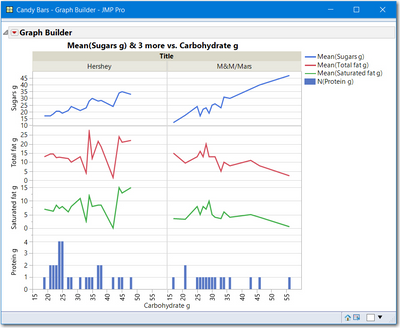
image.png

View solution in original post

2 REPLIES 2
gzmorgan0
Super User (Alumni)

Re: Grid line on Graph builder

The GraphBuilder Scale Box Dispatch statement wants the column name.  A simple method to do that is to use

colref << getname.


Here is a slight modification of the script you provided using the JMP sample data table Candy Bars.jmp

Names Default to Here(1);
//Open the JMP Sample Data table Candy Bars, create a 4x2 display 
dt = Open("$Sample_Data/Candy Bars.jmp");

dt << select where(!Contains({"M&M/Mars","Hershey"}, :Brand) );
dt << delete rows();
:Brand << set name("Title");


x1col = Column(dt, "Carbohydrate g");
y1col = Column(dt, "Sugars g");
y2col = Column(dt, "Total fat g");
y3col = Column(dt, "Saturated fat g");
y4col = Column(dt, "Protein g");


candy_gb1 = dt << Graph Builder( 
  Variables(
     X(x1col), Y(y1col), Y(y2col),Y(y3col),Y(y4col),
	 Group X( :Title )
   ),
    Elements( Position( 1, 1 ), Line( X, Y ) ),
	Elements( Position( 1, 2 ), Line( X, Y ) ),
	Elements( Position( 1, 3 ), Line( X, Y ) ),
	Elements( Position( 1, 4 ), 
		//Bar( X, Y, Legend( 36 ), Summary Statistic( "N" ) )
    Bar( X, Y, Summary Statistic( "N" )) ),
	SendToReport(
		Dispatch(
			{},
			x1col<<getname,
			ScaleBox,
			{Label Row( Label Orientation( "Vertical" ) )}
		),
		Dispatch( {}, y1col<<getname, ScaleBox, {Label Row( Show Major Grid( 1 ) )} ),
		Dispatch( {}, y2col<<getname, ScaleBox, {Label Row( Show Major Grid( 1 ) )} ),
		Dispatch(
			{},
			y3col<<getname,
			ScaleBox,
			{Label Row( Show Major Grid( 1 ) )}
		),
		Dispatch( {}, y4col<<getname, ScaleBox, {Label Row( Show Major Grid( 1 ) )} )
	)
);

image.png

adam
Level IV

Re: Grid line on Graph builder

Thank you gzmorgan0, it works perfectly !!

Recommended Articles