Turn on suggestions
Auto-suggest helps you quickly narrow down your search results by suggesting possible matches as you type.
- Don’t miss your chance to experience Discovery Summit Europe at our best available rate! Early bird registration through 31 Oct.
- Graph Builder Toolbar streamlines interactive graphing. Creates shortcuts on Report and GraphBuilder Helpers toolbars. Download and install the extension.
Options
- Subscribe to RSS Feed
- Mark Topic as New
- Mark Topic as Read
- Float this Topic for Current User
- Bookmark
- Subscribe
- Mute
- Printer Friendly Page
Discussions
Solve problems, and share tips and tricks with other JMP users.- User Community
- :
- Discussions
- :
- GraphBuilder > FrameBox << Add Graphics Script (V Line (x,y1,y2)): dynamically a...


Super User
- Mark as New
- Bookmark
- Subscribe
- Mute
- Subscribe to RSS Feed
- Get Direct Link
- Report Inappropriate Content
GraphBuilder > FrameBox << Add Graphics Script (V Line (x,y1,y2)): dynamically assign x, y1, and y2?
Created:
Mar 11, 2021 02:20 AM
| Last Modified: Jun 11, 2023 4:11 AM
(3349 views)
Hi JMP Community,
It's my turn to be stumped by an apparently trivial project.
I'm trying to dynamically add V Lines to a Graph Builder plot and I'm getting rather unexpected results with the test script below:
Names Default to Here (1);

dt = New Table ("TEST",
	New Column ("X", Set Values ([1,2,3,4,5])),
	New Column ("Y", Set Values ([3,2,5,8,6]))

);

gb = dt << Graph Builder(
			Fit to Window( "Off" ),
			Level Frame Color( "Medium Dark Gray" ),
			Level Spacing Color( "Medium Dark Gray" ),
			Level Underline( 1 ),
			Page Level Underline( 0 ),
			Spacing Borders( 1 ),
			Variables( X( :X ), Y( :Y ) ),
			Elements( Points( X, Y, Legend( 5 ) ) )
			);

gbr = gb << report;


Ypos1 = 2;
Ypos2 = 6;

For (i = 1, i<=5, i++,

				Xpos = i;

				gbr [Framebox (1)] << Add graphics Script (

					Pen color (Green);
					V Line (1,4,6);
					Pen color (Red);
					V Line (Xpos, Ypos1, Ypos2);
					Pen color (blue);
					V Line (i, 6,8);

				)
);
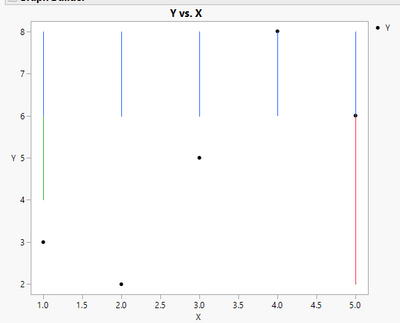
I get the green V Line correctly placed, I get one red V Line positioned at X = 5, and no blue line.
I tried adding Eval Expr (Expr()) for the entire expression and within the graphic script without success, so I'm sure that there is a simple solution that is escaping me at this late hour.
Any help would be greatly appreciated.
Thanks,
TS
Thierry R. Sornasse
2 ACCEPTED SOLUTIONS
Accepted Solutions

Super User
Solution
- Mark as New
- Bookmark
- Subscribe
- Mute
- Subscribe to RSS Feed
- Get Direct Link
- Report Inappropriate Content
Re: GraphBuilder > FrameBox << Add Graphics Script (V Line (x,y1,y2)): dynamically assign x, y1, and y2?
I seem to be able to get blue lines with eval(evalexpr(:
Eval(EvalExpr(gbr [Framebox (1)] << Add graphics Script (

	Pen color (Green);
	V Line (1,4,6);
	Pen color (Red);
	V Line (Xpos, Ypos1, Ypos2);
	Pen color (Blue);
	V Line (Expr(i), 6,8);

)))
Using JMP15.2.1
-Jarmo

Level VI
Solution
- Mark as New
- Bookmark
- Subscribe
- Mute
- Subscribe to RSS Feed
- Get Direct Link
- Report Inappropriate Content
Re: GraphBuilder > FrameBox << Add Graphics Script (V Line (x,y1,y2)): dynamically assign x, y1, and y2?
For (i = 1, i<=5, i++,

				Xpos = i;

				Eval(EvalExpr(gbr [Framebox (1)] << Add graphics Script (

					Pen color (Green);
					V Line (1,4,6);
					Pen color (Red);
					V Line (expr(Xpos), expr(Ypos1), expr(Ypos2));
					Pen color (blue);
					V Line (expr(i), 6,8);

				)))
); 
2 REPLIES 2
Super User
Solution
- Mark as New
- Bookmark
- Subscribe
- Mute
- Subscribe to RSS Feed
- Get Direct Link
- Report Inappropriate Content
Re: GraphBuilder > FrameBox << Add Graphics Script (V Line (x,y1,y2)): dynamically assign x, y1, and y2?
I seem to be able to get blue lines with eval(evalexpr(:
Eval(EvalExpr(gbr [Framebox (1)] << Add graphics Script (

	Pen color (Green);
	V Line (1,4,6);
	Pen color (Red);
	V Line (Xpos, Ypos1, Ypos2);
	Pen color (Blue);
	V Line (Expr(i), 6,8);

)))
Using JMP15.2.1
-Jarmo
Level VI
Solution
- Mark as New
- Bookmark
- Subscribe
- Mute
- Subscribe to RSS Feed
- Get Direct Link
- Report Inappropriate Content
Re: GraphBuilder > FrameBox << Add Graphics Script (V Line (x,y1,y2)): dynamically assign x, y1, and y2?
For (i = 1, i<=5, i++,

				Xpos = i;

				Eval(EvalExpr(gbr [Framebox (1)] << Add graphics Script (

					Pen color (Green);
					V Line (1,4,6);
					Pen color (Red);
					V Line (expr(Xpos), expr(Ypos1), expr(Ypos2));
					Pen color (blue);
					V Line (expr(i), 6,8);

				)))
);
Recommended Articles
- © 2026 JMP Statistical Discovery LLC. All Rights Reserved.
- Terms of Use
- Privacy Statement
- Contact Us