Turn on suggestions
Auto-suggest helps you quickly narrow down your search results by suggesting possible matches as you type.
- JMP Statement Regarding Critical PHP Remote Code Execution Vulnerabilities (CVE-2026-109618, CVE-2026-109619)
- Don’t miss your chance to experience Discovery Summit Europe at our best available rate! Early bird registration through 31 Oct.
- Graph Builder Toolbar streamlines interactive graphing. Creates shortcuts on Report and GraphBuilder Helpers toolbars. Download and install the extension.
Options
- Subscribe to RSS Feed
- Mark Topic as New
- Mark Topic as Read
- Float this Topic for Current User
- Bookmark
- Subscribe
- Mute
- Printer Friendly Page
Discussions
Solve problems, and share tips and tricks with other JMP users.- User Community
- :
- Discussions
- :
- Re: Graph builder: titles font & size

Level III
- Mark as New
- Bookmark
- Subscribe
- Mute
- Subscribe to RSS Feed
- Get Direct Link
- Report Inappropriate Content
Graph builder: titles font & size
Jan 21, 2015 02:44 PM
(21963 views)
In graph builder how do you change the size and font of the title (general) and X and Y titles (right click only allow you to change the font and size of the numbers).
Thanks!
Agnès
1 ACCEPTED SOLUTION
Accepted Solutions


Super User
Solution
- Mark as New
- Bookmark
- Subscribe
- Mute
- Subscribe to RSS Feed
- Get Direct Link
- Report Inappropriate Content
Re: Graph builder: titles font & size
Created:
Jan 21, 2015 04:46 PM
| Last Modified: Oct 18, 2016 3:23 PM
(25762 views)
| Posted in reply to message from agneshb 01-21-2015
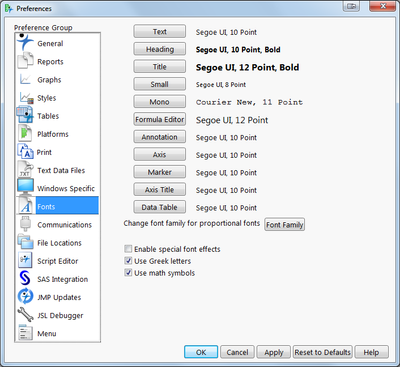
Go to File > Preferences and select Fonts. You can change the Axis and title fonts there.
2 REPLIES 2
Super User
Solution
- Mark as New
- Bookmark
- Subscribe
- Mute
- Subscribe to RSS Feed
- Get Direct Link
- Report Inappropriate Content
Re: Graph builder: titles font & size
Created:
Jan 21, 2015 04:46 PM
| Last Modified: Oct 18, 2016 3:23 PM
(25763 views)
| Posted in reply to message from agneshb 01-21-2015
Go to File > Preferences and select Fonts. You can change the Axis and title fonts there.
Level III
- Mark as New
- Bookmark
- Subscribe
- Mute
- Subscribe to RSS Feed
- Get Direct Link
- Report Inappropriate Content
Re: Graph builder: titles font & size
Thanks a lot, exactly what I was looking for :)
PS: it would be nice to be able to do that from the graph though, may be in version 13?
Agnes
Recommended Articles
- © 2026 JMP Statistical Discovery LLC. All Rights Reserved.
- Terms of Use
- Privacy Statement
- Contact Us