- Don’t miss your chance to experience Discovery Summit Europe at our best available rate! Early bird registration through 31 Oct.
- Graph Builder Toolbar streamlines interactive graphing. Creates shortcuts on Report and GraphBuilder Helpers toolbars. Download and install the extension.
- Subscribe to RSS Feed
- Mark Topic as New
- Mark Topic as Read
- Float this Topic for Current User
- Bookmark
- Subscribe
- Mute
- Printer Friendly Page
Discussions
Solve problems, and share tips and tricks with other JMP users.- User Community
- :
- Discussions
- :
- Re: Graph Builder legend issues

- Mark as New
- Bookmark
- Subscribe
- Mute
- Subscribe to RSS Feed
- Get Direct Link
- Report Inappropriate Content
Graph Builder legend issues
When I make a bar graph I have changed both bar colors to gray but made one pattern hash marked. However the pattern change is not reflected on the legend. How can I fix this?
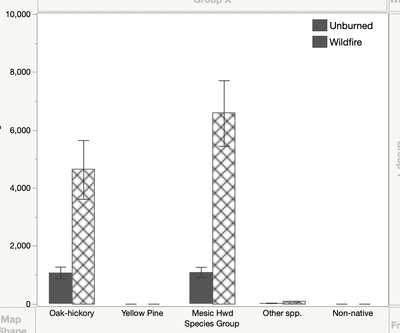
Thank you.


- Mark as New
- Bookmark
- Subscribe
- Mute
- Subscribe to RSS Feed
- Get Direct Link
- Report Inappropriate Content
Re: Graph Builder legend issues
What release of JMP are you running? I am not having the issue in JMP 15.1
- Mark as New
- Bookmark
- Subscribe
- Mute
- Subscribe to RSS Feed
- Get Direct Link
- Report Inappropriate Content
Re: Graph Builder legend issues
- Mark as New
- Bookmark
- Subscribe
- Mute
- Subscribe to RSS Feed
- Get Direct Link
- Report Inappropriate Content
Re: Graph Builder legend issues
Here is my example. Does it work on your copy of JMP.
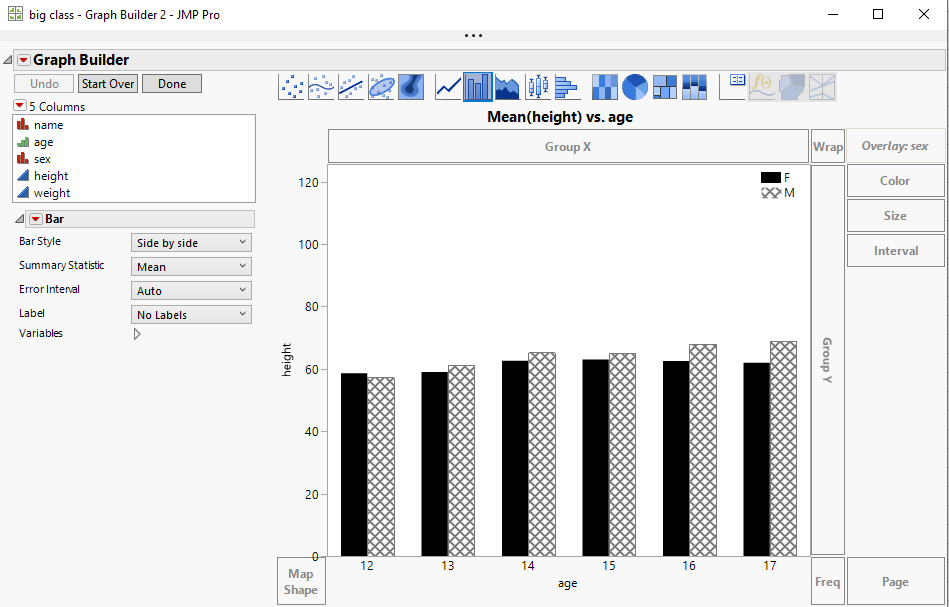
names default to here(1);
dt = Open("$SAMPLE_DATA/big class.jmp");

dt << Graph Builder(
	Legend Position( "Inside Right" ),
	Variables( X( :age ), Y( :height ), Overlay( :sex ) ),
	Elements( Bar( X, Y, Legend( 6 ) ) ),
	SendToReport(
		Dispatch(
			{},
			"height",
			ScaleBox,
			{Min( 0 ), Max( 125.6145 ), Inc( 20 ), Minor Ticks( 0 )}
		),
		Dispatch(
			{},
			"400",
			ScaleBox,
			{Legend Model(
				6,
				Properties( 0, {Fill Color( 0 )}, Item ID( "F", 1 ) ),
				Properties(
					1,
					{Fill Color( 1 ), Fill Pattern( "hatch medium" )},
					Item ID( "M", 1 )
				)
			)}
		),
		Dispatch( {}, "400", LegendBox, {Set Title( "" )} )
	)
)- Mark as New
- Bookmark
- Subscribe
- Mute
- Subscribe to RSS Feed
- Get Direct Link
- Report Inappropriate Content
Re: Graph Builder legend issues
Thank you for your help but unfortunately that didn't work either. The legend shows a change in color but not pattern.
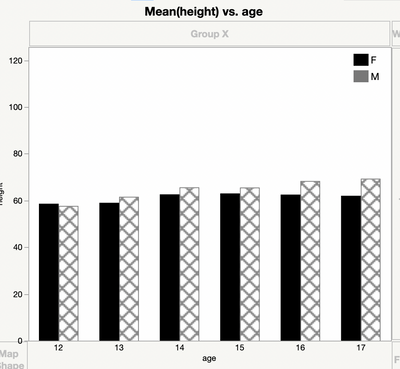
- Mark as New
- Bookmark
- Subscribe
- Mute
- Subscribe to RSS Feed
- Get Direct Link
- Report Inappropriate Content
Re: Graph Builder legend issues
Looks like the solution is for you to get the 15.1.0 version of JMP. Check with your University supplier. They should have it by now.
- Mark as New
- Bookmark
- Subscribe
- Mute
- Subscribe to RSS Feed
- Get Direct Link
- Report Inappropriate Content
Re: Graph Builder legend issues
I was able to get version 15.1 and still have the same problem.
- Mark as New
- Bookmark
- Subscribe
- Mute
- Subscribe to RSS Feed
- Get Direct Link
- Report Inappropriate Content
Re: Graph Builder legend issues
Are you running on a Mac or a PC? Which operating system? I think you will have to contact JMP Support
- Mark as New
- Bookmark
- Subscribe
- Mute
- Subscribe to RSS Feed
- Get Direct Link
- Report Inappropriate Content
Re: Graph Builder legend issues
I am using a Mac, OS Catalina, 10.15.2
- Mark as New
- Bookmark
- Subscribe
- Mute
- Subscribe to RSS Feed
- Get Direct Link
- Report Inappropriate Content
Re: Graph Builder legend issues
Recommended Articles
- © 2026 JMP Statistical Discovery LLC. All Rights Reserved.
- Terms of Use
- Privacy Statement
- Contact Us