cancel
Showing results for 
Show  only  | Search instead for 
Did you mean: 
  • JMP Security Notice: CVE-2026-109618 and CVE-2026-109619

    JMP promptly initiated a review of its products, services, and relevant infrastructure for exposure to CVE-2026-109618 and CVE-2026-109619.

    Our assessment of JMP products has not identified exposure to these vulnerabilities. Where remediation was required within supporting environments, appropriate security updates and controls have been applied and validated.

    We have identified no evidence of successful exploitation or unauthorized access to JMP systems or customer information associated with these vulnerabilities.

    JMP continues to monitor the issue and relevant vendor guidance. No action is required by JMP customers at this time.

  • Don’t miss your chance to experience Discovery Summit Europe at our best available rate! Early bird registration through 31 Oct.
  • Graph Builder Toolbar streamlines interactive graphing. Creates shortcuts on Report and GraphBuilder Helpers toolbars. Download and install the extension.

Discussions

Solve problems, and share tips and tricks with other JMP users.
Choose Language Hide Translation Bar
anole73
Level I

Graph Builder Geographic Heat Map

Hello,

I need help. It is a very simple problem but I can't figure it out. I'd like to have a heat map showing the amount of phosphorus at three different geographic sites on a map. I have the coordinates laid out, the points on the map in their respective sizes and colors, but the points are just solid and do not fade over the area. Is there a way to make them look fuzzy as they span over the area? Don't know if I'm stating this problem properly...thanks.

Ian

1 REPLY 1

Re: Graph Builder Geographic Heat Map

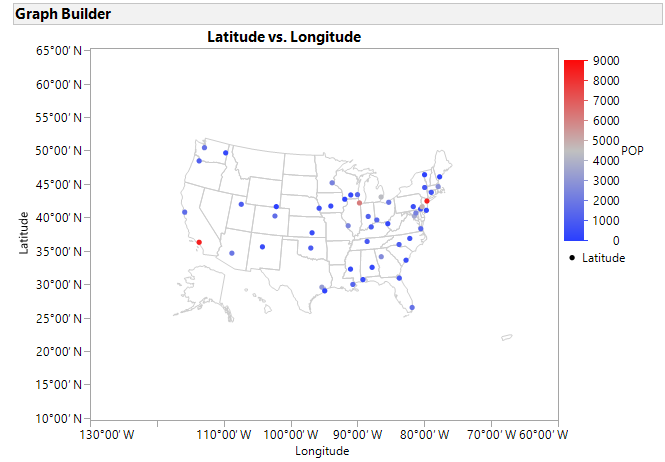
The default view for continuous X and Y data in Graph Builder will be the Points element:

 

GB-Elements.png


This will result in a graph something like:
 

Graph Builder Points.png


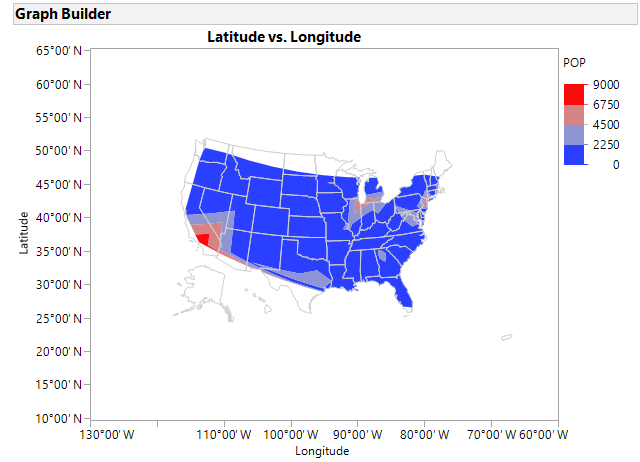
Changing to the Contour element will result in a graph like this:
 

Graph Builder Contour.png


In this case, I customized the graph further (Right click in frame > Customize) to:


  1. Clip the contours by the map shapes (JMP 14)
  2. Change the ordering to layer the contours under the map shapes


The Contour element will fill areas that are within the convex hull of the points using interpolation.


Recommended Articles