- JMP Statement Regarding Critical PHP Remote Code Execution Vulnerabilities (CVE-2026-109618, CVE-2026-109619)
- Don’t miss your chance to experience Discovery Summit Europe at our best available rate! Early bird registration through 31 Oct.
- Graph Builder Toolbar streamlines interactive graphing. Creates shortcuts on Report and GraphBuilder Helpers toolbars. Download and install the extension.
- Subscribe to RSS Feed
- Mark Topic as New
- Mark Topic as Read
- Float this Topic for Current User
- Bookmark
- Subscribe
- Mute
- Printer Friendly Page
Discussions
Solve problems, and share tips and tricks with other JMP users.- User Community
- :
- Discussions
- :
- Re: Generating ordinal data

- Mark as New
- Bookmark
- Subscribe
- Mute
- Subscribe to RSS Feed
- Get Direct Link
- Report Inappropriate Content
Generating ordinal data
Hello!
Does anyone know how I can generate ordinal data in JMP to simulate a sample?
I mean I need to simulate a sample including ordinal measurements by generating synthetic ordinal data.
Thank you in advance for your help.


- Mark as New
- Bookmark
- Subscribe
- Mute
- Subscribe to RSS Feed
- Get Direct Link
- Report Inappropriate Content
Re: Generating ordinal data
What is the required distribution of the ordinal data? Uniform???
Do you want the data to be whole numbers? (no decimals}
How many values do you want?
Do you want a random generation of values?
- Mark as New
- Bookmark
- Subscribe
- Mute
- Subscribe to RSS Feed
- Get Direct Link
- Report Inappropriate Content
Re: Generating ordinal data
Thank you for your response.
The options for answering the questions are:
- very important
- important
- moderately important
- of little importance
- not important
I want to replace the options by numbers 4, 3, 2, 1, and 0 when analyzing the data. I do not know the probability of each option being chosen by participants who will answer the survey.


- Mark as New
- Bookmark
- Subscribe
- Mute
- Subscribe to RSS Feed
- Get Direct Link
- Report Inappropriate Content
Re: Generating ordinal data
I like all the other replies. I have another one. You can set up a simulation with a column formula for a specific outcome. For example, suppose that I expect the following outcome:
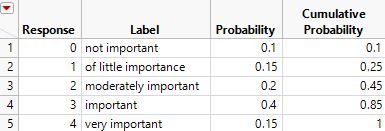
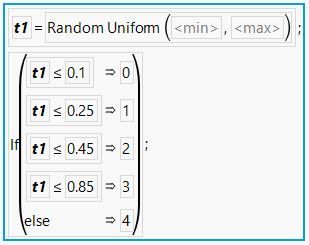
I can set up a data table with a Response column using the Value Labels and the Formula column properties like this:
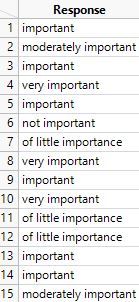
The data table with 1000 rows might look like this (top 15 rows):
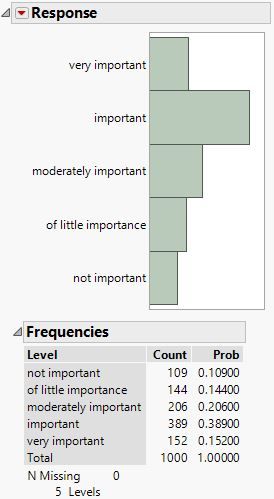
And the distribution of the ordinal responses might look like this:
This data table is attached here.
- Mark as New
- Bookmark
- Subscribe
- Mute
- Subscribe to RSS Feed
- Get Direct Link
- Report Inappropriate Content
Re: Generating ordinal data
Thank you for your response.
The options for answering the questions are:
- very important
- important
- moderately important
- of little importance
- not important
I want to replace the options by numbers 4, 3, 2, 1, and 0 when analyzing the data. I do not know the probability of each option being chosen by participants who will answer the survey.


- Mark as New
- Bookmark
- Subscribe
- Mute
- Subscribe to RSS Feed
- Get Direct Link
- Report Inappropriate Content
Re: Generating ordinal data
Without an idea of what the distribution will be, your simulated data will not likely match reality. But, an easy way to generate some simulated data is to create a new column. Go to the Column Info for this new column. Under Initialize Data click on Missing/Empty and change it to Random. Select Random Integer and specify 0 for the minimum, 4 for the maximum. This will create a uniform distribution of those ordinal values. This is one easy way to simulate some data.
Note that since you are in the Column Info dialog, now would be the time to change the modeling type to Ordinal. You probably would also want to turn on the Value Labels option to specify 0 as Not Important, 1 as Of Little Importance, etc.
Recommended Articles
- © 2026 JMP Statistical Discovery LLC. All Rights Reserved.
- Terms of Use
- Privacy Statement
- Contact Us