- DownloadSemiconductor Toolkit: Tools to create wafer maps, add wafer geometry to graphics, explore die defects & compare wafers.
- Discovery Summit 2026: Early User Edition - September 23-24.Register. It's free.
- Use JMP Clinical with CDISC-compliant data. Review studies, ID safety and efficacy signals & communicate findings with interactive graphics. Register to see how. Aug. 27, 2 pm US ET.
- Subscribe to RSS Feed
- Mark Topic as New
- Mark Topic as Read
- Float this Topic for Current User
- Bookmark
- Subscribe
- Mute
- Printer Friendly Page
Discussions
Solve problems, and share tips and tricks with other JMP users.- JMP User Community
- :
- Discussions
- :
- General visual issue with 16.1

- Mark as New
- Bookmark
- Subscribe
- Mute
- Subscribe to RSS Feed
- Get Direct Link
- Report Inappropriate Content
General visual issue with 16.1
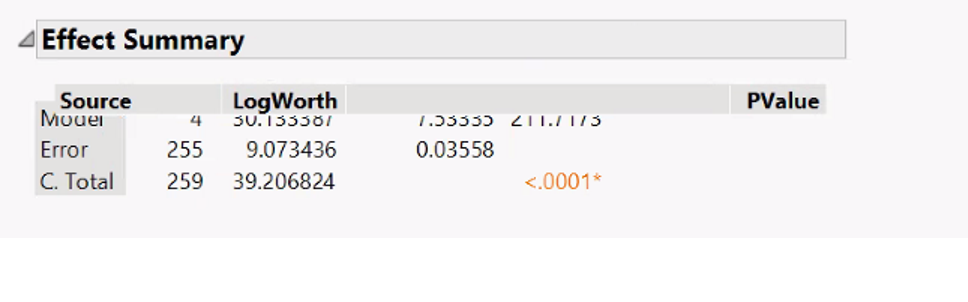
So far there is only one user in the company having this issue. Whenever he scrolls the application the elements in the screen get overlapped (like graphs being behind the title and tables and drop down lists freezing and not showing the bottom values). Multiple reinstalls have not fixed it. I attached an example, has anyone seen this or knows how to fix it?
Accepted Solutions
- Mark as New
- Bookmark
- Subscribe
- Mute
- Subscribe to RSS Feed
- Get Direct Link
- Report Inappropriate Content
Re: General visual issue with 16.1
My two cents -- if he has an HP Elitebook (I have the G5) then they ship with a broken Intel graphics driver that affects the hardware acceleration with JMP. The last option would be to disable hardware acceleration in JMP, but if the graphics card can be manually updated to the fixed one then that is the best solution.


- Mark as New
- Bookmark
- Subscribe
- Mute
- Subscribe to RSS Feed
- Get Direct Link
- Report Inappropriate Content
Re: General visual issue with 16.1
- Mark as New
- Bookmark
- Subscribe
- Mute
- Subscribe to RSS Feed
- Get Direct Link
- Report Inappropriate Content
Re: General visual issue with 16.1
My two cents -- if he has an HP Elitebook (I have the G5) then they ship with a broken Intel graphics driver that affects the hardware acceleration with JMP. The last option would be to disable hardware acceleration in JMP, but if the graphics card can be manually updated to the fixed one then that is the best solution.
Recommended Articles
- © 2026 JMP Statistical Discovery LLC. All Rights Reserved.
- Terms of Use
- Privacy Statement
- Contact Us