- JMP will suspend normal business operations for our Winter Holiday beginning on Wednesday, Dec. 24, 2025, at 5:00 p.m. ET (2:00 p.m. ET for JMP Accounts Receivable).
Regular business hours will resume at 9:00 a.m. EST on Friday, Jan. 2, 2026. - We’re retiring the File Exchange at the end of this year. The JMP Marketplace is now your destination for add-ins and extensions.
- Subscribe to RSS Feed
- Mark Topic as New
- Mark Topic as Read
- Float this Topic for Current User
- Bookmark
- Subscribe
- Mute
- Printer Friendly Page
Discussions
Solve problems, and share tips and tricks with other JMP users.- JMP User Community
- :
- Discussions
- :
- Function to copy down data based on a selection criteria

- Mark as New
- Bookmark
- Subscribe
- Mute
- Subscribe to RSS Feed
- Get Direct Link
- Report Inappropriate Content
Function to copy down data based on a selection criteria
Hi,
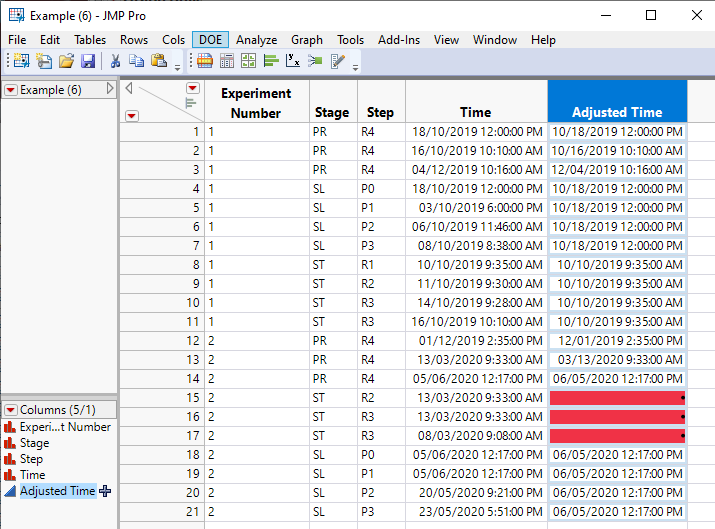
Would it be possible to create a function, script or column formula to copy over information from a column based on a selection that is made in other columns. Some sort of VLOOKUP function if I would need to describe this. I have attached a JMP table as an example.
I would like to populate the Adjusted Time column with data from the Time column. And this should be done in a manner that if Stage = PR it should just copy over the exact data for each row as in the Time column. But if Stage = SL it should copy down the time where Step = P0 (for each SL row) . If Stage = ST it should copy down the time where Step = R1 (for each ST row). This would also need to be done for each Experiment Number separately.
Would it furthermore be possible to generate a warning message if there is no Step = P0 or Step = R1 available in the current data table (eg. Experiment Number 2)?
Much appreciated if someone could help me out or get me started with writing this script or formula.
Rob
Accepted Solutions


- Mark as New
- Bookmark
- Subscribe
- Mute
- Subscribe to RSS Feed
- Get Direct Link
- Report Inappropriate Content
Re: Function to copy down data based on a selection criteria
Here is a formula that does what you want, and if there is not a proper look up value found, it changes the cell color to red. Formula below and attached data table
curExp = :Experiment Number;
curStage = :Stage;
:Adjusted Time << color cells( "White", Row() );
at = .;
If(
	:Stage == "PR", at = :Time,
	:Stage == "SL",
		row = Current Data Table() << get rows where( :Experiment Number == curExp & :Stage == "SL" & :Step == "P0" );
		If( N Rows( row ) > 0,
			at = :Time[row[1]],
			:Adjusted Time << Color Cells( "Red", Row() )
		);,
	:Stage == "ST",
		row = Current Data Table() << get rows where( :Experiment Number == curExp & :Stage == "ST" & :Step == "R1" );
		If( N Rows( row ) > 0,
			at = :Time[row[1]],
			:Adjusted Time << Color Cells( "Red", Row() )
		);
);
at;- Mark as New
- Bookmark
- Subscribe
- Mute
- Subscribe to RSS Feed
- Get Direct Link
- Report Inappropriate Content
Re: Function to copy down data based on a selection criteria
Here is a formula that does what you want, and if there is not a proper look up value found, it changes the cell color to red. Formula below and attached data table
curExp = :Experiment Number;
curStage = :Stage;
:Adjusted Time << color cells( "White", Row() );
at = .;
If(
	:Stage == "PR", at = :Time,
	:Stage == "SL",
		row = Current Data Table() << get rows where( :Experiment Number == curExp & :Stage == "SL" & :Step == "P0" );
		If( N Rows( row ) > 0,
			at = :Time[row[1]],
			:Adjusted Time << Color Cells( "Red", Row() )
		);,
	:Stage == "ST",
		row = Current Data Table() << get rows where( :Experiment Number == curExp & :Stage == "ST" & :Step == "R1" );
		If( N Rows( row ) > 0,
			at = :Time[row[1]],
			:Adjusted Time << Color Cells( "Red", Row() )
		);
);
at;- Mark as New
- Bookmark
- Subscribe
- Mute
- Subscribe to RSS Feed
- Get Direct Link
- Report Inappropriate Content
Re: Function to copy down data based on a selection criteria
Hi @txnelson,
Thanks for the fast respons. This works really great.
However the red colored cells seem to be locked for manual data entry. Would there be a way to bypass this?
I would like to enter a date time value myself whenever this happens.
Regards,
Rob
- Mark as New
- Bookmark
- Subscribe
- Mute
- Subscribe to RSS Feed
- Get Direct Link
- Report Inappropriate Content
Re: Function to copy down data based on a selection criteria
- Since the column's values are created by a formula, the only way to keep it as a formula based column and to correct the values, would be to add in the P0 and R1 rows that are missing, and once you did that, the cell colors would go away.
- If you need to use manual entry to correct the individual cell values, you will need to change the columns values into static values. This is easily done by
- Double click on the Column Header to open the Column Info window.
- Go to the Column Properties area, and specify to Remove the formula by clicking on the Remove button
- Click on OK to close the Column Info window
- You can now change the cell values by typing on them, and change the cell color by right clicking on the cell and selecting Cell Color
I strongly recommend you take the time to read the Discovering JMP and Using JMP documents available in the JMP Documentation Library under the Help pull down menu. You will find that it will make your entry into the JMP world easier and more pleasant. It will also show you, that while JMP and Excel are different from each other, they are both are very powerful tools.
Recommended Articles
- © 2026 JMP Statistical Discovery LLC. All Rights Reserved.
- Terms of Use
- Privacy Statement
- Contact Us