- Don’t miss your chance to experience Discovery Summit Europe at our best available rate! Early bird registration through 31 Oct.
- Graph Builder Toolbar streamlines interactive graphing. Creates shortcuts on Report and GraphBuilder Helpers toolbars. Download and install the extension.
- Subscribe to RSS Feed
- Mark Topic as New
- Mark Topic as Read
- Float this Topic for Current User
- Bookmark
- Subscribe
- Mute
- Printer Friendly Page
Discussions
Solve problems, and share tips and tricks with other JMP users.- User Community
- :
- Discussions
- :
- Re: Formulas in JMP

- Mark as New
- Bookmark
- Subscribe
- Mute
- Subscribe to RSS Feed
- Get Direct Link
- Report Inappropriate Content
Formulas in JMP
I have been trying to write a formula since morning to refer to certain cells in my JMP table, however I seem to be able to get no where.
I can make a clear general statement: When it comes to Formulas Excel is a far ahead of JMP.
Its difficult to understand why its SO SO SO difficult even simple formulas in JMP !
Accepted Solutions


 Community Manager
- Mark as New
- Bookmark
- Subscribe
- Mute
- Subscribe to RSS Feed
- Get Direct Link
- Report Inappropriate Content
Re: Formulas in JMP
I'm sorry that you're frustrated in your attempts to use the Formula Editor in JMP.
The first thing to recognize is that JMP isn't a spreadsheet like Excel (neither is Excel a structured data table like JMP).
When you create a new column and give it a formula. The formula applies to the entire column and is evaluated for every row in the column.
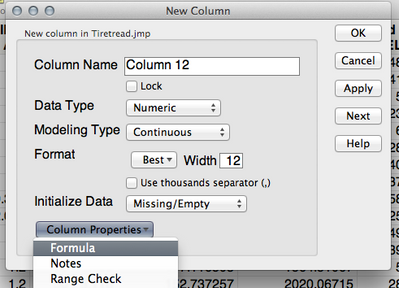
If you want to reference a specific row in a column you can use the Subscript option from the Row functions.
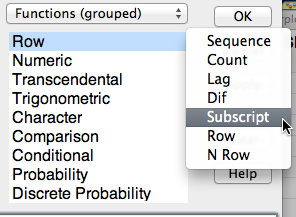
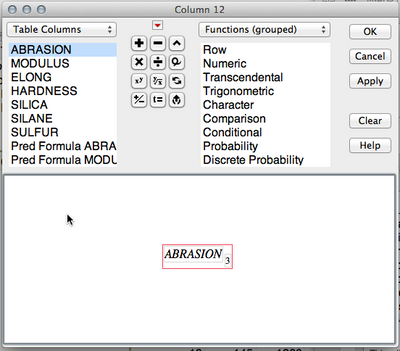
This will give you a subscript for the column you've got selected in the formula. You can put a row number in the subscript and you'll get the value for that column in the row specified.
This formula returns the value for ABRASION in row 3 for every row of this new column.
Can you tell us what you're trying to do and how you've tried to do it and we can give you some pointers to accomplish it?
-Jeff
Community Manager
- Mark as New
- Bookmark
- Subscribe
- Mute
- Subscribe to RSS Feed
- Get Direct Link
- Report Inappropriate Content
Re: Formulas in JMP
I'm sorry that you're frustrated in your attempts to use the Formula Editor in JMP.
The first thing to recognize is that JMP isn't a spreadsheet like Excel (neither is Excel a structured data table like JMP).
When you create a new column and give it a formula. The formula applies to the entire column and is evaluated for every row in the column.
If you want to reference a specific row in a column you can use the Subscript option from the Row functions.
This will give you a subscript for the column you've got selected in the formula. You can put a row number in the subscript and you'll get the value for that column in the row specified.
This formula returns the value for ABRASION in row 3 for every row of this new column.
Can you tell us what you're trying to do and how you've tried to do it and we can give you some pointers to accomplish it?
-Jeff

- Mark as New
- Bookmark
- Subscribe
- Mute
- Subscribe to RSS Feed
- Get Direct Link
- Report Inappropriate Content
Re: Formulas in JMP


- Mark as New
- Bookmark
- Subscribe
- Mute
- Subscribe to RSS Feed
- Get Direct Link
- Report Inappropriate Content
Re: Formulas in JMP
Here is a formula that will give you a numeric value for month
monthList={"Jan","Feb","Mar","Apr","May","Jun","Jul","Aug","Sep","Oct","Nov","Dec"};
contains( monthList, :Month );- Mark as New
- Bookmark
- Subscribe
- Mute
- Subscribe to RSS Feed
- Get Direct Link
- Report Inappropriate Content
Re: Formulas in JMP
Thank you

- Mark as New
- Bookmark
- Subscribe
- Mute
- Subscribe to RSS Feed
- Get Direct Link
- Report Inappropriate Content
Re: Formulas in JMP
The recode tool or the mach function would be handy as well:
Match( :Month, "Jan", "01", "Feb", "02", "Mar", "03", "Apr", "04", :Month )Recommended Articles
- © 2026 JMP Statistical Discovery LLC. All Rights Reserved.
- Terms of Use
- Privacy Statement
- Contact Us