- Don’t miss your chance to experience Discovery Summit Europe at our best available rate! Early bird registration through 31 Oct.
- Graph Builder Toolbar streamlines interactive graphing. Creates shortcuts on Report and GraphBuilder Helpers toolbars. Download and install the extension.
- Subscribe to RSS Feed
- Mark Topic as New
- Mark Topic as Read
- Float this Topic for Current User
- Bookmark
- Subscribe
- Mute
- Printer Friendly Page
Discussions
Solve problems, and share tips and tricks with other JMP users.- User Community
- :
- Discussions
- :
- Formula

- Mark as New
- Bookmark
- Subscribe
- Mute
- Subscribe to RSS Feed
- Get Direct Link
- Report Inappropriate Content
Formula
Hello
The last time I noted that I was receiving the wrong results in my formula.
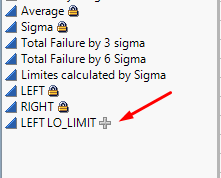
I see that I received the wrong results when I have the sign "plus" in light grey color,
but I see that I received the right result when I have the sign "plus" in dark grey color.
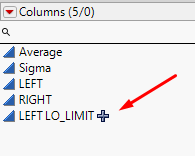
Can you explain me what's the reason and how I can fix it?
Thank you
Dennis
Accepted Solutions


- Mark as New
- Bookmark
- Subscribe
- Mute
- Subscribe to RSS Feed
- Get Direct Link
- Report Inappropriate Content
Re: Formula
Hello @Dennisbur,
In order to have your formula with the black sign, right click on your formula column, select "Column Info..." and check that option "Suppress Eval" is not checked :
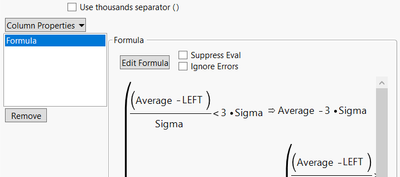
If "Suppress Eval" is checked (or if you select it throught the menu you showed), then the formula will have the grey sign :
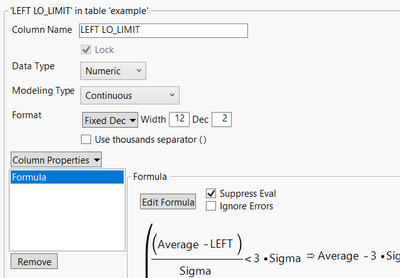
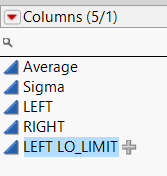
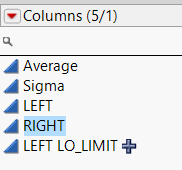
Once you have done your changes, click on "OK" and when you're back on the datatable, deselect your formula column (or click on another column) so that the changes are visible and effective.
I hope it is more clear ?
"It is not unusual for a well-designed experiment to analyze itself" (Box, Hunter and Hunter)

- Mark as New
- Bookmark
- Subscribe
- Mute
- Subscribe to RSS Feed
- Get Direct Link
- Report Inappropriate Content
Re: Formula
To compliment Victor's explanation:
https://www.jmp.com/support/help/en/17.0/?os=mac&source=application#page/jmp/evaluate-formulas.shtml
- Mark as New
- Bookmark
- Subscribe
- Mute
- Subscribe to RSS Feed
- Get Direct Link
- Report Inappropriate Content
Re: Formula
Hi @Dennisbur,
The difference you noticed may be due to a suppression of evaluation of your formula : Evaluate Formulas (jmp.com)
When the sign "plus" is in light grey color, that means the formula isn't being evaluated, so any changes you are doing with your formula won't re-calculate or update the results in your datatable (hence the wrong results you have seen).
This is an interesting option if you're building complex formula and don't want JMP to have a bug (or recalculating each time you're changing something in the formula) or report errors when the formula is still "in construction".
Hope this answer will help you,
"It is not unusual for a well-designed experiment to analyze itself" (Box, Hunter and Hunter)
- Mark as New
- Bookmark
- Subscribe
- Mute
- Subscribe to RSS Feed
- Get Direct Link
- Report Inappropriate Content
Re: Formula
Hello
So if I understood well, to return my formula to the normal condition I need to cancel "Suppress Eval"
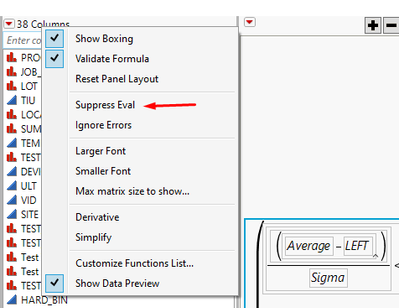
I have done it, but I see I have the sign "plus" in light grey color yet?
- Mark as New
- Bookmark
- Subscribe
- Mute
- Subscribe to RSS Feed
- Get Direct Link
- Report Inappropriate Content
Re: Formula
Hello @Dennisbur,
In order to have your formula with the black sign, right click on your formula column, select "Column Info..." and check that option "Suppress Eval" is not checked :
If "Suppress Eval" is checked (or if you select it throught the menu you showed), then the formula will have the grey sign :
Once you have done your changes, click on "OK" and when you're back on the datatable, deselect your formula column (or click on another column) so that the changes are visible and effective.
I hope it is more clear ?
"It is not unusual for a well-designed experiment to analyze itself" (Box, Hunter and Hunter)
- Mark as New
- Bookmark
- Subscribe
- Mute
- Subscribe to RSS Feed
- Get Direct Link
- Report Inappropriate Content
Re: Formula
To compliment Victor's explanation:
https://www.jmp.com/support/help/en/17.0/?os=mac&source=application#page/jmp/evaluate-formulas.shtml
Recommended Articles
- © 2026 JMP Statistical Discovery LLC. All Rights Reserved.
- Terms of Use
- Privacy Statement
- Contact Us