- Don’t miss your chance to experience Discovery Summit Europe at our best available rate! Early bird registration through 31 Oct.
- Graph Builder Toolbar streamlines interactive graphing. Creates shortcuts on Report and GraphBuilder Helpers toolbars. Download and install the extension.
- Subscribe to RSS Feed
- Mark Topic as New
- Mark Topic as Read
- Float this Topic for Current User
- Bookmark
- Subscribe
- Mute
- Printer Friendly Page
Discussions
Solve problems, and share tips and tricks with other JMP users.- User Community
- :
- Discussions
- :
- Re: For Each() syntax

- Mark as New
- Bookmark
- Subscribe
- Mute
- Subscribe to RSS Feed
- Get Direct Link
- Report Inappropriate Content
For Each() syntax
Hello,
I'm looking to expand the number of values that can be used in the For Each() function. In the scripting index and handful of examples I've found within JMP community and JMP itself, combined, I've only seen a single value and index used: For each( { val1, index}, ... ). I'd like to use: For each( { val1, val2, ..., valn, index}, ...) . When I increase the number of values in the curly braces, a "too many arguments" error pops up.
Strangely, this error message states that the row number of the error corresponds to the total number of rows in the matrix that is passed into the For each() function, not the actual row number of that function in the script. I can confirm it's the number of values I'm attempting to use, and not the number of rows in the matrix I'm passing into the function, by changing the number of values to val1 & index only, which then works.
The matrix that is passed in has an equal number of columns as the number of values I want to pass into the For Each() function.
Any tips? Is this possible?


- Mark as New
- Bookmark
- Subscribe
- Mute
- Subscribe to RSS Feed
- Get Direct Link
- Report Inappropriate Content
Re: For Each() syntax
For Each documentation in Scripting Index does cover this somewhat. Example for Across gives the best idea for syntax
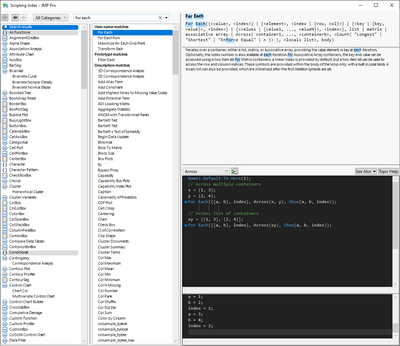
Names Default To Here(1);
// Across multiple containers
x = {"a", "b"};
y = {"d", "c"};
For Each({{a, b}, index}, Across(x, y), Show(a||b, index));- Mark as New
- Bookmark
- Subscribe
- Mute
- Subscribe to RSS Feed
- Get Direct Link
- Report Inappropriate Content
Re: For Each() syntax
I've fiddled with the syntax as in the Scripting Index, but the same error still holds true. This must mean that there's something I'm not understanding with my particular setup. I need to test some more things and will post here on my findings and/or additional questions. Thank you, @jthi !
- Mark as New
- Bookmark
- Subscribe
- Mute
- Subscribe to RSS Feed
- Get Direct Link
- Report Inappropriate Content
Re: For Each() syntax
I think this is another piece to the puzzle:
The Across() formatting for multiple containers is in use. With the number of values I have it makes sense, but this also requires Across(). Currently, I'm saving a data table to a matrix with
matrix1 = dt1 << Get as Matrix();How is Across() properly populated to either work with that, or a data table correctly, since the number of items in Across() needs to equal the number of containers (values) in the curly braces?


- Mark as New
- Bookmark
- Subscribe
- Mute
- Subscribe to RSS Feed
- Get Direct Link
- Report Inappropriate Content
Re: For Each() syntax
What are you actually trying to do? Or are you JUST trying to understand the syntax?
- Mark as New
- Bookmark
- Subscribe
- Mute
- Subscribe to RSS Feed
- Get Direct Link
- Report Inappropriate Content
Re: For Each() syntax
I have 3 tables:
- dt1: measured values & prediction formulas
- dt2: target values (currently saved as matrix):
matrix1 = dt2 << Get as Matrix();
- dt3: table to record coefficients from regression formula from (Prediction) Profiler tool
What I'm hoping to do is to use For Each() to iterate through dt2, use the corresponding prediction formula in dt1, and then record the corresponding coefficients that the (Prediction) Profiler generates. I'm sure I can do this with a standard For() loop, but was advised that For Each() would be a better option.
- Mark as New
- Bookmark
- Subscribe
- Mute
- Subscribe to RSS Feed
- Get Direct Link
- Report Inappropriate Content
Re: For Each() syntax
Is this just to get absolute values of the prediction? I'm confused sorry.
Names default to here( 1 );
dt1 = open("$SAMPLE_DATA\Big Class.jmp");
fm = dt1 << Fit Model(
	Y( :height, :weight ),
	Effects( :age, :sex, :age * :sex ),
	Personality( "Standard Least Squares" ),
	Emphasis( "Effect Leverage" ),
	Run(
		:height << {Summary of Fit( 1 ), Analysis of Variance( 1 ),
		Parameter Estimates( 1 ), Lack of Fit( 0 ), Scaled Estimates( 0 ),
		Plot Actual by Predicted( 1 ), Plot Regression( 0 ),
		Plot Residual by Predicted( 1 ), Plot Studentized Residuals( 0 ),
		Plot Effect Leverage( 1 ), Plot Residual by Normal Quantiles( 0 ),
		Box Cox Y Transformation( 0 )},
		:weight << {Summary of Fit( 1 ), Analysis of Variance( 1 ),
		Parameter Estimates( 1 ), Lack of Fit( 0 ), Scaled Estimates( 0 ),
		Plot Actual by Predicted( 1 ), Plot Regression( 0 ),
		Plot Residual by Predicted( 1 ), Plot Studentized Residuals( 0 ),
		Plot Effect Leverage( 1 ), Plot Residual by Normal Quantiles( 0 ),
		Box Cox Y Transformation( 0 )}
	)
);
fm << Prediction Formula; //

dt2 = new table("Targets",
	<<New Column("age", <<Set Values([12, 14])),
	<< New Column("sex", character, <<Set Values({"M", "F"}))
);

Eval(EvalExpr(dt2 << New Column("Pred Formula height", formula(Expr(dt1:Pred Formula height << Get Formula)))));
Eval(EvalExpr(dt2 << New Column("Pred Formula weight", formula(Expr(dt1:Pred Formula weight << Get Formula)))));- Mark as New
- Bookmark
- Subscribe
- Mute
- Subscribe to RSS Feed
- Get Direct Link
- Report Inappropriate Content
Re: For Each() syntax
@vince_faller , it's all good! Once a prediction formula is generated from a dataset (within dt1), I then want to use the ideal solution (within dt2) and work backwards to grab the coefficients needed to obtain this ideal value (saved in dt3). The prediction profiler displays the coefficients of the values necessary to do this, so I'd need to grab the values from the boxes.
I have a test using the For() loop going on as we speak, in the background. If it works, I can scrap using For Each() entire for this project. Although, now that I'm encountering issues, it makes me even more encouraged to understand why.


- Mark as New
- Bookmark
- Subscribe
- Mute
- Subscribe to RSS Feed
- Get Direct Link
- Report Inappropriate Content
Re: For Each() syntax
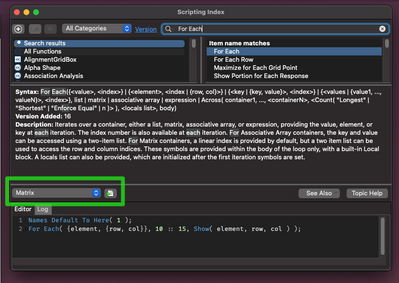
There's a different structure to the arguments if you're trying to loop through matrices. If you look under the little pull down menu in the scripting index, there are examples of the different configurations the For Each() loop can take.
Best,
M
- Mark as New
- Bookmark
- Subscribe
- Mute
- Subscribe to RSS Feed
- Get Direct Link
- Report Inappropriate Content
Re: For Each() syntax
Thank you, @MikeD_Anderson . I've already spent over a day going through each of these options, but the error I mentioned in the original post is what's blocking me.
Recommended Articles
- © 2026 JMP Statistical Discovery LLC. All Rights Reserved.
- Terms of Use
- Privacy Statement
- Contact Us