Turn on suggestions
Auto-suggest helps you quickly narrow down your search results by suggesting possible matches as you type.
- JMP will suspend normal business operations for our Winter Holiday beginning on Wednesday, Dec. 24, 2025, at 5:00 p.m. ET (2:00 p.m. ET for JMP Accounts Receivable).
Regular business hours will resume at 9:00 a.m. EST on Friday, Jan. 2, 2026. - We’re retiring the File Exchange at the end of this year. The JMP Marketplace is now your destination for add-ins and extensions.
Options
- Subscribe to RSS Feed
- Mark Topic as New
- Mark Topic as Read
- Float this Topic for Current User
- Bookmark
- Subscribe
- Mute
- Printer Friendly Page
Discussions
Solve problems, and share tips and tricks with other JMP users.- JMP User Community
- :
- Discussions
- :
- Fit Y by X Spline fit color

Level V
- Mark as New
- Bookmark
- Subscribe
- Mute
- Subscribe to RSS Feed
- Get Direct Link
- Report Inappropriate Content
Fit Y by X Spline fit color
Created:
Oct 5, 2020 11:33 PM
| Last Modified: Jun 11, 2023 4:06 AM
(5033 views)
Hi,
I have a fit Y by X plot with smoothing spline fit, is there any way that I can make the marker colors gray and the spline fit line in JMP default color? I tried changing the color theme into medium light gray, but it's not working
rbiv[Framebox( 1 )] << Row Legend( Column( col1 ), Color( 1 ), Marker( 0 ), Color Theme("JMP Default"), Continuous Scale( 0 ) );
10 REPLIES 10

Level IV
- Mark as New
- Bookmark
- Subscribe
- Mute
- Subscribe to RSS Feed
- Get Direct Link
- Report Inappropriate Content
Re: Fit Y by X Spline fit color
You can right click on the graph and select "Customize"
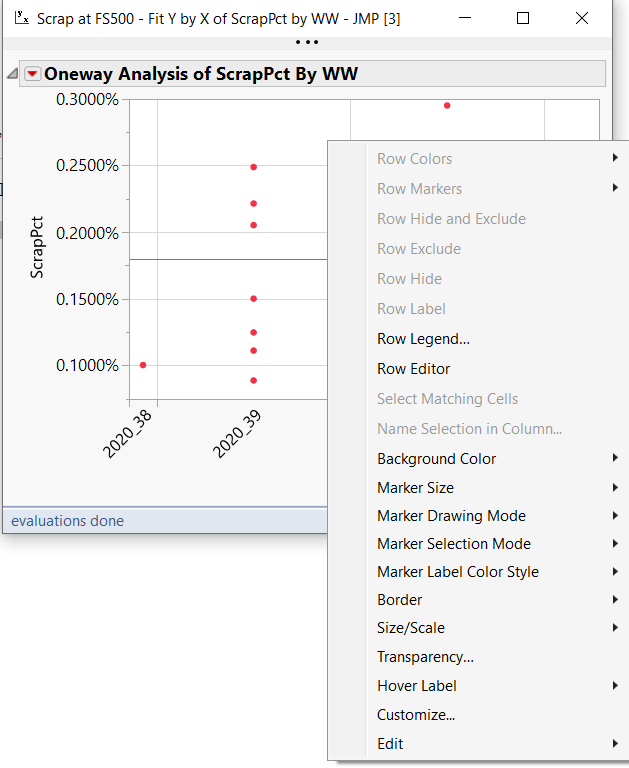
then select the color you want
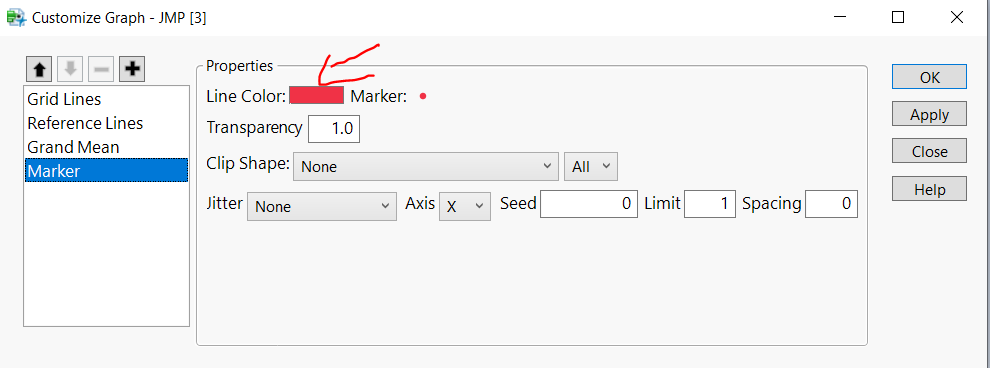
Then export the script to window to see the real code behind
Oneway(
	Y( :Yield ),
	X( :WW ),
	SendToReport(
		Dispatch(
			{},
			"Oneway Plot",
			FrameBox,
			{DispatchSeg(
				Marker Seg( 1 ),
				{Color( "Orange" ), Marker( "Triangle" )}
			)}
		)
	)
);
Thuong Le
Level V
- Mark as New
- Bookmark
- Subscribe
- Mute
- Subscribe to RSS Feed
- Get Direct Link
- Report Inappropriate Content
Re: Fit Y by X Spline fit color
Hi, I tried this method but it is not working when I put it into my function
Level IV
- Mark as New
- Bookmark
- Subscribe
- Mute
- Subscribe to RSS Feed
- Get Direct Link
- Report Inappropriate Content
Re: Fit Y by X Spline fit color
Can you share your full code?
Thuong Le
Level V
- Mark as New
- Bookmark
- Subscribe
- Mute
- Subscribe to RSS Feed
- Get Direct Link
- Report Inappropriate Content
Re: Fit Y by X Spline fit color
Created:
Oct 6, 2020 09:56 PM
| Last Modified: Oct 7, 2020 3:15 AM
(4336 views)
| Posted in reply to message from ThuongLe 10-06-2020
Here's the function:
bivht = Function( {x_param, y_param, htt},
    biv = Bivariate(
        Y( Column( y_param ) ),
        X( Column( x_param ) ),
        GroupBy( Column( ht ) ),
        <<Fit Spline( 1000, {Line Width( 2 )} )
    );
    rbiv = biv << Report;
    rbiv[Framebox( 1 )] << {Marker Size( 3 )};
    rbiv[Axisbox( 2 )] << Tick Font( style( 0 ), size( 9 ) ) << Show Major Grid( 1 ) << Show Minor Grid( 1 ) <<
    Show Minor Ticks( 1 );
    rbiv[Axisbox( 1 )] << Tick Font( style( 0 ), size( 9 ) ) << Show Major Grid( 1 ) << Show Minor Grid( 1 ) <<
    Show Minor Ticks( 1 );
    rbiv[Text Edit Box( 2 )] << Set Font Size( 10 ) << Set Font Style( "Bold" );
    rbiv[Text Edit Box( 1 )] << Set Font Size( 10 ) << Set Font Style( "Bold" );
    rbiv[Outline Box( 1 )] << Set Title( y_param || " by " || x_param );
    rbiv["Smoothing Spline Fit, lambda=1000 ?"] << Close All Like This;
    rbiv[Framebox( 1 )] << Row Legend(
        Column( ht ),
        Color( 1 ),
        Marker( 0 ),
        Color Theme( "JMP Default" ),
        Continuous Scale( 0 )
    );
    rbiv[Border Box( 2 )] << Delete;
    pbiv = rbiv[Outline Box( 1 )] << get picture;
);
Level IV
- Mark as New
- Bookmark
- Subscribe
- Mute
- Subscribe to RSS Feed
- Get Direct Link
- Report Inappropriate Content
Re: Fit Y by X Spline fit color
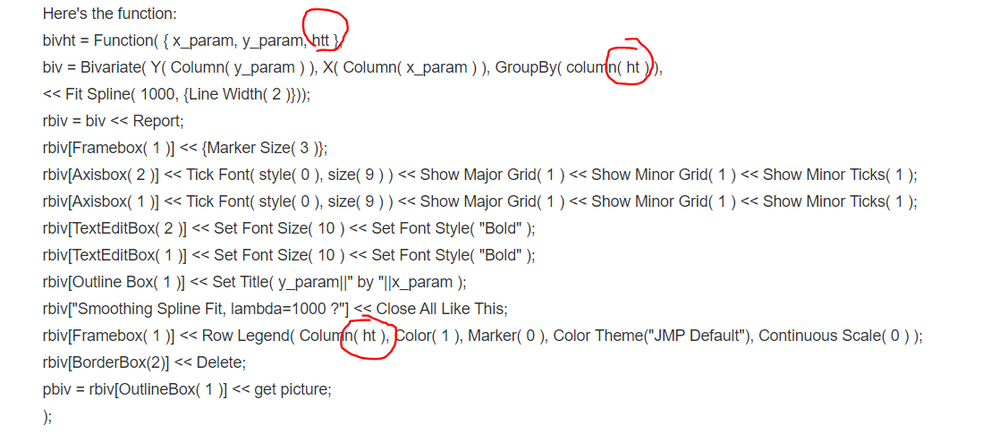
Is this a typo or you have another variable named "ht"
Thuong Le
Level V
- Mark as New
- Bookmark
- Subscribe
- Mute
- Subscribe to RSS Feed
- Get Direct Link
- Report Inappropriate Content
Re: Fit Y by X Spline fit color
ht is a variable name
Level IV
- Mark as New
- Bookmark
- Subscribe
- Mute
- Subscribe to RSS Feed
- Get Direct Link
- Report Inappropriate Content
Re: Fit Y by X Spline fit color
I mean in your function, you define htt but you never use it. Instead, you use ht
That could be the issue
That could be the issue
Thuong Le
Level V
- Mark as New
- Bookmark
- Subscribe
- Mute
- Subscribe to RSS Feed
- Get Direct Link
- Report Inappropriate Content
Re: Fit Y by X Spline fit color
Created:
Oct 6, 2020 10:49 PM
| Last Modified: Oct 7, 2020 3:16 AM
(4293 views)
| Posted in reply to message from ThuongLe 10-06-2020
lb = Lineup Box( N Col( 4 ) );
For( j = 1, j <= N Items( xparam ), j++,
    bivht( xparam[j], yparam[j], h );
    lb << append( pbiv );
    biv << Close Window;
);
ppt9 << append( lb << get picture );
Level IV
- Mark as New
- Bookmark
- Subscribe
- Mute
- Subscribe to RSS Feed
- Get Direct Link
- Report Inappropriate Content
Re: Fit Y by X Spline fit color
I'm lost now :D
Thuong Le
Recommended Articles
- © 2026 JMP Statistical Discovery LLC. All Rights Reserved.
- Terms of Use
- Privacy Statement
- Contact Us