- Discovery Summit 2026: Early User Edition - September 23-24.Register. It's free.
- Graph Builder Toolbar streamlines interactive graphing. Creates shortcuts on Report and GraphBuilder Helpers toolbars. Download and install the extension.
- Subscribe to RSS Feed
- Mark Topic as New
- Mark Topic as Read
- Float this Topic for Current User
- Bookmark
- Subscribe
- Mute
- Printer Friendly Page
Discussions
Solve problems, and share tips and tricks with other JMP users.- User Community
- :
- Discussions
- :
- Re: Filtering through Scatterplot Matrix to find significant interactions

- Mark as New
- Bookmark
- Subscribe
- Mute
- Subscribe to RSS Feed
- Get Direct Link
- Report Inappropriate Content
Filtering through Scatterplot Matrix to find significant interactions
I have a large data set and I am interested in visualizing unique interactions. I made a scatterplot matrix displayed with fit lines and 95% confidence intervals. Is there a way to filter the matrix to select for or display interactions by significance or p-value?
Accepted Solutions


- Mark as New
- Bookmark
- Subscribe
- Mute
- Subscribe to RSS Feed
- Get Direct Link
- Report Inappropriate Content
Re: Filtering through Scatterplot Matrix to find significant interactions
Hi,
@txnelson 's suggestion is a good one. The Response Screening platform is very powerful.
However, I am not sure if that is what you need. I don't think you mean "interactions" - interaction effects are where one predictor variable influences the effect of another predictor variable on the response variable.
I think you really just mean that you want to find significant correlations out of all pairwise correlations of your variables.
You can do this with the Multivariate platform (Analyze > Multivariate Methods > Multivariate). Add your variables in the Y, Columns role as you did for the scatterplot matrix and click OK.
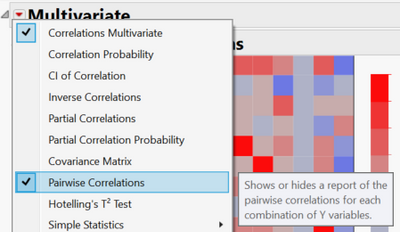
You can bring up a list of all pairwise correlations, including p-values, from the red triangle menu for Multivariate:
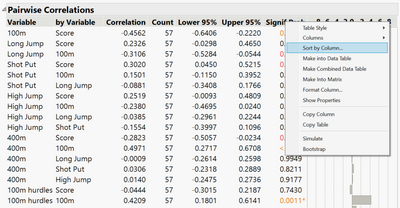
By right-clicking on the column headers you have the option to sort by the p-value column:
If you right-click on this table you can "Make into Data Table", which will make this into a new jmp table, if that is useful.
I hope that helps.
Phil


- Mark as New
- Bookmark
- Subscribe
- Mute
- Subscribe to RSS Feed
- Get Direct Link
- Report Inappropriate Content
Re: Filtering through Scatterplot Matrix to find significant interactions
The Response Screening Platform
Analyze=>Screening=>Response Screening
The platform produces a data table with the pvalues, which will allow you to sort them, and using the built in scripts, you will be able to display their plots.
- Mark as New
- Bookmark
- Subscribe
- Mute
- Subscribe to RSS Feed
- Get Direct Link
- Report Inappropriate Content
Re: Filtering through Scatterplot Matrix to find significant interactions
Hi,
@txnelson 's suggestion is a good one. The Response Screening platform is very powerful.
However, I am not sure if that is what you need. I don't think you mean "interactions" - interaction effects are where one predictor variable influences the effect of another predictor variable on the response variable.
I think you really just mean that you want to find significant correlations out of all pairwise correlations of your variables.
You can do this with the Multivariate platform (Analyze > Multivariate Methods > Multivariate). Add your variables in the Y, Columns role as you did for the scatterplot matrix and click OK.
You can bring up a list of all pairwise correlations, including p-values, from the red triangle menu for Multivariate:
By right-clicking on the column headers you have the option to sort by the p-value column:
If you right-click on this table you can "Make into Data Table", which will make this into a new jmp table, if that is useful.
I hope that helps.
Phil
Recommended Articles
- © 2026 JMP Statistical Discovery LLC. All Rights Reserved.
- Terms of Use
- Privacy Statement
- Contact Us