- JMP Statement Regarding Critical PHP Remote Code Execution Vulnerabilities (CVE-2026-109618, CVE-2026-109619)
- Don’t miss your chance to experience Discovery Summit Europe at our best available rate! Early bird registration through 31 Oct.
- Graph Builder Toolbar streamlines interactive graphing. Creates shortcuts on Report and GraphBuilder Helpers toolbars. Download and install the extension.
- Subscribe to RSS Feed
- Mark Topic as New
- Mark Topic as Read
- Float this Topic for Current User
- Bookmark
- Subscribe
- Mute
- Printer Friendly Page
Discussions
Solve problems, and share tips and tricks with other JMP users.- User Community
- :
- Discussions
- :
- Re: Filter By - disabled by a Local Data Filter

- Mark as New
- Bookmark
- Subscribe
- Mute
- Subscribe to RSS Feed
- Get Direct Link
- Report Inappropriate Content
Filter By - disabled by a Local Data Filter
A nice feature in Jmp:
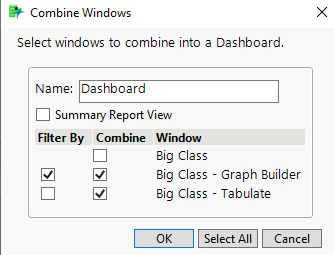
One (main) graph can be used to restrict the data that is displayed in another graph - or tabulate list.
This feature is activated by a checkbox "Filter By":
Surprisingly, activating a Local Data Filter in the (main) Graph disables this functionality.
The respective data points are just highlighted, the display is not restricted to the selected data points:
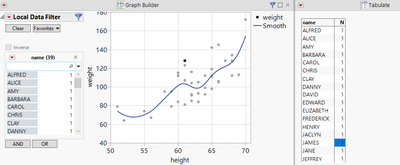
Same effect in Jmp 16 and 17.1.
Why is the functionality disabled by activating a Local Data Filter.
How can I enable the functionality?
Workaround:
Add another Data Filter (outside of the main graph).
how?
table1 = Open( "$SAMPLE_DATA/Big Class.jmp" );
New Window( "Big Class - Dashboard",
	Data Filter Context Box(
		Tab Page Box(
			"Dashboard",
			H Splitter Box(
				Tab Page Box(
					"Tabulate",
					Scroll Box( V List Box( table1 << Tabulate( Show Control Panel( 0 ), Add Table( Row Table( Grouping Columns( :name ) ) ) ) ) )
				),
				Data Filter Source Box(
					Tab Page Box(
						"Graph Builder",
						Scroll Box(
							V List Box(
								table1 << Graph Builder(
									Show Control Panel( 0 ),
									Variables( X( :height ), Y( :weight ) ),
									Elements( Points( X, Y, Legend( 9 ) ) ),
									Local Data Filter( Conditional, Add Filter( columns( :age ), Where( :age == 14 ) ) )
								)
							)
						)
					)
				)
			)
		)
	)
);
Accepted Solutions


- Mark as New
- Bookmark
- Subscribe
- Mute
- Subscribe to RSS Feed
- Get Direct Link
- Report Inappropriate Content
Re: Filter By - disabled by a Local Data Filter
Hello @hogi ,
This is a possible workaround using JSL. I hope it works.
table1 = Open( "$SAMPLE_DATA/Big Class.jmp" );
New Window( "Big Class - Dashboard",
	Data Filter Context Box(
		H List Box(
			Data Filter Source Box(
				table1 << Data Filter( Local, Add Filter( columns( :age ) ) )
			),
			Data Filter Context Box(
				H List Box(
					Data Filter Source Box(
						Data Filter Source Box(
							table1 << Graph Builder(
								Show Control Panel( 0 ),
								Variables( X( :height ), Y( :weight ) ),
								Elements( Points( X, Y, Legend( 9 ) ) )
							)
						)
					),
					table1 << Tabulate(
						Show Control Panel( 0 ),
						Add Table( Row Table( Grouping Columns( :name ) ) )
					)
				)
			)
		)
	)
);
- Mark as New
- Bookmark
- Subscribe
- Mute
- Subscribe to RSS Feed
- Get Direct Link
- Report Inappropriate Content
Re: Filter By - disabled by a Local Data Filter
Hello @hogi ,
This is a possible workaround using JSL. I hope it works.
table1 = Open( "$SAMPLE_DATA/Big Class.jmp" );
New Window( "Big Class - Dashboard",
	Data Filter Context Box(
		H List Box(
			Data Filter Source Box(
				table1 << Data Filter( Local, Add Filter( columns( :age ) ) )
			),
			Data Filter Context Box(
				H List Box(
					Data Filter Source Box(
						Data Filter Source Box(
							table1 << Graph Builder(
								Show Control Panel( 0 ),
								Variables( X( :height ), Y( :weight ) ),
								Elements( Points( X, Y, Legend( 9 ) ) )
							)
						)
					),
					table1 << Tabulate(
						Show Control Panel( 0 ),
						Add Table( Row Table( Grouping Columns( :name ) ) )
					)
				)
			)
		)
	)
);
- Mark as New
- Bookmark
- Subscribe
- Mute
- Subscribe to RSS Feed
- Get Direct Link
- Report Inappropriate Content
Re: Filter By - disabled by a Local Data Filter
Hi @yuichi_katsumur ,thanks a lot for the solution.
So, the trick is to add a level with a second Data Filter Context Boxes ...
Are the nested data filter source boxes necessary. It seems that a single one is also fine:
table1 = Open( "$SAMPLE_DATA/Big Class.jmp" );
New Window( "Big Class - Dashboard",
	Data Filter Context Box(
		H List Box(
			Data Filter Source Box(
				table1 << Data Filter( Local, Add Filter( columns( :age ) ) )
			),
			Data Filter Context Box(
				H List Box(
						Data Filter Source Box(
							table1 << Graph Builder(
								Show Control Panel( 0 ),
								Variables( X( :height ), Y( :weight ) ),
								Elements( Points( X, Y, Legend( 9 ) ) )
							)
					),
					table1 << Tabulate(
						Show Control Panel( 0 ),
						Add Table( Row Table( Grouping Columns( :name ) ) )
					)
				)
			)
		)
	)
);
- Mark as New
- Bookmark
- Subscribe
- Mute
- Subscribe to RSS Feed
- Get Direct Link
- Report Inappropriate Content
Re: Filter By - disabled by a Local Data Filter
Hi @hogi ,
Thank you for correcting my error.
- Mark as New
- Bookmark
- Subscribe
- Mute
- Subscribe to RSS Feed
- Get Direct Link
- Report Inappropriate Content
Re: Filter By - disabled by a Local Data Filter
Jmp support just confirmed:
In Dashboard mode, there is no possibility to generate the hierarchical structure which is needed to make this Dashboard work :(
(Case 00045639)
- Mark as New
- Bookmark
- Subscribe
- Mute
- Subscribe to RSS Feed
- Get Direct Link
- Report Inappropriate Content
Re: Filter By - disabled by a Local Data Filter
A warning like this one could help:
Dear user, I noticed that you activated a Local Data Filter in a graph that is used as Filter By.
Please be aware that this is NOT supported in Jmp. Therefore the Filter By functionality *) will be disabled.
*) just the functionality of Filter By is disabled, not the icon:

Recommended Articles
- © 2026 JMP Statistical Discovery LLC. All Rights Reserved.
- Terms of Use
- Privacy Statement
- Contact Us